
Thingamajigs
Adds thingamajigs, which are various decorations and blocks.
Screenshots
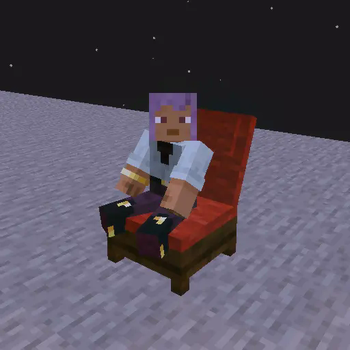
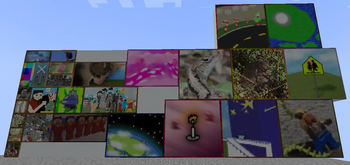
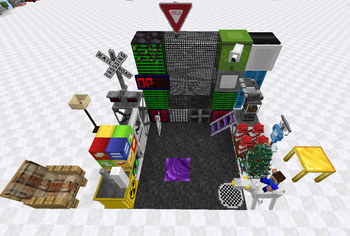
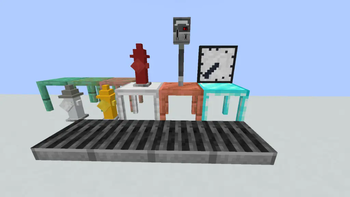

Über diese Mod
Welcome to Thingamajigs!
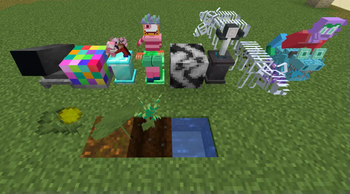
Ever wanted decorations in your Minecraft world such as tables, arcade machines, lightbulbs, more variants of vanilla blocks, traffic lights and more? Then you have come across the mod you are looking for.
This mod adds more furniture, appliances, lighting fixtures, toys, outdoor decorations, and more vanilla block variants (there is over 100+ unique decorations in this mod, each with their own category).
This mod is for the NeoForge environment only. Some versions are added here for convenience (Forge versions).
Need some help or want to know how to craft something? Check out the docs: https://bonincreativemedia.gitbook.io/thingamajigs-docs/
Want to see progress on the mod and new features upcoming or report bugs? Visit the GitHub page:
Official Thingamajigs GitHub Link
<-- Want To Support the mod Directly? See the left sidebar for a direct link (Uses PayPal).
Build a city! A mall! Or even just build your dream home...
"I personally hope you enjoy this mod." - CMB, creator of mod
Alpha, Pre-release and other versions exist for testing here: GitHub Downloads
Thingamajigs 2:
Thingamajigs 2 GitHub Link ->
Verfügbare Versionen
Thingamajigs auf dem Server installieren
Server bestellen
Bestelle einen Minecraft Java Server mit mindestens 3 GB RAM (4 GB empfohlen).
forge Loader setzen
Wähle im Panel unter "Egg" den forge-Loader und die passende Minecraft-Version (1.21.4).
Mod installieren
Öffne den Mod-Browser im Dashboard und suche nach "Thingamajigs". Klicke "Installieren" – fertig! Alternativ: Lade die .jar via SFTP in den /mods Ordner.
Kompatibilität
Mod-Loader
Minecraft-Versionen
1.21.4, 1.21.3, 1.21.1 (+9 weitere)
Server-seitig
✓ ErforderlichEmpfohlener RAM
4 GB(min. 3 GB)Häufige Fragen
Thingamajigs Server crasht beim Start – was tun?
Häufigste Ursache: falsche forge-Version oder zu wenig RAM. Prüfe im Server-Log (latest.log), ob ein "OutOfMemoryError" oder "Mixin"-Fehler auftritt. Bei Mado Hosting: Stelle sicher, dass mindestens 3 GB RAM zugewiesen sind und der Loader zur Mod-Version passt (1.21.4). Über das Panel kannst du den Loader mit einem Klick wechseln.
Ist Thingamajigs mit forge und neoforge kompatibel?
Thingamajigs unterstützt offiziell forge, neoforge für Minecraft 1.21.4, 1.21.3, 1.21.1. Im Mado Dashboard werden inkompatible Loader-Kombinationen automatisch erkannt.
Server laggt mit Thingamajigs – wie optimiere ich die Performance?
Empfohlener RAM: 4 GB (+1 GB pro 8 Spieler). Prüfe mit /spark profiler, ob Thingamajigs den meisten Tick-Time verbraucht. Häufige Fixes: Server-View-Distance auf 8-10 reduzieren, bei Forge "performant" oder "starlight" als Zusatz-Mod installieren. Bei Mado Hosting läuft dein Server auf NVMe-SSDs mit dedizierten CPU-Kernen für minimale Latenz.
Ähnliche Mods

![[ETF] Entity Texture Features](https://cdn.modrinth.com/data/BVzZfTc1/af683d206d50b05258d865b0d6e4aa2f2cee12f2_96.webp)
![[EMF] Entity Model Features](https://cdn.modrinth.com/data/4I1XuqiY/6e5bbd0d06b1741bfdab6c0cfab6de8fdaf0064c_96.webp)



Modded Server mieten
Installiere Thingamajigs mit nur einem Klick auf deinem Server.