
Tidal
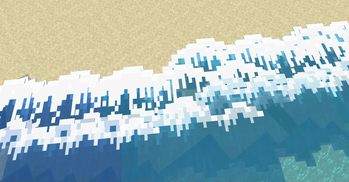
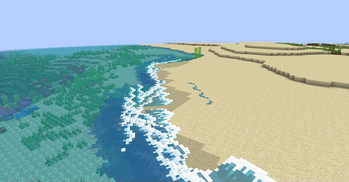
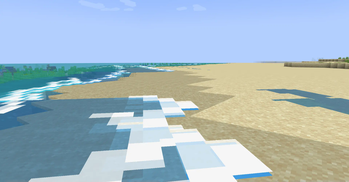
Adds ambient tidal waves to beaches and oceans!
Screenshots
Über diese Mod
Tidal
Beach waves!
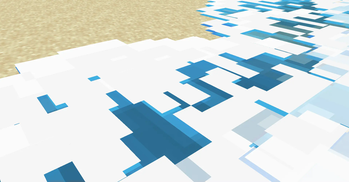
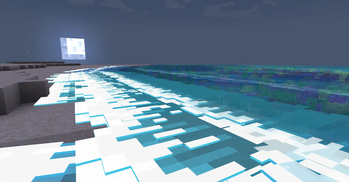
Tidal adds ambient water waves! They are most noticeable at beaches & shores where they get really big, but can also spawn around islands to help make the water feel more alive.
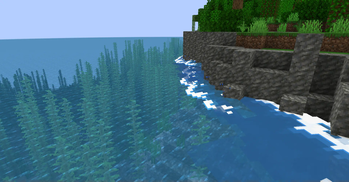
Waves can also crash against blocks if they're in the way, making rocky cliffs next to water even more dramatic! During full moons, the waves glow at night too.
Note: Tidal is currently in alpha! There's plenty of known bugs and plans for optimizations.
Lots of work happens behind the scenes to figure out where & how to spawn waves. If waves are not spawning, or spawning unusually(e.g. going wrong way), you can recalculate this info by reloading the chunks via F3 + a.

Dependencies
Requires Fabric API. In the near future, a config library might also be required.
Note for resource packs
If you decide to change the wave textures via a resource pack, the naming and mcmeta is very specific!!
The names & locations of textures must be the same.
A custom mcmeta format is used. Instead of animation, use wave_animation. This provides you with 2 options:
frametime- The amount of ticks each frame should exist. (Default = 5)frame_height- The height(in pixels) of each frame. (Default = 16)
It is expected that the animation is done with a single vertical sprite sheet image. The amount of frames will be determined using the frame_height variable.
Verfügbare Versionen
Tidal auf deinem Client installieren
Mod-Loader lokal installieren
Installiere fabric für deine lokale Minecraft-Version.
Passende Datei herunterladen
Wähle die Tidal-Datei für fabric und Minecraft 1.21.1.
Mod installieren
Lege die .jar-Datei in deinem lokalen .minecraft/mods-Ordner ab und starte Minecraft neu. Eine Installation auf dem Server ist nicht nötig.
Kompatibilität
Mod-Loader
Minecraft-Versionen
1.21.1
Server-seitig
✗ Nicht unterstütztEmpfohlener RAM
4 GB(min. 3 GB)Häufige Fragen
Muss Tidal auf dem Minecraft Server installiert werden?
Nein. Modrinth kennzeichnet Tidal serverseitig als nicht unterstützt. Installiere die Mod nur im lokalen Minecraft-Mods-Ordner. Dein Server kann unverändert bleiben, sofern die Mod-Seite keine zusätzliche Abhängigkeit nennt.
Welche Version und welchen Loader braucht Tidal?
Nutze eine Datei für fabric und exakt deine Minecraft-Version. Unterstützte Versionen sind unter anderem 1.21.1. Loader-Dateien sind nicht untereinander austauschbar.
Tidal funktioniert nicht – was kann ich prüfen?
Prüfe zuerst Minecraft-Version, Loader-Version und erforderliche Abhängigkeiten. Lege die .jar-Datei im lokalen .minecraft/mods-Ordner ab und entferne ältere Duplikate. Da die Mod clientseitig ist, löst mehr Server-RAM dieses Problem nicht.
Ähnliche Mods




Minecraft Server für deine Gruppe
Tidal bleibt auf deinem Client. Hoste dazu eine kompatible Welt für deine Mitspieler.