
Tree Capitator
TreeCapitator makes chopping trees and getting wood much easier! If you cut a log block from a tree, all the logs above will also drop! There are lots of settings so you can customize everything to your needs!
Screenshots
Über diese Mod
Join Discord for more updates.
TreeCapitator makes chopping trees and getting wood much easier! If you cut a log block from a tree, all the logs above will also drop!
There are lots of settings so that you can customize everything to your needs!
Features
- Instantly chop a tree by cutting one block
- Wood types do not interfere
- Settings to configure everything you want!
- Only works on naturally generated trees
- Support for Nether "trees" (disabled by default, can be enabled in axe settings)
- Axes lose durability depending on logs cut (1.17 and up)
Settings
By default, this data pack:
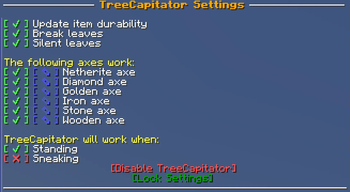
- Breaks leaves
- Works for all axes
- Won't work when sneaking
- Won't break Nether trees
If you want to change this, you can do this by typing /trigger TreeCapitator
This will open the settings in your chat. To change a setting, simply click on the green or red icon next to the setting you wish to change.
Settings
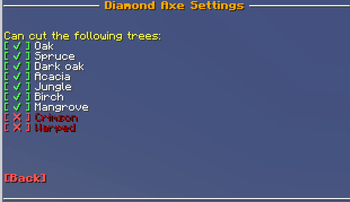
For each axe, you can choose which tree type TreeCapitator will work.
Only want the Netherite axe to break Nether trees? You can do that!
Because you don't need to have cheats enabled to edit settings, anyone can change them. If you want to lock the settings, click the [Lock Settings] text.
Running the command /function treecapitator:unlock will unlock them again, but this does require cheats/OP.
Compatibility
The latest version works for Minecraft 1.21.2 and below
You can download older versions in the section down below.
Installation instructions
Data pack:
Download the data pack
Place the zip file inside the data packs folder of your world
Rejoin the world or use /reload
Mod:
Download the mod
Place the jar file inside the mod folder of your clients
Enjoy!
Starting from 1.16.2, you can also add the data pack to your world when creating it.
New world -> Datapacks -> Open Pack Folder
Copy the zip file into this folder, and Minecraft should detect it.
Verfügbare Versionen
Tree Capitator auf dem Server installieren
Server bestellen
Bestelle einen Minecraft Java Server mit mindestens 3 GB RAM (4 GB empfohlen).
datapack Loader setzen
Wähle im Panel unter "Egg" den datapack-Loader und die passende Minecraft-Version (26.3).
Mod installieren
Öffne den Mod-Browser im Dashboard und suche nach "Tree Capitator". Klicke "Installieren" – fertig! Alternativ: Lade die .jar via SFTP in den /mods Ordner.
Kompatibilität
Mod-Loader
Minecraft-Versionen
26.3, 1.21.11, 1.21.10 (+22 weitere)
Server-seitig
✓ ErforderlichEmpfohlener RAM
4 GB(min. 3 GB)Häufige Fragen
Tree Capitator Server crasht beim Start – was tun?
Häufigste Ursache: falsche datapack-Version oder zu wenig RAM. Prüfe im Server-Log (latest.log), ob ein "OutOfMemoryError" oder "Mixin"-Fehler auftritt. Bei Mado Hosting: Stelle sicher, dass mindestens 3 GB RAM zugewiesen sind und der Loader zur Mod-Version passt (26.3). Über das Panel kannst du den Loader mit einem Klick wechseln.
Ist Tree Capitator mit datapack und fabric kompatibel?
Tree Capitator unterstützt offiziell datapack, fabric für Minecraft 26.3, 1.21.11, 1.21.10. Im Mado Dashboard werden inkompatible Loader-Kombinationen automatisch erkannt.
Server laggt mit Tree Capitator – wie optimiere ich die Performance?
Empfohlener RAM: 4 GB (+1 GB pro 8 Spieler). Prüfe mit /spark profiler, ob Tree Capitator den meisten Tick-Time verbraucht. Häufige Fixes: Server-View-Distance auf 8-10 reduzieren, bei Forge "performant" oder "starlight" als Zusatz-Mod installieren. Bei Mado Hosting läuft dein Server auf NVMe-SSDs mit dedizierten CPU-Kernen für minimale Latenz.
Ähnliche Mods




Modded Server mieten
Installiere Tree Capitator mit nur einem Klick auf deinem Server.