
Tree Capitator
TreeCapitator makes chopping trees and getting wood much easier! If you cut a log block from a tree, all the logs above will also drop! There are lots of settings so you can customize everything to your needs!
Screenshots
About this Mod
Join Discord for more updates.
TreeCapitator makes chopping trees and getting wood much easier! If you cut a log block from a tree, all the logs above will also drop!
There are lots of settings so that you can customize everything to your needs!
Features
- Instantly chop a tree by cutting one block
- Wood types do not interfere
- Settings to configure everything you want!
- Only works on naturally generated trees
- Support for Nether "trees" (disabled by default, can be enabled in axe settings)
- Axes lose durability depending on logs cut (1.17 and up)
Settings
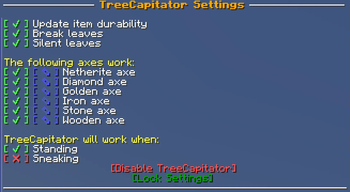
By default, this data pack:
- Breaks leaves
- Works for all axes
- Won't work when sneaking
- Won't break Nether trees
If you want to change this, you can do this by typing /trigger TreeCapitator
This will open the settings in your chat. To change a setting, simply click on the green or red icon next to the setting you wish to change.
Settings
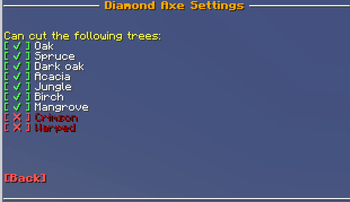
For each axe, you can choose which tree type TreeCapitator will work.
Only want the Netherite axe to break Nether trees? You can do that!
Because you don't need to have cheats enabled to edit settings, anyone can change them. If you want to lock the settings, click the [Lock Settings] text.
Running the command /function treecapitator:unlock will unlock them again, but this does require cheats/OP.
Compatibility
The latest version works for Minecraft 1.21.2 and below
You can download older versions in the section down below.
Installation instructions
Data pack:
Download the data pack
Place the zip file inside the data packs folder of your world
Rejoin the world or use /reload
Mod:
Download the mod
Place the jar file inside the mod folder of your clients
Enjoy!
Starting from 1.16.2, you can also add the data pack to your world when creating it.
New world -> Datapacks -> Open Pack Folder
Copy the zip file into this folder, and Minecraft should detect it.
Available Versions
How to Install Tree Capitator on Your Server
Order Server
Order a Minecraft Java server with at least 3 GB RAM (4 GB recommended).
Set datapack Loader
In the panel under "Egg", select the datapack loader and matching Minecraft version (26.3).
Install Mod
Open the mod browser in the dashboard and search for "Tree Capitator". Click "Install" – done! Alternatively, upload the .jar via SFTP to the /mods folder.
Compatibility
Mod Loaders
Minecraft Versions
26.3, 1.21.11, 1.21.10 (+22 more)
Server-side
✓ RequiredRecommended RAM
4 GB(min. 3 GB)Frequently Asked Questions
Tree Capitator server crashes on startup – what to do?
Most common cause: wrong datapack version or insufficient RAM. Check the server log (latest.log) for "OutOfMemoryError" or "Mixin" errors. With Mado Hosting: ensure at least 3 GB RAM is allocated and the loader matches the mod version (26.3). You can switch loaders with one click in the panel.
Is Tree Capitator compatible with datapack and fabric?
Tree Capitator officially supports datapack, fabric for Minecraft 26.3, 1.21.11, 1.21.10. The Mado dashboard automatically detects incompatible loader combinations.
Server lagging with Tree Capitator – how to optimize performance?
Recommended RAM: 4 GB (per 8 players). Use /spark profiler to check if Tree Capitator consumes the most tick time. Common fixes: reduce server view-distance to 8-10, install "performant" or "starlight" as supplementary mods on Forge. With Mado Hosting, your server runs on NVMe SSDs with dedicated CPU cores for minimal latency.
Similar Mods




Rent Modded Server
Install Tree Capitator with just one click on your server.