
Modrinth · Fabric, Forge, NeoForge
TrimsEffects auf deinem Minecraft Server
TrimsEffects läuft auf Minecraft Servern mit Fabric oder Forge oder NeoForge. Bestell deinen Server, stell den Loader im Panel ein und installiere die Mod mit einem Klick im Mod-Browser.
The objective of this mod is none other than to expand the world of trims added by Mojang in the latest versions, since now, each of them will be able to grant an effect.
- Downloads
- 1.1M
- Autor
- Lupin
- Loader
- Fabric, Forge, NeoForge
- Minecraft
- 1.20 – 26.2
- Aktualisiert
- –
Screenshots
So sieht TrimsEffects aus


Bilder: TrimsEffects auf Modrinth, vom Projektteam veröffentlicht.
Einrichtung
TrimsEffects auf dem Server installieren
Server und Spieler brauchen denselben Loader und dieselbe Minecraft-Version. Sichere die Welt, bevor du Mods hinzufügst oder aktualisierst.
- 01
Konfigurieren
4 GB RAM sind vorausgewählt. Laufzeit und Add-ons wählst du selbst, bezahlt wird per Kreditkarte oder PayPal.
- 02
Loader einstellen
Stell im Panel die Serversoftware auf Fabric oder Forge oder NeoForge und wähl die passende Minecraft-Version, zum Beispiel 26.2.
- 03
Mod installieren
Such im Mod-Browser nach „TrimsEffects“ und installiere die Version für deinen Loader. Alternativ lädst du die .jar per SFTP in den Ordner mods. Erforderliche Abhängigkeiten stehen auf der Projektseite.
- 04
Verbinden
Alle Spieler installieren TrimsEffects in derselben Version lokal und verbinden sich über die Serveradresse aus dem Panel.
- Auf dem Server
- Erforderlich
- Auf dem Client
- Erforderlich
- Loader
- Fabric, Forge, NeoForge
- Minecraft
- 26.2, 26.1.2, 1.21.4 +11 weitere
- Lizenz
- LicenseRef-All-Rights-Reserved
Das Panel
Mods installieren, Fehler finden.
Echte Screenshots aus dem Mado Panel. Beides ist bei jedem Minecraft Server enthalten.
Mod-Browser
Modrinth und CurseForge direkt im Panel.
Der Browser filtert nach deiner Minecraft-Version. Mods installierst du mit einem Klick, ohne .jar-Dateien hochzuladen.

KI-Crash-Analyse
Wenn ein Mod crasht, liest die Analyse das Log.
Mods scheitern oft an einer falschen Loader-Version, Java-Version oder fehlenden Abhängigkeit. Die Analyse nennt eine wahrscheinliche Ursache und einen Lösungsvorschlag.

Versionen
Veröffentlichte Versionen
Nimm die Datei, die zu Loader und Minecraft-Version deines Servers passt. Server und Spieler brauchen dieselbe Version.
TrimsEffects · Modrinth- [NEO] TrimsEffects - MC 1.21.X - 1.3.518. August 2024Minecraft 1.21, 1.21.1 · NeoForge
- [FABRIC] TrimsEffects - MC 1.21.X - 1.3.518. August 2024Minecraft 1.21, 1.21.1 · Fabric
- [FORGE] TrimsEffects - MC 1.20.X - 1.3.518. August 2024Minecraft 1.20, 1.20.1, 1.20.2, 1.20.3, 1.20.4 · Forge
- [FABRIC] TrimsEffects - MC 1.20.X - 1.3.518. August 2024Minecraft 1.20, 1.20.1, 1.20.2, 1.20.3, 1.20.4 · Fabric
Originalbeschreibung des Projektautors
!
The objective of this mod is none other than to expand the world of trims added by Mojang in the latest versions, since now, each of them will be able to grant an effect.
TrimsEffects major update is now available!
Spoiler
This new version changes many features of the mod, and adds many of the most desired features.
- First of all, from now on, all trims will give effects, no matter what material they are combined with (previously only diamond and netherite were available by default). Now, all minerals are valid and resin has also been added, which will give night vision.
- By default, if you wear three armors with the same trim, it will give you a level 1 effect, while if you wear all four parts of the armor with the same trim, the effect will be level 2. But this is completely configurable!
- Now you can combine effects! The same trim will be able to give several effects at the same time, this can be modified to your liking in the mod settings, which by the way, is much larger and configurable! You can configure almost any feature of TrimsEffects.
- Mobs that have armor with trims will also receive effects by default! Of course, you can also disable it in the settings.
- TrimsEffects is now compatible with many other Minecraft mods and items, just edit the settings and you'll see how the effects will be applied!
- Other small tweaks have also been made, such as changes to the default effects for each trim and other bug fixes.
Being such a big update, there might be some small bugs, please feel free to report them and we will resolve them as soon as possible.
Do you need a server to play with your friends?
For exceptional server hosting services, look no further than ****. Of course, you can install all the mods or modpacks you want, and their support team is always available to help you.
!
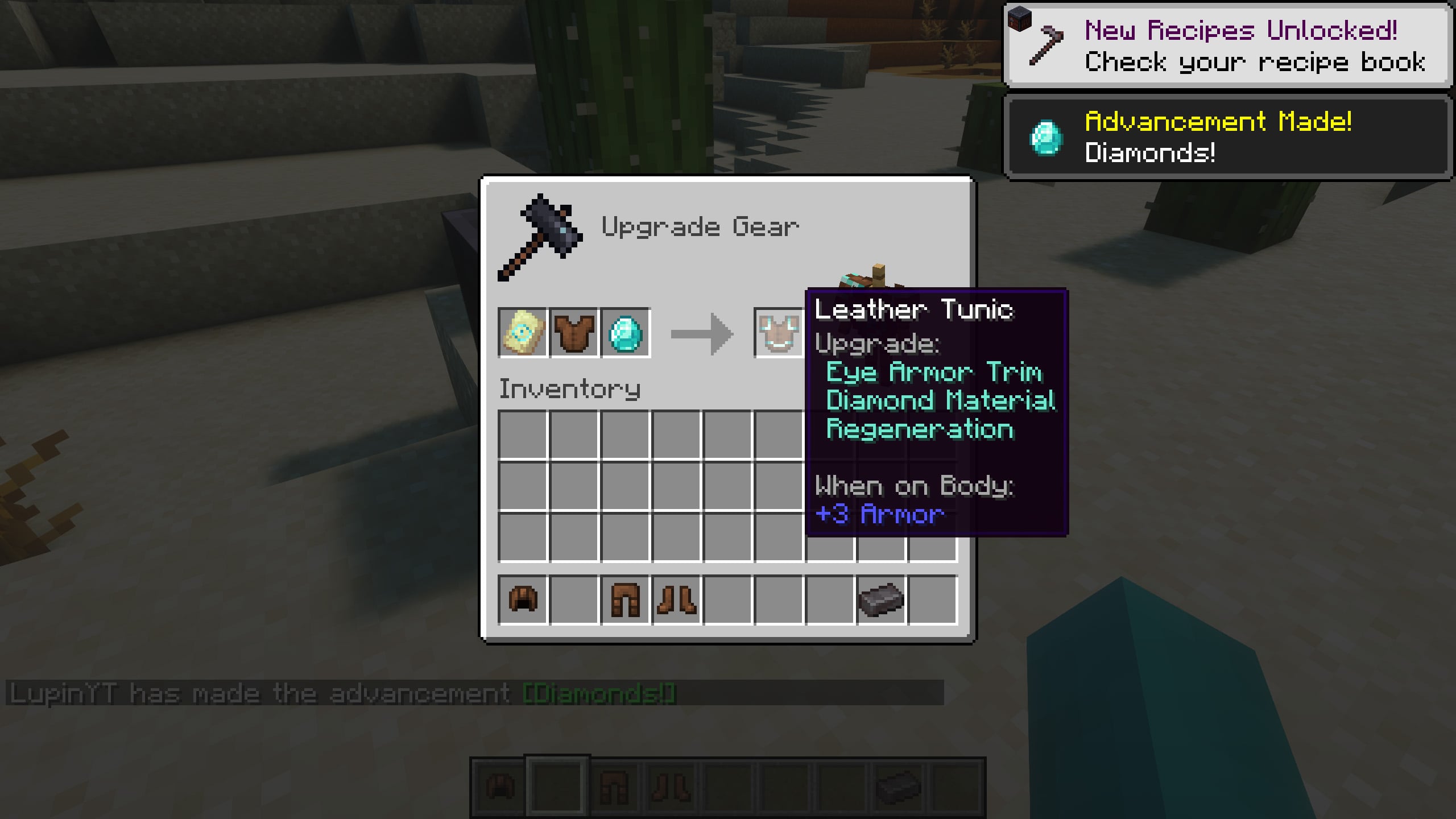
With TrimsEffects you can get effects when using armor with trims, for example, with the “dune” trim you will get “speed” level 1, in case you have only three pieces of armor with the same trim. If you have all four pieces of armor with the “dune” trim, the effect will be level 2!
Of course, this is completely configurable, and you can do it in the configuration settings of the mod, as well as configure many other settings, such as, for example, that a trim gives several effects simultaneously, add compatibility with other mods, disable that enemies also receive effects when wearing armor with trims... among many other features!
Here's the current list of trims and effects:
Spire -> StrengthEye -> RegenerationSnout -> Fire ResistanceRib -> HasteVex -> InvisibilityWard -> AbsorptionTide -> Conduit PowerWild -> Hero of the VillageCoast -> Water BreathingDune -> SpeedSentry -> ResistanceWayfinder -> Slow FallingShaper -> LuckSilence -> Health BoostRaiser -> SaturationHost -> GlowingFlow -> Jump BoostBolt -> Dolphins Grace
If you combine any trim with the resin material, instead of receiving the default trim effect, you will receive the night vision effect (configurable).
!
Is it compatible with other mods related to trims?
It depends on the mod in question, we have worked to make it compatible with the vast majority of Minecraft mods, including those that add new Trims or features related to them. Obviously, there may be some mods that aren't compatible, but tell us about them and we'll take care of them.
Does it work on servers?
Sure! Remember that the best way to play with mods and friends is with BisectHosting, and by .
Can this mod be used in modpacks?
Of course! As long as it is published only on Modrinth or CurseForge. Uploading it to any other platform would be violating our rights and is not allowed at all.
However, we are really grateful if you consider adding it to your Modrinth or CurseForge modpack. If you need any small changes or have any questions, contact us!
!


](https://discord.gg/X8VY5WMbe4)
.
TrimsEffects Server crasht beim Start – was tun?
Häufige Ursachen: Loader- oder Minecraft-Version passen nicht zur Mod-Datei, eine Abhängigkeit fehlt oder der RAM reicht nicht. Such im Log (latest.log) nach „OutOfMemoryError“, „Mixin“ oder fehlenden Mods. Bei Mado wertet die KI-Crash-Analyse das Log aus und schlägt eine Ursache vor. Loader und Version änderst du im Panel.
Mit welchem Loader läuft TrimsEffects?
Laut Modrinth unterstützt TrimsEffects Fabric, Forge, NeoForge für Minecraft 26.2, 26.1.2, 1.21.4. Forge- und Fabric-Dateien sind nicht untereinander austauschbar: Wähl einen Loader für Server und Clients.
Wie viel RAM braucht ein Server mit TrimsEffects?
Als Orientierung 3–4 GB für einen Server mit dieser Mod. Das ist eine Schätzung, keine gemessene Mindestanforderung. Weitere Mods, viele Spieler und große Sichtweiten brauchen mehr. Ob eine Mod die Tick-Zeit belastet, siehst du mit dem spark-Profiler.
Ähnliche Mods
Beliebte Mods aus derselben Kategorie
 Server-fähig

VeinMiner
von Miraculixx
Mine the whole vein on mining a single ore/block. Make the tedious mining experience to something satisfying and fun! FTB Ultimine alternative
 Nur Client

VeinMiner Hotkey
von Miraculixx
Veinminer Addon - Use a hotkey to veinmine with a dynamic crosshair & block highlighting
 Server-fähig

Curios API
von TheIllusiveC4
A flexible and expandable accessory/equipment API for users and developers.
 Server-fähig

[TaCZ] Timeless and Classics Zero
von craneblock6666
The most Immersive and Customizable modern FPS experience in Minecraft - A complete Remaster of the TaC gun mod by the original team.
Bereit für deinen Server mit TrimsEffects?
4 GB RAM ab 8,00 € im Monat. 35 % auf den 1. Monat mit MADO35.