
Modrinth · Fabric, Forge, NeoForge
TrimsEffects on your Minecraft server
TrimsEffects runs on Minecraft servers with Fabric or Forge or NeoForge. Order your server, set the loader in the panel and install the mod with one click in the mod browser.
The objective of this mod is none other than to expand the world of trims added by Mojang in the latest versions, since now, each of them will be able to grant an effect.
- Downloads
- 1.1M
- Author
- Lupin
- Loader
- Fabric, Forge, NeoForge
- Minecraft
- 1.20 – 26.2
- Updated
- –
Screenshots
What TrimsEffects looks like


Images: TrimsEffects on Modrinth, published by the project team.
Setup
Install TrimsEffects on your server
The server and players need the same loader and Minecraft version. Back up the world before adding or updating mods.
- 01
Configure
4 GB of RAM is preselected. You choose the term and add-ons and pay by credit card or PayPal.
- 02
Set the loader
In the panel, set the server software to Fabric or Forge or NeoForge and choose the matching Minecraft version, for example 26.2.
- 03
Install the mod
Search the mod browser for “TrimsEffects” and install the release for your loader. Alternatively, upload the .jar to the mods folder via SFTP. Required dependencies are listed on the project page.
- 04
Connect
Every player installs the same TrimsEffects release locally and connects using the server address from the panel.
- On the server
- Required
- On the client
- Required
- Loader
- Fabric, Forge, NeoForge
- Minecraft
- 26.2, 26.1.2, 1.21.4 +11 more
- License
- LicenseRef-All-Rights-Reserved
The panel
Install mods, find errors.
Real screenshots from the Mado panel. Both come with every Minecraft server.
Mod browser
Modrinth and CurseForge, right in the panel.
The browser filters by your Minecraft version. Install mods with one click, without uploading .jar files.

AI crash analysis
When a mod crashes, the analyzer reads the log.
Mods often fail on a wrong loader version, Java version or missing dependency. The analyzer names a likely cause and suggests a fix.

Releases
Published releases
Pick the file that matches your server’s loader and Minecraft version. The server and players need the same release.
TrimsEffects · Modrinth- [NEO] TrimsEffects - MC 1.21.X - 1.3.5August 18, 2024Minecraft 1.21, 1.21.1 · NeoForge
- [FABRIC] TrimsEffects - MC 1.21.X - 1.3.5August 18, 2024Minecraft 1.21, 1.21.1 · Fabric
- [FORGE] TrimsEffects - MC 1.20.X - 1.3.5August 18, 2024Minecraft 1.20, 1.20.1, 1.20.2, 1.20.3, 1.20.4 · Forge
- [FABRIC] TrimsEffects - MC 1.20.X - 1.3.5August 18, 2024Minecraft 1.20, 1.20.1, 1.20.2, 1.20.3, 1.20.4 · Fabric
Original description by the project author
!
The objective of this mod is none other than to expand the world of trims added by Mojang in the latest versions, since now, each of them will be able to grant an effect.
TrimsEffects major update is now available!
Spoiler
This new version changes many features of the mod, and adds many of the most desired features.
- First of all, from now on, all trims will give effects, no matter what material they are combined with (previously only diamond and netherite were available by default). Now, all minerals are valid and resin has also been added, which will give night vision.
- By default, if you wear three armors with the same trim, it will give you a level 1 effect, while if you wear all four parts of the armor with the same trim, the effect will be level 2. But this is completely configurable!
- Now you can combine effects! The same trim will be able to give several effects at the same time, this can be modified to your liking in the mod settings, which by the way, is much larger and configurable! You can configure almost any feature of TrimsEffects.
- Mobs that have armor with trims will also receive effects by default! Of course, you can also disable it in the settings.
- TrimsEffects is now compatible with many other Minecraft mods and items, just edit the settings and you'll see how the effects will be applied!
- Other small tweaks have also been made, such as changes to the default effects for each trim and other bug fixes.
Being such a big update, there might be some small bugs, please feel free to report them and we will resolve them as soon as possible.
Do you need a server to play with your friends?
For exceptional server hosting services, look no further than ****. Of course, you can install all the mods or modpacks you want, and their support team is always available to help you.
!
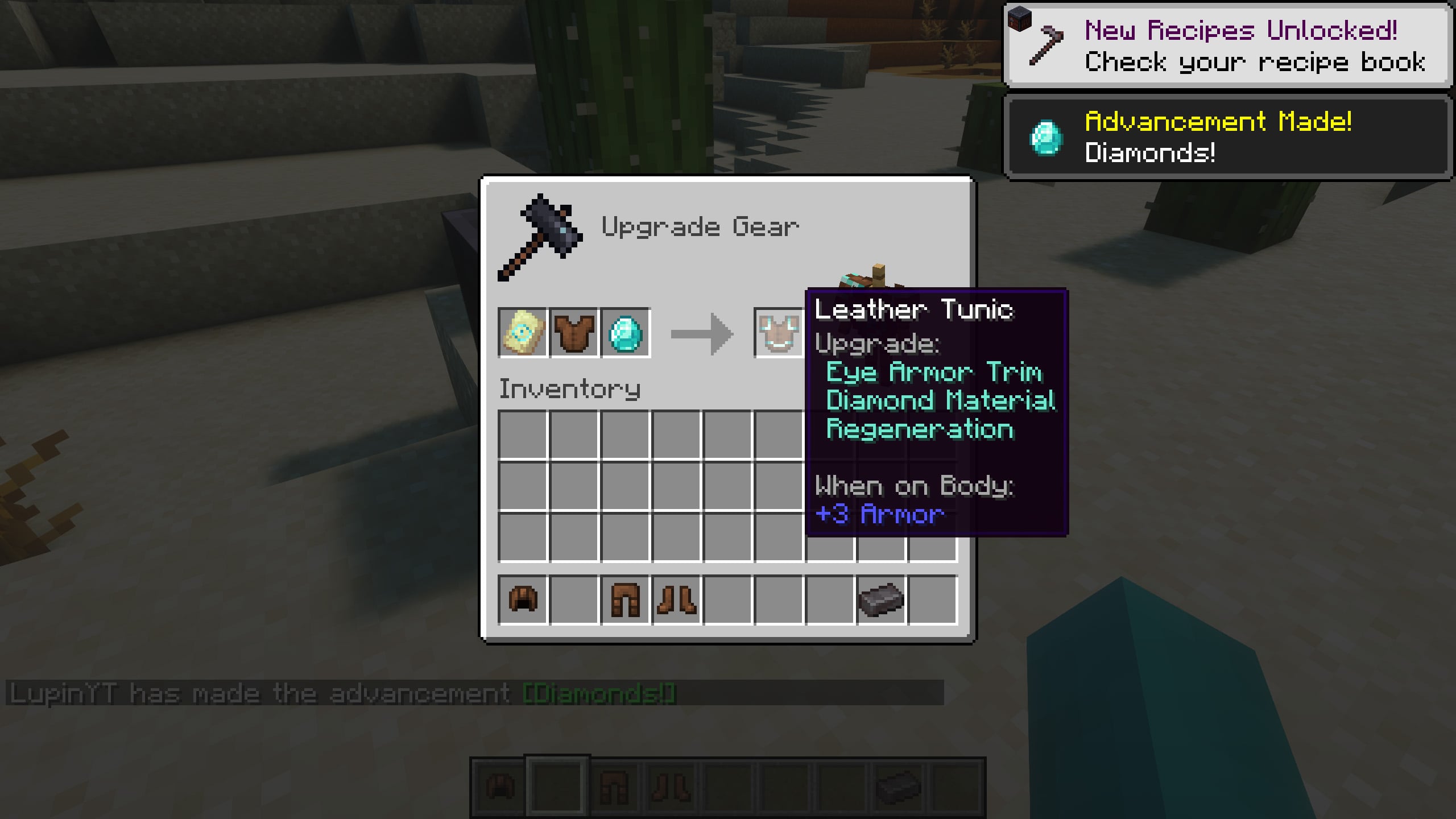
With TrimsEffects you can get effects when using armor with trims, for example, with the “dune” trim you will get “speed” level 1, in case you have only three pieces of armor with the same trim. If you have all four pieces of armor with the “dune” trim, the effect will be level 2!
Of course, this is completely configurable, and you can do it in the configuration settings of the mod, as well as configure many other settings, such as, for example, that a trim gives several effects simultaneously, add compatibility with other mods, disable that enemies also receive effects when wearing armor with trims... among many other features!
Here's the current list of trims and effects:
Spire -> StrengthEye -> RegenerationSnout -> Fire ResistanceRib -> HasteVex -> InvisibilityWard -> AbsorptionTide -> Conduit PowerWild -> Hero of the VillageCoast -> Water BreathingDune -> SpeedSentry -> ResistanceWayfinder -> Slow FallingShaper -> LuckSilence -> Health BoostRaiser -> SaturationHost -> GlowingFlow -> Jump BoostBolt -> Dolphins Grace
If you combine any trim with the resin material, instead of receiving the default trim effect, you will receive the night vision effect (configurable).
!
Is it compatible with other mods related to trims?
It depends on the mod in question, we have worked to make it compatible with the vast majority of Minecraft mods, including those that add new Trims or features related to them. Obviously, there may be some mods that aren't compatible, but tell us about them and we'll take care of them.
Does it work on servers?
Sure! Remember that the best way to play with mods and friends is with BisectHosting, and by .
Can this mod be used in modpacks?
Of course! As long as it is published only on Modrinth or CurseForge. Uploading it to any other platform would be violating our rights and is not allowed at all.
However, we are really grateful if you consider adding it to your Modrinth or CurseForge modpack. If you need any small changes or have any questions, contact us!
!


](https://discord.gg/X8VY5WMbe4)
.
TrimsEffects server crashes on startup – what to do?
Common causes: the loader or Minecraft version does not match the mod file, a dependency is missing, or RAM is too low. Check the log (latest.log) for “OutOfMemoryError”, “Mixin” or missing mods. At Mado, the AI crash analysis reads the log and suggests a cause. You can change the loader and version in the panel.
Which loader does TrimsEffects run on?
According to Modrinth, TrimsEffects supports Fabric, Forge, NeoForge for Minecraft 26.2, 26.1.2, 1.21.4. Forge and Fabric files are not interchangeable: pick one loader for the server and clients.
How much RAM does a server with TrimsEffects need?
As guidance, 3–4 GB for a server with this mod. This is an estimate, not a measured minimum. More mods, many players and long view distances need more. The spark profiler shows whether a mod is costing tick time.
Similar mods
Popular mods in the same category
 Server-ready

VeinMiner
by Miraculixx
Mine the whole vein on mining a single ore/block. Make the tedious mining experience to something satisfying and fun! FTB Ultimine alternative
 Client only

VeinMiner Hotkey
by Miraculixx
Veinminer Addon - Use a hotkey to veinmine with a dynamic crosshair & block highlighting
 Server-ready

Curios API
by TheIllusiveC4
A flexible and expandable accessory/equipment API for users and developers.
 Server-ready

[TaCZ] Timeless and Classics Zero
by craneblock6666
The most Immersive and Customizable modern FPS experience in Minecraft - A complete Remaster of the TaC gun mod by the original team.
Ready for your server with TrimsEffects?
4 GB of RAM from €8.00 per month. 35% off your first month with MADO35.