
Twilight Forest: The Lost Blocks
Adds missing blocks to Twilight Forest for the builders!
Screenshots
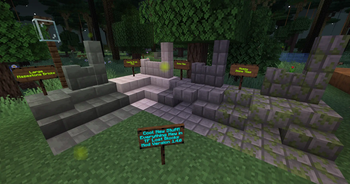
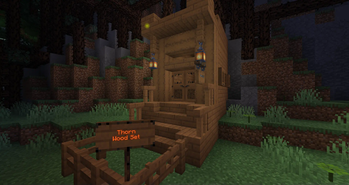
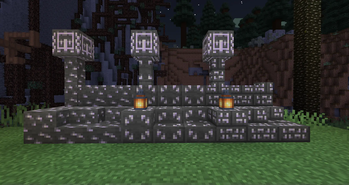
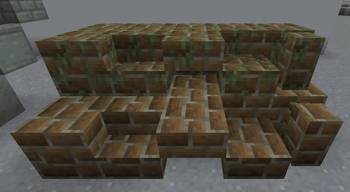
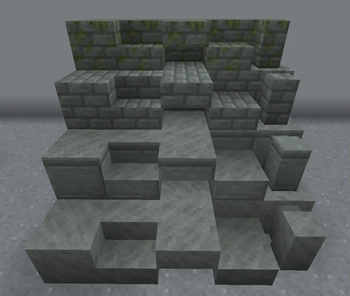
Über diese Mod


About the Mod
Strange how some blocks are missing in Twilight Forest even though it looks like they would be AMAZING additions?
This addon mod introduces the missing blocks as well as making Towerwood a fully-fledged wood type! That's a lot of choices for builders!
Features:
- Over 60 new blocks have been added!
- Integrates vanilla recipe advancement system.
- Matches the aesthetics of Twilight Forest.
List of new blocks:
- Aurora Stairs and Walls (Tintable!)
- Auroralized Glass Panes
- Castle Brick Slabs and Walls (+ Bold, Encased, Cracked, Worn, and Mossy variant)
- Deadrock Slabs and Stairs (+ Cracked & Weathered)
- Towerwood Slabs, Stairs, Fences, Fence Gates, Doors, Trapdoors, Pressure Plates, Buttons, Signs, and Banisters
- Mossy Towerwood Slabs and Stairs
- Mazestone Slabs, Stairs, and Walls (+ Cut, Brick, and Mossy Brick variant)
- Nagastone Slabs (Left & Right variant, includes Mossy and Weathered)
- Underbrick Slabs, Stairs, and Walls (+ Cracked and Mossy variant)
Requirements:
This addon requires having the Twilight Forest mod installed to function.
Permissions:
You may add this to your modpack as long as you give credit! :)
You may port this mod to Fabric if you desire. It will mean a lot!
Special Promotions
I've partnered with RocketNode Hosting!
RocketNode provides top-tier server hosting worldwide, allowing you to set up your server with just a few clicks! Their intuitive dashboard makes server management a breeze, and you can even schedule automatic restarts without needing any coding knowledge.
Use the code KITTEH to get 25% off your first month on any of their gaming servers.
Get started here: https://rocketnode.com/kitteh
Verfügbare Versionen
Twilight Forest: The Lost Blocks auf dem Server installieren
Server bestellen
Bestelle einen Minecraft Java Server mit mindestens 3 GB RAM (4 GB empfohlen).
forge Loader setzen
Wähle im Panel unter "Egg" den forge-Loader und die passende Minecraft-Version (1.21.1).
Mod installieren
Öffne den Mod-Browser im Dashboard und suche nach "Twilight Forest: The Lost Blocks". Klicke "Installieren" – fertig! Alternativ: Lade die .jar via SFTP in den /mods Ordner.
Kompatibilität
Mod-Loader
Minecraft-Versionen
1.21.1, 1.20.1, 1.19.4 (+4 weitere)
Server-seitig
✓ ErforderlichEmpfohlener RAM
4 GB(min. 3 GB)Häufige Fragen
Twilight Forest: The Lost Blocks Server crasht beim Start – was tun?
Häufigste Ursache: falsche forge-Version oder zu wenig RAM. Prüfe im Server-Log (latest.log), ob ein "OutOfMemoryError" oder "Mixin"-Fehler auftritt. Bei Mado Hosting: Stelle sicher, dass mindestens 3 GB RAM zugewiesen sind und der Loader zur Mod-Version passt (1.21.1). Über das Panel kannst du den Loader mit einem Klick wechseln.
Ist Twilight Forest: The Lost Blocks mit forge und neoforge kompatibel?
Twilight Forest: The Lost Blocks unterstützt offiziell forge, neoforge für Minecraft 1.21.1, 1.20.1, 1.19.4. Im Mado Dashboard werden inkompatible Loader-Kombinationen automatisch erkannt.
Server laggt mit Twilight Forest: The Lost Blocks – wie optimiere ich die Performance?
Empfohlener RAM: 4 GB (+1 GB pro 8 Spieler). Prüfe mit /spark profiler, ob Twilight Forest: The Lost Blocks den meisten Tick-Time verbraucht. Häufige Fixes: Server-View-Distance auf 8-10 reduzieren, bei Forge "performant" oder "starlight" als Zusatz-Mod installieren. Bei Mado Hosting läuft dein Server auf NVMe-SSDs mit dedizierten CPU-Kernen für minimale Latenz.
Ähnliche Mods

![[ETF] Entity Texture Features](https://cdn.modrinth.com/data/BVzZfTc1/af683d206d50b05258d865b0d6e4aa2f2cee12f2_96.webp)
![[EMF] Entity Model Features](https://cdn.modrinth.com/data/4I1XuqiY/6e5bbd0d06b1741bfdab6c0cfab6de8fdaf0064c_96.webp)



Modded Server mieten
Installiere Twilight Forest: The Lost Blocks mit nur einem Klick auf deinem Server.