
Variants-CIT
Alternative CIT format for large collections of variants with repeating patterns.
Screenshots
Über diese Mod
Variants-CIT
An alternative CIT format designed to handle large amounts of variants.
This mod excels in scenarios where one item has many variants all based on the same pieces of data. It yields better performances when extreme amounts of CITs are available, and uses a resource format that is less redundant, requiring only one short file to configure all possible variants of an item at once.
Assigning models on a case-by-case basis (similar to how Optifine-CIT handles it) is still possible, but does not boast the same performances.
Resource Pack Format
This is a quick showcase. Refer to The Wiki for a complete guide.
The format revolves around item variants being automatically associated to models or textures with matching names.
Instead of defining separate conditions for every variants, you define a single rule that governs all variants in a collection, (so-called modules). This module defines what item is affected, how to figure out its variants, and where the variant models are located.
Fully automatic variants-to-model association
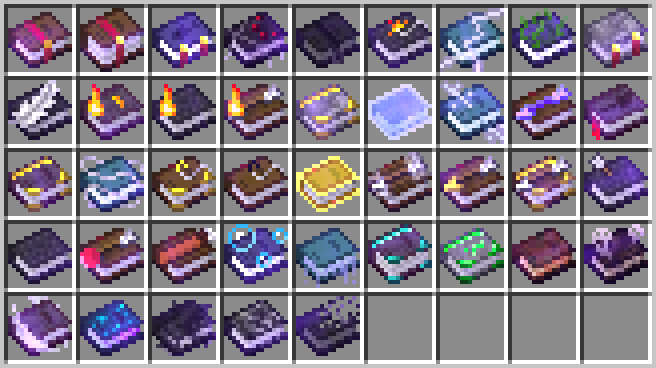
Here's a simple module that would change the texture of enchanted books :
{
	"items": "enchanted_book", // The affected item type(s)

	"modelPrefix": "book_cit/", // The folder containing the possible models/textures.
	"assetGen": "item_model/generated", // Auto-generate models from textures (if missing)

	"type": "stored_entchantment", // How to compute the item's "variant ID"
	"parameters": { // Extra options specific to the module's type
		"levelSeparator": "_lvl_" // Include enchantment level in the variant ID
	}
}
Here, a book with the enchantment minecraft:unbreaking at level 2 will have the variant ID minecraft:unbreaking_lvl_2, and thus use the texture stored at /assets/minecraft/textures/item/book_cit/unbreaking_lvl_2.png.
This single module will work for every possible enchantment, vanilla or modded, so long as a corresponding texture exists.
Automatic variants based on custom data
The module above has a purpose-made type for enchanted books. If no type exists for a specific use-case, you can still use more generic modules to get a variant from any component:
{
	"items": "minecraft:suspicious_stew",
	"modelPrefix": "item/suspicious_stew_cit/",
	"assetGen": "item_model/generated",

	"type": "component_data",
	"parameters": {
		"componentType": "suspicious_stew_effects", // The component containing the variant ID
		"nbtPath": "[0].id" // The location of the variant ID in the component.
	}
}
Processing data that can't be used as-is:
{
	"items": "diamond_sword",

	"modelPrefix": "item/named_swords/",
	"assetGen": "item_model/handheld",

	"type": "component_data",
	"parameters":
	{
		"componentType": "custom_name",
		"transform": [
			{
				"function": "regex",
				// Pattern matching,..
				"regex": "(?i)(.*'s )?(Great |Grand )?(?<var>.*(sword|dagger))( of doom)?",
				// ... and preserve only a portion of the name.
				"substitution": "$var"
				// (E.g: "steev18's great Steel Sword" => "Steel Sword")
			}
			{
				// Turns any text into a valid identifier
				"function": "sanitize"
				// (E.g: "Steel Sword" => "minecraft:steel_sword")
			}
		]
	}
}
Combining multiple pieces of data from different sources:
{
	"items": "minecraft:diamond_sword",
	"modelPrefix": "item/trimmed_diamond_sword/",
	"assetGen": "item_model/handheld",

	"type": "component_format",
	"parameters":
	{
		// How to combine various pieces of data into a variant ID
		// (E.g: sentry_diamond)
		"format": "${pattern}_${material}",
		// Where to find those pieces of data.
		"variables": {
			"pattern": {
				"componentType": "trim",
				"nbtPath": ".pattern"
			},
			"material": {
				"componentType": "trim",
				"nbtPath": ".material",
				"transform": "discard_namespace"
			}
		}
	}
}
Case-by-case variants
For systems that don't really follow any rules, (or if you have too few variants to care about automatism), you can use a format closer to Optifine-CIT's paradigms:
{
	"items": "trident",
	"modelPrefix": "item/godly_tridents/",
	"assetGen": "item_model/trident",

	"type": "predicates",
	"parameters": {
		"predicates":
		[
			{
				"variantId": "zeus_smite",
				"precondition": {
					"enchantments.channeling": { "greater_or_equals": 1 }
				}
			},
			{
				"variantId": "jupiter_syphon",
				"precondition": {
					"enchantments.riptide": { "greater_or_equals": 1 }
				}
			}
			// etc
		]
	}
}
Verfügbare Versionen
Variants-CIT auf deinem Client installieren
Mod-Loader lokal installieren
Installiere fabric für deine lokale Minecraft-Version.
Passende Datei herunterladen
Wähle die Variants-CIT-Datei für fabric und Minecraft 26.3.
Mod installieren
Lege die .jar-Datei in deinem lokalen .minecraft/mods-Ordner ab und starte Minecraft neu. Eine Installation auf dem Server ist nicht nötig.
Kompatibilität
Mod-Loader
Minecraft-Versionen
26.3, 26.3-pre-2, 26.2 (+19 weitere)
Server-seitig
✗ Nicht unterstütztEmpfohlener RAM
4 GB(min. 3 GB)Häufige Fragen
Muss Variants-CIT auf dem Minecraft Server installiert werden?
Nein. Modrinth kennzeichnet Variants-CIT serverseitig als nicht unterstützt. Installiere die Mod nur im lokalen Minecraft-Mods-Ordner. Dein Server kann unverändert bleiben, sofern die Mod-Seite keine zusätzliche Abhängigkeit nennt.
Welche Version und welchen Loader braucht Variants-CIT?
Nutze eine Datei für fabric und exakt deine Minecraft-Version. Unterstützte Versionen sind unter anderem 26.3, 26.3-pre-2, 26.2. Loader-Dateien sind nicht untereinander austauschbar.
Variants-CIT funktioniert nicht – was kann ich prüfen?
Prüfe zuerst Minecraft-Version, Loader-Version und erforderliche Abhängigkeiten. Lege die .jar-Datei im lokalen .minecraft/mods-Ordner ab und entferne ältere Duplikate. Da die Mod clientseitig ist, löst mehr Server-RAM dieses Problem nicht.
Ähnliche Mods



Minecraft Server für deine Gruppe
Variants-CIT bleibt auf deinem Client. Hoste dazu eine kompatible Welt für deine Mitspieler.