
vista
Cameras, Tv, Live feed, cassette, security, gifs, television, mirrors
Screenshots


Über diese Mod
Vista
Made for ModJam 2025
WELCOME TO THE FUTURE!
Well, Minecraft's future at least...
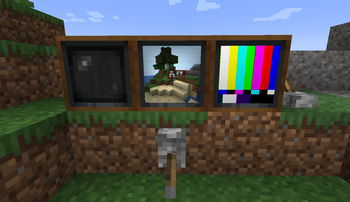
This mod adds two new tech inspired blocks to your game, starring Televisions and "cameras".
Its main function is allowing to remotely monitor area of your world using television and cameras blocks.
The added blocks are:
Televisions:
- Need to be powered on by redstone
- Can be linked to a view finder through a hollow cassette to view what it sees
- Can accept and display cassettes or hollow cassettes
- Can be connected in any square size
- Can be interacted with droppers and hoppers to swap cassettes
- Shift click on a tv to pause it
Cassette:
- Can be dropped by creepers killed by a pillager arrow
- Will also rarely be found in chests
- Each plays a unique gif. Collect them all!
- Insert them in a TV to play them
- New ones can be added with datapack & resource packs.
Hollow Cassette:
- Crafted with a Cassette and Echo Shard
- Use it on a view finder to link it to it
- Can be inserted in a TV to view the view finder content
View Finder:
- Can be interacted with to see a particular view
- Click to lock it while using it
- Scroll to zoom
- Can have glass panes applied to have the linked TV get a particular tint effects
- Can also equip mob heads when supplementaries is on to have the linked tv use the respective mob head shaders
- Can be rotated remotely using a supplementaries turn table
- View distance can be changed with redstone
Wave Gate:
- A creative only block that can accept a URL
- When linked with a hollow cassette to a tv it will display that URL onto the TV
- Configs exist to make it craftable and usable in creative
- Valid links must be direct urls to any kind of media (i.e. .gif , .mp4, etc.)
Note: The mod has degraded visuals when using IRIS mod. This is something iris would have to fix. For best experience don't use Iris shaderpacks. The mod will have fancy crt shaders and tv turn on effects
Verfügbare Versionen
vista auf dem Server installieren
Server bestellen
Bestelle einen Minecraft Java Server mit mindestens 3 GB RAM (4 GB empfohlen).
fabric Loader setzen
Wähle im Panel unter "Egg" den fabric-Loader und die passende Minecraft-Version (1.21.1).
Mod installieren
Öffne den Mod-Browser im Dashboard und suche nach "vista". Klicke "Installieren" – fertig! Alternativ: Lade die .jar via SFTP in den /mods Ordner.
Kompatibilität
Mod-Loader
Minecraft-Versionen
1.21.1, 1.21, 1.20.1
Server-seitig
✓ ErforderlichEmpfohlener RAM
4 GB(min. 3 GB)Häufige Fragen
vista Server crasht beim Start – was tun?
Häufigste Ursache: falsche fabric-Version oder zu wenig RAM. Prüfe im Server-Log (latest.log), ob ein "OutOfMemoryError" oder "Mixin"-Fehler auftritt. Bei Mado Hosting: Stelle sicher, dass mindestens 3 GB RAM zugewiesen sind und der Loader zur Mod-Version passt (1.21.1). Über das Panel kannst du den Loader mit einem Klick wechseln.
Ist vista mit fabric und forge und neoforge kompatibel?
vista unterstützt offiziell fabric, forge, neoforge für Minecraft 1.21.1, 1.21, 1.20.1. Achtung: Forge- und Fabric-Mods sind NICHT untereinander kompatibel – wähle einen Loader und bleibe dabei. Im Mado Dashboard werden inkompatible Loader-Kombinationen automatisch erkannt.
Server laggt mit vista – wie optimiere ich die Performance?
Empfohlener RAM: 4 GB (+1 GB pro 8 Spieler). Prüfe mit /spark profiler, ob vista den meisten Tick-Time verbraucht. Häufige Fixes: Server-View-Distance auf 8-10 reduzieren, bei Forge "performant" oder "starlight" als Zusatz-Mod installieren. Bei Mado Hosting läuft dein Server auf NVMe-SSDs mit dedizierten CPU-Kernen für minimale Latenz.
Ähnliche Mods






Modded Server mieten
Installiere vista mit nur einem Klick auf deinem Server.
Details
- Lizenz
- LicenseRef-Supplementaries-Team-License-1.5
- Server-seitig
- Erforderlich