
vista
Cameras, Tv, Live feed, cassette, security, gifs, television, mirrors
Screenshots


About this Mod
Vista
Made for ModJam 2025
WELCOME TO THE FUTURE!
Well, Minecraft's future at least...
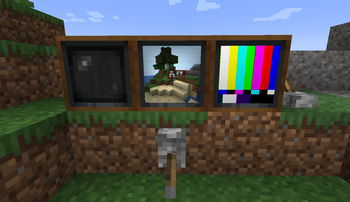
This mod adds two new tech inspired blocks to your game, starring Televisions and "cameras".
Its main function is allowing to remotely monitor area of your world using television and cameras blocks.
The added blocks are:
Televisions:
- Need to be powered on by redstone
- Can be linked to a view finder through a hollow cassette to view what it sees
- Can accept and display cassettes or hollow cassettes
- Can be connected in any square size
- Can be interacted with droppers and hoppers to swap cassettes
- Shift click on a tv to pause it
Cassette:
- Can be dropped by creepers killed by a pillager arrow
- Will also rarely be found in chests
- Each plays a unique gif. Collect them all!
- Insert them in a TV to play them
- New ones can be added with datapack & resource packs.
Hollow Cassette:
- Crafted with a Cassette and Echo Shard
- Use it on a view finder to link it to it
- Can be inserted in a TV to view the view finder content
View Finder:
- Can be interacted with to see a particular view
- Click to lock it while using it
- Scroll to zoom
- Can have glass panes applied to have the linked TV get a particular tint effects
- Can also equip mob heads when supplementaries is on to have the linked tv use the respective mob head shaders
- Can be rotated remotely using a supplementaries turn table
- View distance can be changed with redstone
Wave Gate:
- A creative only block that can accept a URL
- When linked with a hollow cassette to a tv it will display that URL onto the TV
- Configs exist to make it craftable and usable in creative
- Valid links must be direct urls to any kind of media (i.e. .gif , .mp4, etc.)
Note: The mod has degraded visuals when using IRIS mod. This is something iris would have to fix. For best experience don't use Iris shaderpacks. The mod will have fancy crt shaders and tv turn on effects
Available Versions
How to Install vista on Your Server
Order Server
Order a Minecraft Java server with at least 3 GB RAM (4 GB recommended).
Set fabric Loader
In the panel under "Egg", select the fabric loader and matching Minecraft version (1.21.1).
Install Mod
Open the mod browser in the dashboard and search for "vista". Click "Install" – done! Alternatively, upload the .jar via SFTP to the /mods folder.
Compatibility
Mod Loaders
Minecraft Versions
1.21.1, 1.21, 1.20.1
Server-side
✓ RequiredRecommended RAM
4 GB(min. 3 GB)Frequently Asked Questions
vista server crashes on startup – what to do?
Most common cause: wrong fabric version or insufficient RAM. Check the server log (latest.log) for "OutOfMemoryError" or "Mixin" errors. With Mado Hosting: ensure at least 3 GB RAM is allocated and the loader matches the mod version (1.21.1). You can switch loaders with one click in the panel.
Is vista compatible with fabric and forge and neoforge?
vista officially supports fabric, forge, neoforge for Minecraft 1.21.1, 1.21, 1.20.1. Note: Forge and Fabric mods are NOT cross-compatible – pick one loader and stick with it. The Mado dashboard automatically detects incompatible loader combinations.
Server lagging with vista – how to optimize performance?
Recommended RAM: 4 GB (per 8 players). Use /spark profiler to check if vista consumes the most tick time. Common fixes: reduce server view-distance to 8-10, install "performant" or "starlight" as supplementary mods on Forge. With Mado Hosting, your server runs on NVMe SSDs with dedicated CPU cores for minimal latency.
Similar Mods






Rent Modded Server
Install vista with just one click on your server.