
VulkanFlow
VulkanFlow brings bloom, shadows and shader like effects to Minecraft highly optimized for integrated GPUs and low end devicec. Achieve stable 60 FPS on hardware like Intel UHD 620, fully compatible with Sodium.
Screenshots


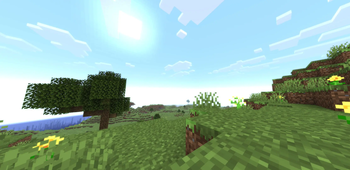
Über diese Mod
VulkanFlow [still in Alpha]
Some Bugs in the 26.3 Version
A Shader Mod for Low End Hardware.
Welcome to VulkanFlow! This mod integrates Shader effects directly into the Minecraft rendering pipeline without destroying your framerate. It is made for players on laptops or older PCs that just want to play shaders without playing on really low fps. I made this mod because I wanted to play with Shaders on my iGPU, so I made this solution.
IMPORTANT Alpha
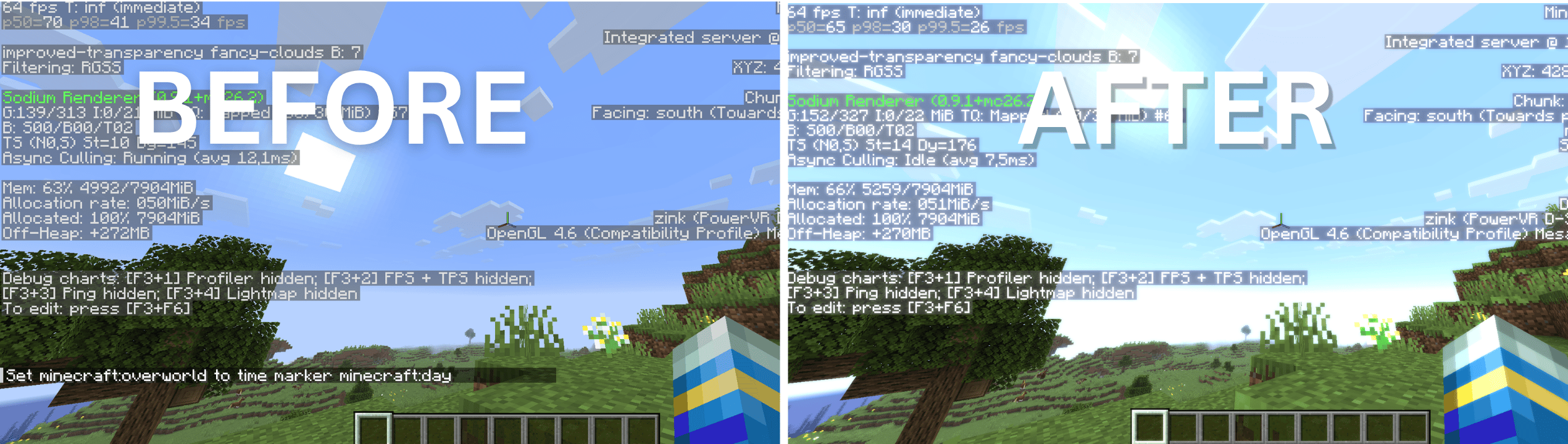
VulkanFlow is currently in an early Alpha stage. At this moment, ONLY the following features are fully implemented and functional:
- Bloom:
- Smooth, cinematic glows for light sources.
- Wind:
- Gently swaying leaves and grass.
(Other planned features, including dynamic shadows and custom water, are still in active development and will be released in future updates!)
Why VulkanFlow?
Standard shaders (via Iris or OptiFine) usually drops your framerate on integrated graphics cards because they force heavy calculations into a single frame. VulkanFlow does do this this way,
VulkanFlow is based on the Folowing Technics:
- Time Slicing:
- The mod distributes the rendering load across multiple frames, smoothing out frame spikes.
- Vulkan & OpenGL Fallback: Designed to hook directly into Minecraft's new Vulkan pipeline while maintaining OpenGL fallback.
- Made for iGPUs: Specifically optimized and tested to maintain a stable 60 FPS on hardware like the Intel UHD 620 (tested on a ThinkPad T480).
Compatibility & Setup
- Sodium: Fully compatible! VulkanFlow is designed from the ground up to run alongside Sodium.
- No Iris / OptiFine Required: VulkanFlow runs as a completely standalone, lightweight graphics mod.
Installation:
Right now you have to install Sodium to access the Settings Menu of the VulkanFlow mod.
Join the Community & Support
Want to report bugs, request features? Join our community on the official CraftingStudioPro Discord server!
Licence things:
You can use this mod in any public modpack.
Verfügbare Versionen
VulkanFlow auf deinem Client installieren
Mod-Loader lokal installieren
Installiere fabric für deine lokale Minecraft-Version.
Passende Datei herunterladen
Wähle die VulkanFlow-Datei für fabric und Minecraft 26.3.
Mod installieren
Lege die .jar-Datei in deinem lokalen .minecraft/mods-Ordner ab und starte Minecraft neu. Eine Installation auf dem Server ist nicht nötig.
Kompatibilität
Mod-Loader
Minecraft-Versionen
26.3, 26.2
Server-seitig
✗ Nicht unterstütztEmpfohlener RAM
4 GB(min. 3 GB)Häufige Fragen
Muss VulkanFlow auf dem Minecraft Server installiert werden?
Nein. Modrinth kennzeichnet VulkanFlow serverseitig als nicht unterstützt. Installiere die Mod nur im lokalen Minecraft-Mods-Ordner. Dein Server kann unverändert bleiben, sofern die Mod-Seite keine zusätzliche Abhängigkeit nennt.
Welche Version und welchen Loader braucht VulkanFlow?
Nutze eine Datei für fabric und exakt deine Minecraft-Version. Unterstützte Versionen sind unter anderem 26.3, 26.2. Loader-Dateien sind nicht untereinander austauschbar.
VulkanFlow funktioniert nicht – was kann ich prüfen?
Prüfe zuerst Minecraft-Version, Loader-Version und erforderliche Abhängigkeiten. Lege die .jar-Datei im lokalen .minecraft/mods-Ordner ab und entferne ältere Duplikate. Da die Mod clientseitig ist, löst mehr Server-RAM dieses Problem nicht.
Ähnliche Mods

![[ETF] Entity Texture Features](https://cdn.modrinth.com/data/BVzZfTc1/af683d206d50b05258d865b0d6e4aa2f2cee12f2_96.webp)
![[EMF] Entity Model Features](https://cdn.modrinth.com/data/4I1XuqiY/6e5bbd0d06b1741bfdab6c0cfab6de8fdaf0064c_96.webp)



Minecraft Server für deine Gruppe
VulkanFlow bleibt auf deinem Client. Hoste dazu eine kompatible Welt für deine Mitspieler.