
Web Chat
Client side mod that gives you access to minecraft chat through the browser.
Screenshots

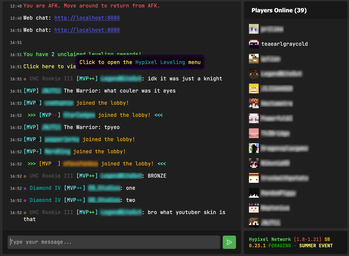
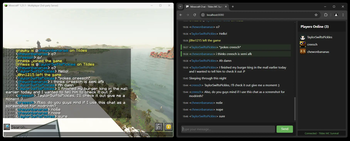
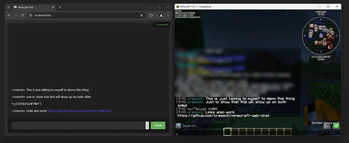
Über diese Mod
Web chat is a client only mod that gives you access to the Minecraft chat of your running game window. This allows you to chat with other players while having minecraft in the background. Great for things like semi-afk farming and similar things!
Features
- Access chat through any web browser.
- Chat history is stored and available when you are on a server and open chat in a browser.
- Tab completion of usernames.
- Tab icon notification for new messages when the browser isn't focused.
- Fully client side, works on any server.
- Ping support for your username & configurable keywords.
- Support for
/tell,/msg,/wand/mecommands. - Full support for Minecraft's text formatting (colors, bold, italic, translation, etc.)
- Support for official click and hover interactions (opening URLs, achievement details, etc.)

Availability
- Minecraft version:
- 26.3 supported by Web Chat v1.10.0
- 26.2 supported by Web Chat v1.9.0-1.9.1
- 26.1 supported by Web Chat v1.7.0-v1.8.0
- 1.21.11 supported by Web Chat v1.5.0-v1.6.0
- 1.21.8 supported by Web Chat v1.4.0
- 1.21.1 - 1.21.4 are supported up to Web Chat v1.3.0 and not further.
- Mod loader: Fabric only
There are no plans to support other mod loaders.
Usage
Requirements
- Fabric API (required)
- YACL (required)
- Mod Menu (optional, needed for configuration)
Installation
- Install the mod from Modrinth or grab the latest release from GitHub.
- Start minecraft.
- Join a server.
- Go to
localhost:8080on the same computer, or use your computer's local IP address (like192.168.1.x:8080) from other devices on your network. - Start chatting.
Settings
Message settings
Ping on Username- This will ping the browser window any time a player's username appears in the chat.Extra Ping keywords- This will ping the browser window any time one of these words appear in the chat.
Network settings
HTTP Port- Port number used to serve the web interface.8080by default.Open Chat to LAN- Open the web chat to your local network so other devices (like your phone) can connect. Enabled by default. When disabled, the chat binds tolocalhostonly and is reachable from this computer alone. While enabled, a QR code button is shown in the player list that lets you quickly open the chat on your phone by scanning your computer's local network address.
Security & Privacy
This mod turns minecraft into a small web server on your computer that's only accessible (using localhost or your local IP) on your home network. This means that you can access Web Chat on a different device on your network, but not over the internet.
No data is sent over the internet beyond your normal Minecraft traffic.
Important: This mod is designed for local use only. Do not expose the web chat port to the internet. If you need remote access, setup a VPN (such as Tailscale).
Verfügbare Versionen
Web Chat auf deinem Client installieren
Mod-Loader lokal installieren
Installiere fabric für deine lokale Minecraft-Version.
Passende Datei herunterladen
Wähle die Web Chat-Datei für fabric und Minecraft 26.3.
Mod installieren
Lege die .jar-Datei in deinem lokalen .minecraft/mods-Ordner ab und starte Minecraft neu. Eine Installation auf dem Server ist nicht nötig.
Kompatibilität
Mod-Loader
Minecraft-Versionen
26.3, 26.2, 26.1.2 (+8 weitere)
Server-seitig
✗ Nicht unterstütztEmpfohlener RAM
4 GB(min. 3 GB)Häufige Fragen
Muss Web Chat auf dem Minecraft Server installiert werden?
Nein. Modrinth kennzeichnet Web Chat serverseitig als nicht unterstützt. Installiere die Mod nur im lokalen Minecraft-Mods-Ordner. Dein Server kann unverändert bleiben, sofern die Mod-Seite keine zusätzliche Abhängigkeit nennt.
Welche Version und welchen Loader braucht Web Chat?
Nutze eine Datei für fabric und exakt deine Minecraft-Version. Unterstützte Versionen sind unter anderem 26.3, 26.2, 26.1.2. Loader-Dateien sind nicht untereinander austauschbar.
Web Chat funktioniert nicht – was kann ich prüfen?
Prüfe zuerst Minecraft-Version, Loader-Version und erforderliche Abhängigkeiten. Lege die .jar-Datei im lokalen .minecraft/mods-Ordner ab und entferne ältere Duplikate. Da die Mod clientseitig ist, löst mehr Server-RAM dieses Problem nicht.
Ähnliche Mods






Minecraft Server für deine Gruppe
Web Chat bleibt auf deinem Client. Hoste dazu eine kompatible Welt für deine Mitspieler.