
WolfSwordMod - Wolf equips Swords and Spins!
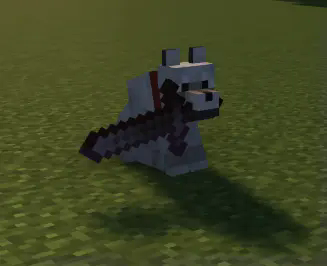
Wolves now can hold sword and SPIN-ATTACK with them!
Screenshots
Über diese Mod
Wolves now can hold sword and SPIN-ATTACK with them!
Give the wolf a sword and have fun.
Right-click and crouch to take sword from wolf.
Adding your own swords:
Out of the box wolves will use every vanilla sword and almost every modded one, so most people never need to touch this. If a sword from another mod is being ignored, you can add it yourself with a datapack.
Make this folder inside your world:
Put a pack.mcmeta in it:
{
  "pack": { "pack_format": 15, "description": "Extra wolf swords" }
}
Then create data/wolfswordmod/tags/items/swords.json inside that same folder and list the items you want, using the id shown by pressing F3+H in game:
{
  "replace": false,
  "values": [
    "somemod:ruby_sword",
    "othermod:cursed_blade"
  ]
}
Keep "replace": false so your list is added to the built-in one instead of wiping it. Reload with /reload or by rejoining the world.
To stop wolves using a sword, use the same setup but name the file swords_excluded.json instead. Exclusions win over everything, so this is how you ban a weapon that the mod picks up automatically. A wolf already carrying a sword you just banned will drop it on the ground.
Verfügbare Versionen
WolfSwordMod - Wolf equips Swords and Spins! auf deinem Client installieren
Mod-Loader lokal installieren
Installiere forge für deine lokale Minecraft-Version.
Passende Datei herunterladen
Wähle die WolfSwordMod - Wolf equips Swords and Spins!-Datei für forge und Minecraft 1.20.6.
Mod installieren
Lege die .jar-Datei in deinem lokalen .minecraft/mods-Ordner ab und starte Minecraft neu. Eine Installation auf dem Server ist nicht nötig.
Kompatibilität
Mod-Loader
Minecraft-Versionen
1.20.6, 1.20.5, 1.20.4 (+4 weitere)
Server-seitig
✗ Nicht unterstütztEmpfohlener RAM
4 GB(min. 3 GB)Häufige Fragen
Muss WolfSwordMod - Wolf equips Swords and Spins! auf dem Minecraft Server installiert werden?
Nein. Modrinth kennzeichnet WolfSwordMod - Wolf equips Swords and Spins! serverseitig als nicht unterstützt. Installiere die Mod nur im lokalen Minecraft-Mods-Ordner. Dein Server kann unverändert bleiben, sofern die Mod-Seite keine zusätzliche Abhängigkeit nennt.
Welche Version und welchen Loader braucht WolfSwordMod - Wolf equips Swords and Spins!?
Nutze eine Datei für forge und exakt deine Minecraft-Version. Unterstützte Versionen sind unter anderem 1.20.6, 1.20.5, 1.20.4. Loader-Dateien sind nicht untereinander austauschbar.
WolfSwordMod - Wolf equips Swords and Spins! funktioniert nicht – was kann ich prüfen?
Prüfe zuerst Minecraft-Version, Loader-Version und erforderliche Abhängigkeiten. Lege die .jar-Datei im lokalen .minecraft/mods-Ordner ab und entferne ältere Duplikate. Da die Mod clientseitig ist, löst mehr Server-RAM dieses Problem nicht.
Ähnliche Mods




Minecraft Server für deine Gruppe
WolfSwordMod - Wolf equips Swords and Spins! bleibt auf deinem Client. Hoste dazu eine kompatible Welt für deine Mitspieler.