
World Play Time
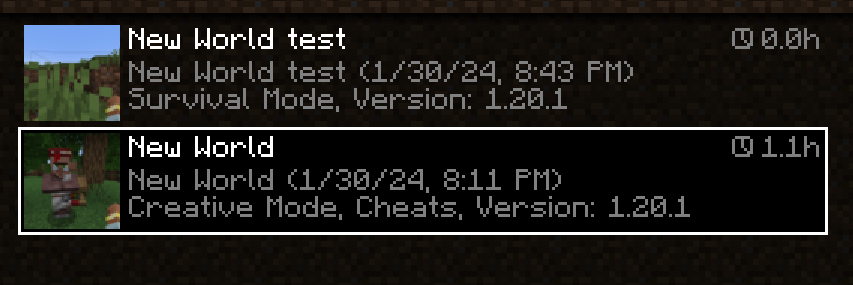
Displays the world's play time in the world selection menu.
Screenshots
Über diese Mod

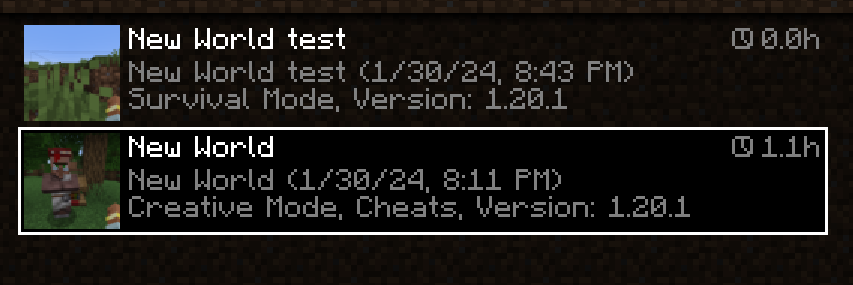
World Play Time is a mod that displays the amount of time you've spent on a given Minecraft world in the world selection screen, in the top-right corner of each world entry.
It does this by checking the "Play Time" statistic for the world, so playtime will be displayed for existing worlds that were created without the mod as well.
The mod is client-side only, and does nothing on the server-side.

Would you like to support me, or the mod?
Here is how you can do that:
- Donate on Ko-Fi!
- Use my on for 25% off!
- Contribute code, let me know of issues or add a star on the mod's GitHub page!
Thanks a lot!
Whether you're looking for a server for your modpack, or just to mess around with your friends - is one of the most reliable and affordable options you can get! It makes installing modpacks just a couple of clicks. 25% off with code khajiitos!
Verfügbare Versionen
World Play Time auf deinem Client installieren
Mod-Loader lokal installieren
Installiere fabric für deine lokale Minecraft-Version.
Passende Datei herunterladen
Wähle die World Play Time-Datei für fabric und Minecraft 26.1.
Mod installieren
Lege die .jar-Datei in deinem lokalen .minecraft/mods-Ordner ab und starte Minecraft neu. Eine Installation auf dem Server ist nicht nötig.
Kompatibilität
Mod-Loader
Minecraft-Versionen
26.1, 1.21.10, 1.21.9 (+13 weitere)
Server-seitig
✗ Nicht unterstütztEmpfohlener RAM
4 GB(min. 3 GB)Häufige Fragen
Muss World Play Time auf dem Minecraft Server installiert werden?
Nein. Modrinth kennzeichnet World Play Time serverseitig als nicht unterstützt. Installiere die Mod nur im lokalen Minecraft-Mods-Ordner. Dein Server kann unverändert bleiben, sofern die Mod-Seite keine zusätzliche Abhängigkeit nennt.
Welche Version und welchen Loader braucht World Play Time?
Nutze eine Datei für fabric, forge, neoforge und exakt deine Minecraft-Version. Unterstützte Versionen sind unter anderem 26.1, 1.21.10, 1.21.9. Loader-Dateien sind nicht untereinander austauschbar.
World Play Time funktioniert nicht – was kann ich prüfen?
Prüfe zuerst Minecraft-Version, Loader-Version und erforderliche Abhängigkeiten. Lege die .jar-Datei im lokalen .minecraft/mods-Ordner ab und entferne ältere Duplikate. Da die Mod clientseitig ist, löst mehr Server-RAM dieses Problem nicht.
Ähnliche Mods

![[ETF] Entity Texture Features](https://cdn.modrinth.com/data/BVzZfTc1/af683d206d50b05258d865b0d6e4aa2f2cee12f2_96.webp)
![[EMF] Entity Model Features](https://cdn.modrinth.com/data/4I1XuqiY/6e5bbd0d06b1741bfdab6c0cfab6de8fdaf0064c_96.webp)



Minecraft Server für deine Gruppe
World Play Time bleibt auf deinem Client. Hoste dazu eine kompatible Welt für deine Mitspieler.