
Modrinth · Fabric, Forge
yumo compactmachines por auf deinem Minecraft Server
yumo compactmachines por läuft auf Minecraft Servern mit Fabric oder Forge. Bestell deinen Server, stell den Loader im Panel ein und installiere die Mod mit einem Klick im Mod-Browser.
Optimizing compressed space by speculating on estimated production
- Downloads
- 2.6K
- Autor
- yumo2333
- Loader
- Fabric, Forge
- Minecraft
- 1.18.2 – 1.20.4
- Aktualisiert
- –
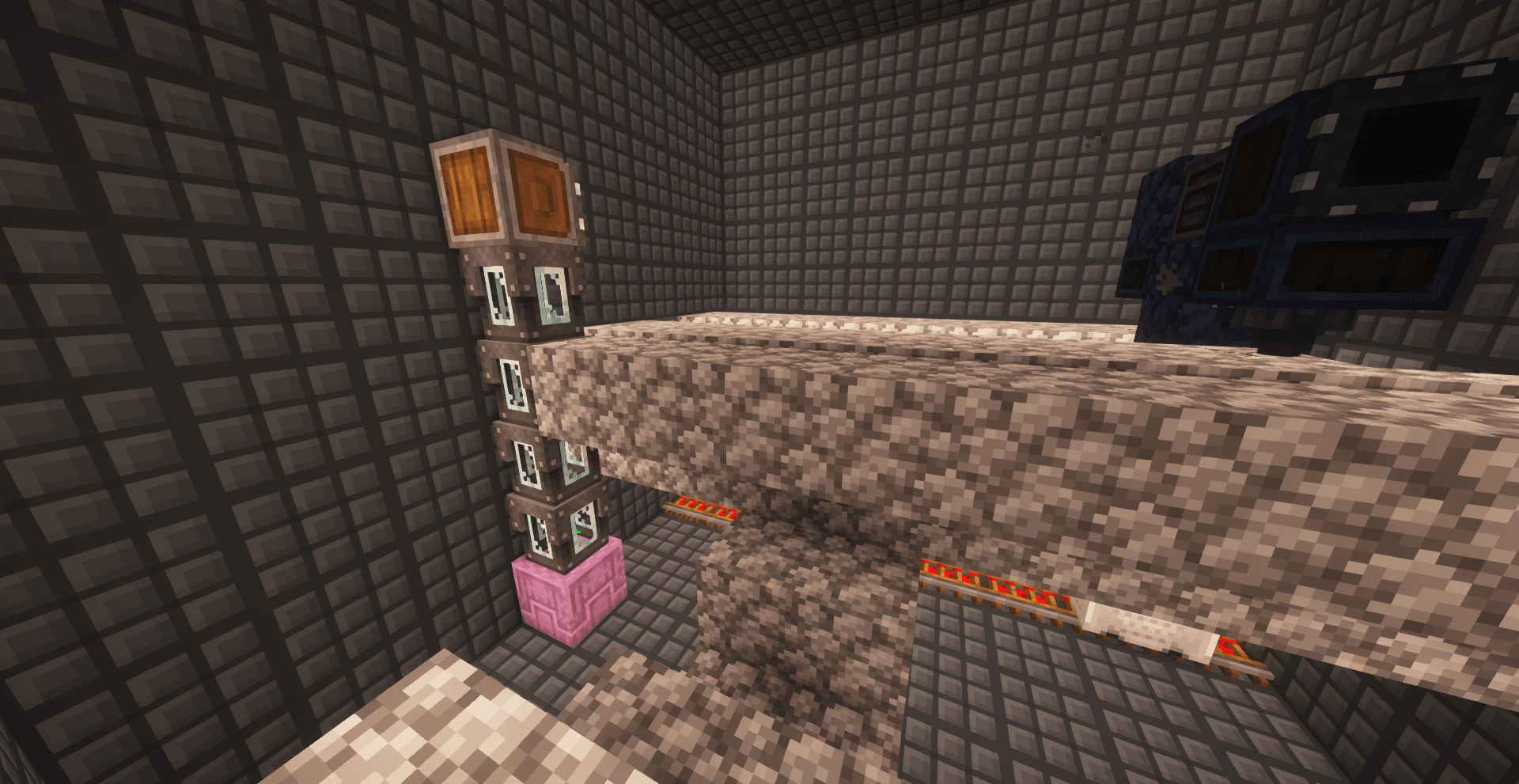
Screenshots
So sieht yumo compactmachines por aus


Bilder: yumo compactmachines por auf Modrinth, vom Projektteam veröffentlicht.
Einrichtung
yumo compactmachines por auf dem Server installieren
Server und Spieler brauchen denselben Loader und dieselbe Minecraft-Version. Sichere die Welt, bevor du Mods hinzufügst oder aktualisierst.
- 01
Konfigurieren
4 GB RAM sind vorausgewählt. Laufzeit und Add-ons wählst du selbst, bezahlt wird per Kreditkarte oder PayPal.
- 02
Loader einstellen
Stell im Panel die Serversoftware auf Fabric oder Forge und wähl die passende Minecraft-Version, zum Beispiel 1.20.4.
- 03
Mod installieren
Such im Mod-Browser nach „yumo compactmachines por“ und installiere die Version für deinen Loader. Alternativ lädst du die .jar per SFTP in den Ordner mods. Erforderliche Abhängigkeiten stehen auf der Projektseite.
- 04
Verbinden
yumo compactmachines por ist auf dem Client optional. Spieler verbinden sich über die Serveradresse aus dem Panel.
- Auf dem Server
- Erforderlich
- Auf dem Client
- Optional
- Loader
- Fabric, Forge
- Minecraft
- 1.20.4, 1.20.3, 1.20.2 +8 weitere
- Lizenz
- MIT License
Das Panel
Mods installieren, Fehler finden.
Echte Screenshots aus dem Mado Panel. Beides ist bei jedem Minecraft Server enthalten.
Mod-Browser
Modrinth und CurseForge direkt im Panel.
Der Browser filtert nach deiner Minecraft-Version. Mods installierst du mit einem Klick, ohne .jar-Dateien hochzuladen.

KI-Crash-Analyse
Wenn ein Mod crasht, liest die Analyse das Log.
Mods scheitern oft an einer falschen Loader-Version, Java-Version oder fehlenden Abhängigkeit. Die Analyse nennt eine wahrscheinliche Ursache und einen Lösungsvorschlag.

Versionen
Veröffentlichte Versionen
Nimm die Datei, die zu Loader und Minecraft-Version deines Servers passt. Server und Spieler brauchen dieselbe Version.
yumo compactmachines por · ModrinthOriginalbeschreibung des Projektautors
Sorry I don't speak English so I use a translator
Have you ever wondered why the game Mindustry doesn't stall at all when there are so many blocks working in production at the same time? This is because each individual block is only counted for production when the player is there, while the player is elsewhere to increase the amount of supplies in that block
Yes, this packet also makes a similar function, you can cram some huge pipeline into the compressed space, evaluate the yield and make it into a yield block, while the compressed space internal block is unloaded after this process to save memory!
Edible instructions
To use this data packet, it is necessary to install the compressed space module as the front, after installing the data packet, throw the personal space shrinking device on the compressed space machine to mark it, throw the box and the personal space shrinking device together with the interface installed on the compressed wall inside the compressed space to place the yield evaluation box for it. Throwing the funnel together with the personal space shrinking device can add consumable evaluation blocks (note that both blocks can only be generated on a square surface perpendicular to the ground, and only one of each type of yield evaluation consumable evaluation can exist in a compressed space)
Production evaluation must have a production evaluation box, while consumables evaluation box is optional (without this box, items cannot enter the compressed space during evaluation)
If you already have a production line in a compressed space, you can use it with only a few adjustments, using the output evaluation box at the interface of the output space, using the consumables evaluation box at the interface of the input space, regardless of the direction of the interface configuration, and then ensuring that there are no players in the compressed space. The yield calculation can be started by throwing a grinding deep SLATE into the compressed space machine
After the production evaluation starts, the compressed space machine will become a shulker box. Placing the original container close to the shulker box will connect the inside of the compressed space. The contents of the container will be transferred to the consumable evaluation box inside the space, which will then be processed by your production line to the production evaluation box, and finally back to the outer Shulker box, which means that even if it is being evaluated, It does not affect the function of this assembly line at all! After the evaluation, the inner block is automatically unloaded (provided you don't have a block loader in it) and the block is turned into a yield block, which can be moved at any time, just by digging it down! At the same time, throwing the items of the production box together with the personal space shrinking device can also restore the production box into a compressed space machine, relayout your production line, and because the nesting doll will not need to load all the nesting doll blocks as before, but only need to load the final result of the production box can be greatly improved efficiency
Matters needing attention
The Yield/Consumables calculation box can only record up to 6 types of items (matching nbt), and items that exceed the type limit will be cleared
Use the yield cube items (item display boxes) for compositing and your compressed space may say goodbye to you forever
In version 1.1.5, the block loading method based on mannequins has been updated, which is very useful for calculating yields that require random engraving (such as crops, saplings). Simply throw deep slate instead of grinding it when starting yield inference. This feature is only available when fabrics/forges are loaded.
In version 1.2.0, this mod has a built-in instruction implemented compression space ("gap block"), which can now be used without installing the compression space mod. Of course, this built-in compression space does not conflict with the compression space mod and can be used together. The compression space mod is not available in game version 1.20.1, so this feature can be used as a substitute.
Usage of built-in compression space

To synthesize the 'gap block', you need to first build this multi block structure, and then throw a final shadow pearl into it. The emergence of purple particles indicates successful construction
When there are items in it and the iron flap door is closed, it will start to synthesize and emit flame particle effects, followed by an explosion (without damaging the block). If the items required for the formula are included, they will pop up above the iron flap door and can be synthesized in batches, but unrelated items will be removed.
Recipe List
- Book → Personal Space Shrinking Device;
- Copper block → first level gap (3x3x3);
- Iron block → secondary gap (5x5x5);
- Gold nugget → third level gap (7x7x7);
- Obsidian → Level 4 gap (9x9x9);
- Diamond block → Level 5 gap (11x11x11);
- Lower bound alloy block → Level 6 gap (13x13x13).
This packet advantage
Better optimization, even if hundreds of production blocks are placed, it will not be too congested (after all, if you can have hundreds of pipelines that are often loaded, the difference is still very big)
Strict namespace, all modules within the tag, functions are in the yumo_cmp range to ensure compatibility
Contains a configuration file, which is highly configurable, and is located in the configs file, the outermost layer of the packet function file (data\yumo_cmp\function\configs.mcfunction).
High readability
Look out
This package was developed in 1.18.2 in the fabric environment and has not been tested for compatibility with forge and other versions (in fact, as long as the item id of the compressed space module does not change, it can be compatible up until the major update of the component).
If you have bugs or suggestions, please contact the author or give feedback in the comments section
Future plan
Add fluid, energy, stress (Create), mana (Botania), and other mods for yield inference of various resources
Anti-cheating, restrictions on mods such as Ender storage that can transfer items across space to prevent "scram" production (current versions can jam, but what difference is this from cheating?)
Author's email. If there are any issues, please provide feedback here.
[email protected]
yumo compactmachines por Server crasht beim Start – was tun?
Häufige Ursachen: Loader- oder Minecraft-Version passen nicht zur Mod-Datei, eine Abhängigkeit fehlt oder der RAM reicht nicht. Such im Log (latest.log) nach „OutOfMemoryError“, „Mixin“ oder fehlenden Mods. Bei Mado wertet die KI-Crash-Analyse das Log aus und schlägt eine Ursache vor. Loader und Version änderst du im Panel.
Mit welchem Loader läuft yumo compactmachines por?
Laut Modrinth unterstützt yumo compactmachines por Fabric, Forge für Minecraft 1.20.4, 1.20.3, 1.20.2. Forge- und Fabric-Dateien sind nicht untereinander austauschbar: Wähl einen Loader für Server und Clients.
Wie viel RAM braucht ein Server mit yumo compactmachines por?
Als Orientierung 3–4 GB für einen Server mit dieser Mod. Das ist eine Schätzung, keine gemessene Mindestanforderung. Weitere Mods, viele Spieler und große Sichtweiten brauchen mehr. Ob eine Mod die Tick-Zeit belastet, siehst du mit dem spark-Profiler.
Ähnliche Mods
Beliebte Mods aus derselben Kategorie
 Nur Client

Sodium
von jellysquid3
A high-performance rendering engine replacement for Minecraft, which greatly improves frame rates and reduces micro-stutter.
 Nur Client

Iris Shaders
von coderbot
A modern shader pack loader for Minecraft intended to be compatible with existing OptiFine shader packs
 Nur Client

Entity Culling
von tr7zw
Using async path-tracing to hide Block-/Entities that are not visible
 Server-fähig

FerriteCore
von malte0811
Memory usage optimizations
Bereit für deinen Server mit yumo compactmachines por?
4 GB RAM ab 8,00 € im Monat. 35 % auf den 1. Monat mit MADO35.