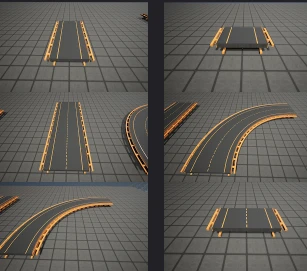
Community Road Network
This mod will copy the blueprints to every Save Session that you have at least one blueprint saved.
Beschreibung
PS: This mod will copy the blueprints to every Save Session that you have at least one blueprint saved. (Dont worry about the size if you have a lot of sessions, all bps has 180kb)
This mod is a part of 3 big blueprint sets:
- Community Railway Set ( https://ficsit.app/mod/CommunityRailwaySet )
- Community Railway Set 2 ( https://ficsit.app/mod/CommunityRailwaySet2 )
- Community Basic Tracks ( https://ficsit.app/mod/CommunityBasicTracks )
- Community Road Network ( This one )
Twitch: https://www.twitch.tv/hornslet
Reddit Post: https://www.reddit.com/r/SatisfactoryGame/comments/13rfvh7/crn_update_103_27_blueprints_12_new_crn_meets_crs/
CRN - Community Road Network
- 27 Blueprints
- CRN 1 and 2 With Power
- Straight 8m, 16m, 48m, 96m
- Curved 90
List of Blueprints: (Made by Hornslet)
-


----
See all Hornslet Blueprints on [Satisfactory Calculator](https://satisfactory-calculator.com/en/blueprints/index/index/idU/26026/user/Hornslet).
All the BPs of this mod was made by Hornslet. Andre Aquila helped with the mod/copy part.
Bigger Blueprints made with [FICSIT Blueprints Extensions](https://ficsit.app/mod/KBlueprintDesignPlus).
Twitch: https://www.twitch.tv/hornslet
Versionen
Community Road Network auf dem Server installieren
Satisfactory Server bestellen
Bestelle einen Satisfactory Server mit mindestens 4 GB RAM (6 GB empfohlen). Bei Multiplayer: +1 GB pro 4 Spieler.
Mod installieren
Öffne den Mod-Manager im Dashboard und suche nach "Community Road Network". Installations-Dependencies werden automatisch mitinstalliert.
Server neu starten
Starte den Server neu, damit die Mod geladen wird. Spieler müssen die Mod ebenfalls lokal installiert haben.
Häufige Fragen
Community Road Network funktioniert nicht nach Update – was tun?
Nach einem Satisfactory-Update müssen Mods aktualisiert werden. Prüfe auf ficsit.app, ob Community Road Network bereits für die neue Game-Version aktualisiert wurde. Bei Mado Hosting: Öffne den Mod-Manager und klicke "Alle aktualisieren". Wenn die Mod noch nicht aktualisiert ist, entferne sie temporär, damit der Server startet.
Community Road Network verursacht Crashes im Multiplayer – Lösung
Häufigste Ursache: alle Spieler müssen exakt die gleiche Mod-Version installiert haben. Prüfe in den Server-Logs nach "ModMismatch" oder "Version Conflict". Stelle sicher, dass alle Spieler Community Road Network v1.0.7 und den gleichen SML verwenden. Bei Mado Hosting laufen Satisfactory Server mit 6 GB RAM für stabile Multiplayer-Performance.
Ist Community Road Network mit anderen Satisfactory Mods kompatibel?
Community Road Network nutzt den Satisfactory Mod Loader (SML). Generell sind SML-basierte Mods untereinander kompatibel, aber Mods die gleiche Game-Systeme ändern, können Konflikte verursachen. Teste neue Mod-Kombinationen am besten auf einem Backup-Save. Im Mado Dashboard werden bekannte Konflikte automatisch erkannt und du wirst gewarnt.
Community Road Network Server mieten
Spiele Community Road Network auf deinem eigenen Satisfactory Server mit Mod-Support.
Mod Informationen
- Ersteller
- Andre Aquila, Hornslet Gaming
- Neueste Version
- v1.0.7
- Erstellt am
- 19. Mai 2023
- Zuletzt aktualisiert
- 7. Oktober 2026