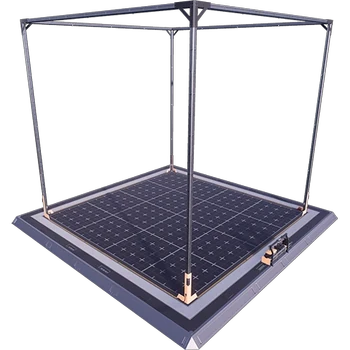
Blueprint Designer+
Extended blueprint designer tools for Satisfactory.
Beschreibung
<table width="100%" cellpadding="0" cellspacing="0" style="border:none;background:#1a1a2e;border-radius:12px;overflow:hidden;margin-bottom:16px">
<tr>
<td width="140" style="padding:20px 16px 20px 24px;vertical-align:middle;border:none">
<a href="https://discord.gg/JsJ9XXWS7Q">
<img src="https://raw.githubusercontent.com/Kyri123/KMods-Docs/main/docs/Images/KMods-Logo.png" height="100" width="100" alt="KMods Logo" />
</a>
</td>
<td style="padding:20px 24px 20px 0;vertical-align:middle;text-align:right;border:none">
<div>
<a href="https://discord.gg/JsJ9XXWS7Q"><img src="https://img.shields.io/badge/Discord-Join%20Us-5865F2?style=for-the-badge&logo=discord&logoColor=white" height="28" alt="Discord" /></a>
<a href="https://www.patreon.com/kmods"><img src="https://img.shields.io/badge/Patreon-Support%20Us-F96854?style=for-the-badge&logo=patreon&logoColor=white" height="28" alt="Patreon" /></a>
</div>
<div style="margin-top:8px">
<a href="https://ficsit.app/user/9uvZtCA4cM6H4q"><img src="https://img.shields.io/badge/ficsit.app-KMods-009688?style=for-the-badge" height="28" alt="ficsit.app" /></a>
<img src="https://img.shields.io/badge/Multiplayer-Not%20Tested-lightgrey?style=for-the-badge&logo=steam&logoColor=white" alt="Multiplayer: Not Tested" />
</div>
</td>
</tr>
</table>
<br />
<table width="100%" cellpadding="0" cellspacing="0" style="border:none">
<tr>
<td style="padding:4px 0;border:none">
<a href="https://k-mods.com"><img src="https://img.shields.io/badge/k--mods.com-Website-e8a202?style=flat-square" alt="k-mods.com" /></a>
<a href="https://k-mods.com/production-planner"><img src="https://img.shields.io/badge/SF%2B-Production%20Planner-e8a202?style=flat-square" alt="SF+ Production Planner" /></a>
<a href="https://k-mods.com/production-modeler"><img src="https://img.shields.io/badge/SF%2B-Production%20Modeler-e8a202?style=flat-square" alt="SF+ Production Modeler" /></a>
<a href="https://k-mods.com/wiki"><img src="https://img.shields.io/badge/SF%2B-Wiki-e8a202?style=flat-square" alt="SF+ Wiki" /></a>
</td>
</tr>
</table>
---
Ever tried cramming a whole production floor into a blueprint and just... couldn't? Same. That's the whole reason Blueprint Designer Plus exists. It gives you three much bigger Blueprint Designers, so entire factory sections fit in one blueprint instead of getting chopped up into a dozen tiny ones.
---
<table width="100%" cellpadding="0" cellspacing="0"><tr><td style="background:#e8a202;padding:6px 14px;border-radius:6px 6px 0 0;border:none"><strong style="color:#1a1a2e;font-size:18px">Three New Designer Sizes</strong></td></tr></table>
Stock Blueprint Designer? A cozy little 32 m × 32 m × 32 m box. Great for a handful of machines, a bit tight for anything bigger. This mod throws three roomier options into the mix, and you get all of them in one go:
| Designer | Build Area (W × D × H) |
|----------|------------------------|
| Blueprint Designer Mk.4.1 | 80 m × 80 m × 64 m |
| Blueprint Designer Mk.4.2 | 96 m × 96 m × 48 m |
| Blueprint Designer Mk.5 | 176 m × 176 m × 96 m |
Hit Tier 9 in your HUB and unlock the Milestone, and boom, all three designers unlock together.
---
<table width="100%" cellpadding="0" cellspacing="0"><tr><td style="background:#e8a202;padding:6px 14px;border-radius:6px 6px 0 0;border:none"><strong style="color:#1a1a2e;font-size:18px">Works Just Like Vanilla Blueprints</strong></td></tr></table>
Don't worry, there's no learning curve. Plop one of these designers down anywhere in your factory, walk inside, and lay out your machines within the glowing frame, same as you'd do with the vanilla one. Hit save, and the blueprint lands in your Build Menu under the Blueprint tab, ready to drop wherever you feel like building next.
A few things you'll want to know:
- Your blueprints live in your save file, not the mod. Once you've made one, you can place it in any world, even one that doesn't have this mod installed.
- Share away. Friends on your server can place blueprints you built with these bigger designers even if they never installed the mod themselves.
- Editing has a size floor. Made a blueprint inside a Mk.4.1? You can only reopen and tweak it inside a Mk.4.1 or something bigger. Placing it out in the world, though, has no such limit.
---
<table width="100%" cellpadding="0" cellspacing="0"><tr><td style="background:#e8a202;padding:6px 14px;border-radius:6px 6px 0 0;border:none"><strong style="color:#1a1a2e;font-size:18px">A Note on the Mk.5</strong></td></tr></table>
Let's talk about the Mk.5 for a second. It's massive, almost 176 m per side, built for players who genuinely need that much room. Heads up, though: cram enough into one blueprint at that scale and you start bumping into Satisfactory's own limits. Load it up with tons of pipes or belts and you might hit noticeable lag, or even the occasional crash, when saving or placing it.
That one's on the game, not on us. There's only so much you can squeeze into a blueprint before the engine starts to sweat. So save the Mk.5 for when nothing smaller cuts it, and always save your game before placing a big print.
---
<table width="100%" cellpadding="0" cellspacing="0" style="border:none;background:#1a1a2e;border-radius:12px;overflow:hidden;margin-top:16px">
<tr>
<td colspan="2" style="background:#e8a202;padding:0;border:none;height:4px"></td>
</tr>
<tr>
<td style="padding:20px 24px;border:none;vertical-align:middle">
<strong style="color:#e8a202;font-size:14px">Questions, bugs, or suggestions?</strong><br />
<span style="color:#94a3b8;font-size:12px">Join the Discord or support us on Patreon</span>
</td>
<td style="padding:20px 24px 20px 0;text-align:right;border:none;vertical-align:middle">
<table cellpadding="0" cellspacing="0" style="display:inline-table;border:none">
<tr>
<td style="padding:3px 4px;border:none"><a href="https://discord.gg/JsJ9XXWS7Q"><img src="https://img.shields.io/badge/Discord-5865F2?style=for-the-badge&logo=discord&logoColor=white" height="28" alt="Discord" /></a></td>
<td style="padding:3px 4px;border:none"><a href="https://www.patreon.com/kmods"><img src="https://img.shields.io/badge/Patreon-F96854?style=for-the-badge&logo=patreon&logoColor=white" height="28" alt="Patreon" /></a></td>
</tr>
<tr>
<td style="padding:3px 4px;border:none"><a href="https://ficsit.app/user/9uvZtCA4cM6H4q"><img src="https://img.shields.io/badge/ficsit.app-009688?style=for-the-badge" height="28" alt="ficsit.app" /></a></td>
<td style="padding:3px 4px;border:none"><a href="https://k-mods.com"><img src="https://img.shields.io/badge/k--mods.com-e8a202?style=for-the-badge" height="28" alt="k-mods.com" /></a></td>
</tr>
<tr>
<td style="padding:3px 4px;border:none"><a href="https://k-mods.com/production-planner"><img src="https://img.shields.io/badge/SF%2B%20Planner-e8a202?style=for-the-badge" height="28" alt="SF+ Production Planner" /></a></td>
<td style="padding:3px 4px;border:none"><a href="https://k-mods.com/production-modeler"><img src="https://img.shields.io/badge/SF%2B%20Modeler-e8a202?style=for-the-badge" height="28" alt="SF+ Production Modeler" /></a></td>
</tr>
<tr>
<td colspan="2" style="padding:3px 4px;text-align:right;border:none"><a href="https://k-mods.com/wiki"><img src="https://img.shields.io/badge/SF%2B%20Wiki-e8a202?style=for-the-badge" height="28" alt="SF+ Wiki" /></a></td>
</tr>
</table>
</td>
</tr>
</table>
Versionen
Blueprint Designer+ auf dem Server installieren
Satisfactory Server bestellen
Bestelle einen Satisfactory Server mit mindestens 4 GB RAM (6 GB empfohlen). Bei Multiplayer: +1 GB pro 3 Spieler.
Mod installieren
Öffne den Mod-Manager im Dashboard und suche nach "Blueprint Designer+". Installations-Dependencies werden automatisch mitinstalliert.
Server neu starten
Starte den Server neu, damit die Mod geladen wird. Spieler müssen die Mod ebenfalls lokal installiert haben.
Häufige Fragen
Blueprint Designer+ funktioniert nicht nach Update – was tun?
Nach einem Satisfactory-Update müssen Mods aktualisiert werden. Prüfe auf ficsit.app, ob Blueprint Designer+ bereits für die neue Game-Version aktualisiert wurde. Bei Mado Hosting: Öffne den Mod-Manager und klicke "Alle aktualisieren". Wenn die Mod noch nicht aktualisiert ist, entferne sie temporär, damit der Server startet.
Blueprint Designer+ verursacht Crashes im Multiplayer – Lösung
Häufigste Ursache: alle Spieler müssen exakt die gleiche Mod-Version installiert haben. Prüfe in den Server-Logs nach "ModMismatch" oder "Version Conflict". Stelle sicher, dass alle Spieler Blueprint Designer+ v2026.3.467 und den gleichen SML verwenden. Bei Mado Hosting laufen Satisfactory Server mit 6 GB RAM für stabile Multiplayer-Performance.
Ist Blueprint Designer+ mit anderen Satisfactory Mods kompatibel?
Blueprint Designer+ nutzt den Satisfactory Mod Loader (SML). Generell sind SML-basierte Mods untereinander kompatibel, aber Mods die gleiche Game-Systeme ändern, können Konflikte verursachen. Teste neue Mod-Kombinationen am besten auf einem Backup-Save. Im Mado Dashboard werden bekannte Konflikte automatisch erkannt und du wirst gewarnt.
Blueprint Designer+ Server mieten
Spiele Blueprint Designer+ auf deinem eigenen Satisfactory Server mit Mod-Support.
Mod Informationen
- Ersteller
- Kyrium
- Neueste Version
- v2026.3.467
- Erstellt am
- 19. November 2022
- Zuletzt aktualisiert
- 7. Oktober 2026
- Quellcode
- GitHub →