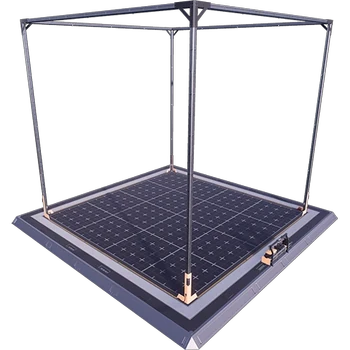
Blueprint Designer+
Extended blueprint designer tools for Satisfactory.
Description
<table width="100%" cellpadding="0" cellspacing="0" style="border:none;background:#1a1a2e;border-radius:12px;overflow:hidden;margin-bottom:16px">
<tr>
<td width="140" style="padding:20px 16px 20px 24px;vertical-align:middle;border:none">
<a href="https://discord.gg/JsJ9XXWS7Q">
<img src="https://raw.githubusercontent.com/Kyri123/KMods-Docs/main/docs/Images/KMods-Logo.png" height="100" width="100" alt="KMods Logo" />
</a>
</td>
<td style="padding:20px 24px 20px 0;vertical-align:middle;text-align:right;border:none">
<div>
<a href="https://discord.gg/JsJ9XXWS7Q"><img src="https://img.shields.io/badge/Discord-Join%20Us-5865F2?style=for-the-badge&logo=discord&logoColor=white" height="28" alt="Discord" /></a>
<a href="https://www.patreon.com/kmods"><img src="https://img.shields.io/badge/Patreon-Support%20Us-F96854?style=for-the-badge&logo=patreon&logoColor=white" height="28" alt="Patreon" /></a>
</div>
<div style="margin-top:8px">
<a href="https://ficsit.app/user/9uvZtCA4cM6H4q"><img src="https://img.shields.io/badge/ficsit.app-KMods-009688?style=for-the-badge" height="28" alt="ficsit.app" /></a>
<img src="https://img.shields.io/badge/Multiplayer-Not%20Tested-lightgrey?style=for-the-badge&logo=steam&logoColor=white" alt="Multiplayer: Not Tested" />
</div>
</td>
</tr>
</table>
<br />
<table width="100%" cellpadding="0" cellspacing="0" style="border:none">
<tr>
<td style="padding:4px 0;border:none">
<a href="https://k-mods.com"><img src="https://img.shields.io/badge/k--mods.com-Website-e8a202?style=flat-square" alt="k-mods.com" /></a>
<a href="https://k-mods.com/production-planner"><img src="https://img.shields.io/badge/SF%2B-Production%20Planner-e8a202?style=flat-square" alt="SF+ Production Planner" /></a>
<a href="https://k-mods.com/production-modeler"><img src="https://img.shields.io/badge/SF%2B-Production%20Modeler-e8a202?style=flat-square" alt="SF+ Production Modeler" /></a>
<a href="https://k-mods.com/wiki"><img src="https://img.shields.io/badge/SF%2B-Wiki-e8a202?style=flat-square" alt="SF+ Wiki" /></a>
</td>
</tr>
</table>
---
Ever tried cramming a whole production floor into a blueprint and just... couldn't? Same. That's the whole reason Blueprint Designer Plus exists. It gives you three much bigger Blueprint Designers, so entire factory sections fit in one blueprint instead of getting chopped up into a dozen tiny ones.
---
<table width="100%" cellpadding="0" cellspacing="0"><tr><td style="background:#e8a202;padding:6px 14px;border-radius:6px 6px 0 0;border:none"><strong style="color:#1a1a2e;font-size:18px">Three New Designer Sizes</strong></td></tr></table>
Stock Blueprint Designer? A cozy little 32 m × 32 m × 32 m box. Great for a handful of machines, a bit tight for anything bigger. This mod throws three roomier options into the mix, and you get all of them in one go:
| Designer | Build Area (W × D × H) |
|----------|------------------------|
| Blueprint Designer Mk.4.1 | 80 m × 80 m × 64 m |
| Blueprint Designer Mk.4.2 | 96 m × 96 m × 48 m |
| Blueprint Designer Mk.5 | 176 m × 176 m × 96 m |
Hit Tier 9 in your HUB and unlock the Milestone, and boom, all three designers unlock together.
---
<table width="100%" cellpadding="0" cellspacing="0"><tr><td style="background:#e8a202;padding:6px 14px;border-radius:6px 6px 0 0;border:none"><strong style="color:#1a1a2e;font-size:18px">Works Just Like Vanilla Blueprints</strong></td></tr></table>
Don't worry, there's no learning curve. Plop one of these designers down anywhere in your factory, walk inside, and lay out your machines within the glowing frame, same as you'd do with the vanilla one. Hit save, and the blueprint lands in your Build Menu under the Blueprint tab, ready to drop wherever you feel like building next.
A few things you'll want to know:
- Your blueprints live in your save file, not the mod. Once you've made one, you can place it in any world, even one that doesn't have this mod installed.
- Share away. Friends on your server can place blueprints you built with these bigger designers even if they never installed the mod themselves.
- Editing has a size floor. Made a blueprint inside a Mk.4.1? You can only reopen and tweak it inside a Mk.4.1 or something bigger. Placing it out in the world, though, has no such limit.
---
<table width="100%" cellpadding="0" cellspacing="0"><tr><td style="background:#e8a202;padding:6px 14px;border-radius:6px 6px 0 0;border:none"><strong style="color:#1a1a2e;font-size:18px">A Note on the Mk.5</strong></td></tr></table>
Let's talk about the Mk.5 for a second. It's massive, almost 176 m per side, built for players who genuinely need that much room. Heads up, though: cram enough into one blueprint at that scale and you start bumping into Satisfactory's own limits. Load it up with tons of pipes or belts and you might hit noticeable lag, or even the occasional crash, when saving or placing it.
That one's on the game, not on us. There's only so much you can squeeze into a blueprint before the engine starts to sweat. So save the Mk.5 for when nothing smaller cuts it, and always save your game before placing a big print.
---
<table width="100%" cellpadding="0" cellspacing="0" style="border:none;background:#1a1a2e;border-radius:12px;overflow:hidden;margin-top:16px">
<tr>
<td colspan="2" style="background:#e8a202;padding:0;border:none;height:4px"></td>
</tr>
<tr>
<td style="padding:20px 24px;border:none;vertical-align:middle">
<strong style="color:#e8a202;font-size:14px">Questions, bugs, or suggestions?</strong><br />
<span style="color:#94a3b8;font-size:12px">Join the Discord or support us on Patreon</span>
</td>
<td style="padding:20px 24px 20px 0;text-align:right;border:none;vertical-align:middle">
<table cellpadding="0" cellspacing="0" style="display:inline-table;border:none">
<tr>
<td style="padding:3px 4px;border:none"><a href="https://discord.gg/JsJ9XXWS7Q"><img src="https://img.shields.io/badge/Discord-5865F2?style=for-the-badge&logo=discord&logoColor=white" height="28" alt="Discord" /></a></td>
<td style="padding:3px 4px;border:none"><a href="https://www.patreon.com/kmods"><img src="https://img.shields.io/badge/Patreon-F96854?style=for-the-badge&logo=patreon&logoColor=white" height="28" alt="Patreon" /></a></td>
</tr>
<tr>
<td style="padding:3px 4px;border:none"><a href="https://ficsit.app/user/9uvZtCA4cM6H4q"><img src="https://img.shields.io/badge/ficsit.app-009688?style=for-the-badge" height="28" alt="ficsit.app" /></a></td>
<td style="padding:3px 4px;border:none"><a href="https://k-mods.com"><img src="https://img.shields.io/badge/k--mods.com-e8a202?style=for-the-badge" height="28" alt="k-mods.com" /></a></td>
</tr>
<tr>
<td style="padding:3px 4px;border:none"><a href="https://k-mods.com/production-planner"><img src="https://img.shields.io/badge/SF%2B%20Planner-e8a202?style=for-the-badge" height="28" alt="SF+ Production Planner" /></a></td>
<td style="padding:3px 4px;border:none"><a href="https://k-mods.com/production-modeler"><img src="https://img.shields.io/badge/SF%2B%20Modeler-e8a202?style=for-the-badge" height="28" alt="SF+ Production Modeler" /></a></td>
</tr>
<tr>
<td colspan="2" style="padding:3px 4px;text-align:right;border:none"><a href="https://k-mods.com/wiki"><img src="https://img.shields.io/badge/SF%2B%20Wiki-e8a202?style=for-the-badge" height="28" alt="SF+ Wiki" /></a></td>
</tr>
</table>
</td>
</tr>
</table>
Versions
How to Install Blueprint Designer+ on Your Server
Order Satisfactory Server
Order a Satisfactory server with at least 4 GB RAM (6 GB recommended). For multiplayer: per 3 players.
Install Mod
Open the mod manager in the dashboard and search for "Blueprint Designer+". Installation dependencies are installed automatically.
Restart Server
Restart the server so the mod is loaded. Players need to have the mod installed locally as well.
Frequently Asked Questions
Blueprint Designer+ not working after update – what to do?
After a Satisfactory update, mods need to be updated. Check ficsit.app whether Blueprint Designer+ has been updated for the new game version. With Mado Hosting: open the mod manager and click "Update All". If the mod hasn't been updated yet, temporarily remove it so the server starts.
Blueprint Designer+ causing crashes in multiplayer – solution
Most common cause: all players must have exactly the same mod version installed. Check server logs for "ModMismatch" or "Version Conflict". Ensure all players use Blueprint Designer+ v2026.3.467 and the same SML. With Mado Hosting, Satisfactory servers run with 6 GB RAM for stable multiplayer performance.
Is Blueprint Designer+ compatible with other Satisfactory mods?
Blueprint Designer+ uses the Satisfactory Mod Loader (SML). Generally, SML-based mods are cross-compatible, but mods modifying the same game systems can cause conflicts. Test new mod combinations on a backup save. The Mado dashboard automatically detects known conflicts and warns you.
Rent Blueprint Designer+ Server
Play Blueprint Designer+ on your own Satisfactory server with mod support.
Mod Information
- Author
- Kyrium
- Latest Version
- v2026.3.467
- Created
- November 19, 2022
- Last Updated
- October 7, 2026
- Source Code
- GitHub →