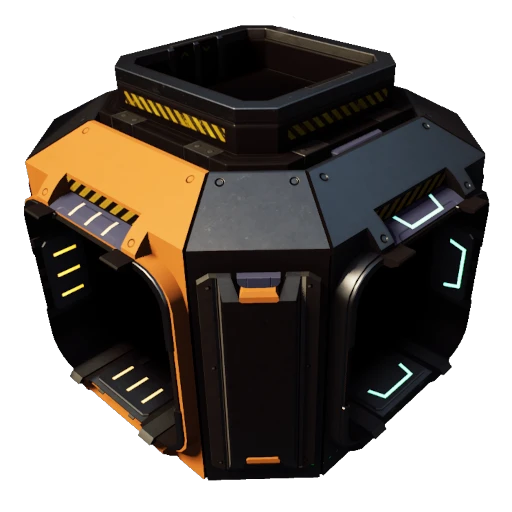
Vertical Splitters and Mergers
Adds splitters and mergers with Top/Bottom ports
Beschreibung
Each vertical splitter/merger has an extra two item ports in the center of the unit, which you can attach a Conveyor Lift to. The belt connection nodes are pretty crowded, so double check if you are connecting to a side port, or one of the vertical ports.
You can connect one lift starting from the splitter itself (the viewing/aiming angle is a bit tricky but the hologram should appear from the center of the splitter), the second lift must start somewhere else, then attach to the center of the splitter (weird soft clearance rules). Placing a lift in the center of the splitter is easier if the side ports are already occupied by belts.
The Type A splitters and mergers will have their unique input/output port on the side, like a vanilla one would.
<b>The Type B units have their unique input/output port in the top or bottom</b>, so that you can for example, feed a splitter from above/below. The B types will have both an input and output port in the center, so the most reliable way to connect to them is to build a lift above or below, and bring the other end into the splitter with the appropriate belt direction (when freebuilding conveyor lifts, the default key to swap belt direction is R).
All vertical splitters/mergers are unlocked with the vanilla splitters
<h3>Credit</h3>
Commissioned by @Mighty Mackinac#3437
All mesh assets are from the vanilla game.
<h3>Contact</h3>
https://discord.gg/xkVJ73E
Versionen
Vertical Splitters and Mergers auf dem Server installieren
Satisfactory Server bestellen
Bestelle einen Satisfactory Server mit mindestens 4 GB RAM (6 GB empfohlen). Bei Multiplayer: +1 GB pro 4 Spieler.
Mod installieren
Öffne den Mod-Manager im Dashboard und suche nach "Vertical Splitters and Mergers". Installations-Dependencies werden automatisch mitinstalliert.
Server neu starten
Starte den Server neu, damit die Mod geladen wird. Spieler müssen die Mod ebenfalls lokal installiert haben.
Häufige Fragen
Vertical Splitters and Mergers funktioniert nicht nach Update – was tun?
Nach einem Satisfactory-Update müssen Mods aktualisiert werden. Prüfe auf ficsit.app, ob Vertical Splitters and Mergers bereits für die neue Game-Version aktualisiert wurde. Bei Mado Hosting: Öffne den Mod-Manager und klicke "Alle aktualisieren". Wenn die Mod noch nicht aktualisiert ist, entferne sie temporär, damit der Server startet.
Vertical Splitters and Mergers verursacht Crashes im Multiplayer – Lösung
Häufigste Ursache: alle Spieler müssen exakt die gleiche Mod-Version installiert haben. Prüfe in den Server-Logs nach "ModMismatch" oder "Version Conflict". Stelle sicher, dass alle Spieler Vertical Splitters and Mergers v1.4.0 und den gleichen SML verwenden. Bei Mado Hosting laufen Satisfactory Server mit 6 GB RAM für stabile Multiplayer-Performance.
Ist Vertical Splitters and Mergers mit anderen Satisfactory Mods kompatibel?
Vertical Splitters and Mergers nutzt den Satisfactory Mod Loader (SML). Generell sind SML-basierte Mods untereinander kompatibel, aber Mods die gleiche Game-Systeme ändern, können Konflikte verursachen. Teste neue Mod-Kombinationen am besten auf einem Backup-Save. Im Mado Dashboard werden bekannte Konflikte automatisch erkannt und du wirst gewarnt.
Vertical Splitters and Mergers Server mieten
Spiele Vertical Splitters and Mergers auf deinem eigenen Satisfactory Server mit Mod-Support.
Mod Informationen
- Ersteller
- BlogmasterAvery
- Neueste Version
- v1.4.0
- Erstellt am
- 30. Januar 2022
- Zuletzt aktualisiert
- 7. Oktober 2026