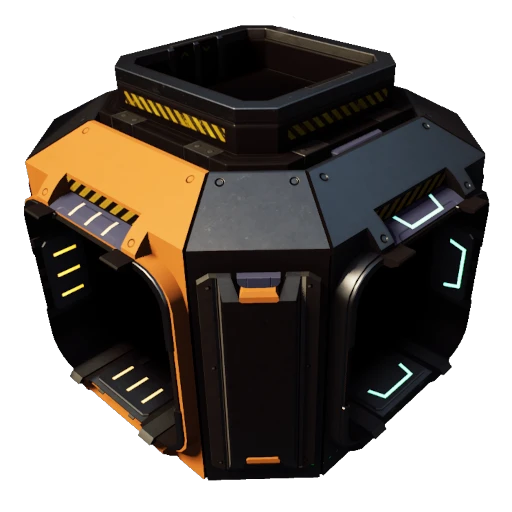
Vertical Splitters and Mergers
Adds splitters and mergers with Top/Bottom ports
Description
Each vertical splitter/merger has an extra two item ports in the center of the unit, which you can attach a Conveyor Lift to. The belt connection nodes are pretty crowded, so double check if you are connecting to a side port, or one of the vertical ports.
You can connect one lift starting from the splitter itself (the viewing/aiming angle is a bit tricky but the hologram should appear from the center of the splitter), the second lift must start somewhere else, then attach to the center of the splitter (weird soft clearance rules). Placing a lift in the center of the splitter is easier if the side ports are already occupied by belts.
The Type A splitters and mergers will have their unique input/output port on the side, like a vanilla one would.
<b>The Type B units have their unique input/output port in the top or bottom</b>, so that you can for example, feed a splitter from above/below. The B types will have both an input and output port in the center, so the most reliable way to connect to them is to build a lift above or below, and bring the other end into the splitter with the appropriate belt direction (when freebuilding conveyor lifts, the default key to swap belt direction is R).
All vertical splitters/mergers are unlocked with the vanilla splitters
<h3>Credit</h3>
Commissioned by @Mighty Mackinac#3437
All mesh assets are from the vanilla game.
<h3>Contact</h3>
https://discord.gg/xkVJ73E
Versions
How to Install Vertical Splitters and Mergers on Your Server
Order Satisfactory Server
Order a Satisfactory server with at least 4 GB RAM (6 GB recommended). For multiplayer: per 4 players.
Install Mod
Open the mod manager in the dashboard and search for "Vertical Splitters and Mergers". Installation dependencies are installed automatically.
Restart Server
Restart the server so the mod is loaded. Players need to have the mod installed locally as well.
Frequently Asked Questions
Vertical Splitters and Mergers not working after update – what to do?
After a Satisfactory update, mods need to be updated. Check ficsit.app whether Vertical Splitters and Mergers has been updated for the new game version. With Mado Hosting: open the mod manager and click "Update All". If the mod hasn't been updated yet, temporarily remove it so the server starts.
Vertical Splitters and Mergers causing crashes in multiplayer – solution
Most common cause: all players must have exactly the same mod version installed. Check server logs for "ModMismatch" or "Version Conflict". Ensure all players use Vertical Splitters and Mergers v1.4.0 and the same SML. With Mado Hosting, Satisfactory servers run with 6 GB RAM for stable multiplayer performance.
Is Vertical Splitters and Mergers compatible with other Satisfactory mods?
Vertical Splitters and Mergers uses the Satisfactory Mod Loader (SML). Generally, SML-based mods are cross-compatible, but mods modifying the same game systems can cause conflicts. Test new mod combinations on a backup save. The Mado dashboard automatically detects known conflicts and warns you.
Rent Vertical Splitters and Mergers Server
Play Vertical Splitters and Mergers on your own Satisfactory server with mod support.
Mod Information
- Author
- BlogmasterAvery
- Latest Version
- v1.4.0
- Created
- January 30, 2022
- Last Updated
- October 7, 2026