
Final Nights: Freedom
A modpack focusing on Vampirism and Tinker's Construct and their popular addons including Werewolves and Construct Armory.
Screenshots
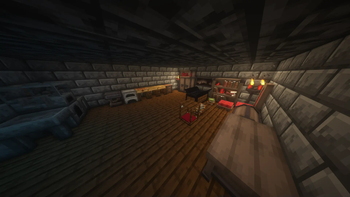
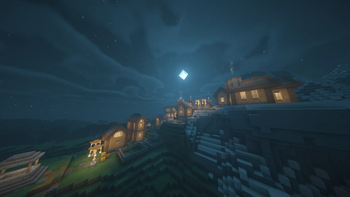
About this Modpack
The Overworld has become more dangerous. Vampires and werewolves claim the night as their own,
while vicious beasts have emerged from the wilderness. However, it is not hopeless.
New materials and smithing techniques have allowed more powerful arms and armour to be made,
and an order of hunters has been established to protect the humans and villagers threatened
by these creatures.
It is up to you to join these hunters, or realise the power of the night and take these lands as their
rightful ruler.
A modpack focusing on Vampirism and Tinker's Construct and their popular addons including Werewolves and Construct Armory. Also includes immersive and QoL mods such as Ambient Sounds, JEI, inventory sorting, mouse tweaks, etc.
FAQ
- Why "Freedom"?
Originally I was going to make this modpack on Curseforge, but after being annoyed at it, I decided to start a "Freedom" version on Modrinth (named after it's open-source philosophy) to see how well it would turn out. I don't know if I'll finish the Curseforge version, but in case I do, it'll have a different subtitle.
- How do I get started with X mod?/I'm stuck and can't progress in X mod!
Vampirism and Tinker's have books that are very helpful, your answer is probably in there! If not, look for the mod here on Modrinth and check their wiki. Or you could type @
in JEI and see if you can find the station that starts that mod.
- I can't feed as a vampire!
Middle-mouse button is now feed. If that's a problem, it can be rebound in your controls.
- How do I use the gender mod?
The G key.
Mod List
Main mods:
Construct Armoury (1.18.2 port from Curseforge)
Gameplay
Decoration
Atmosphere/Immersion
Dynamic Trees - Ecologics - BYG (Curseforge) - Vampirism (Curseforge)- Plus
Quality of Life
Gravestone (1.18.2 from Curseforge)
Technical
Other
Resourcepacks
Shaders
BSL (Default)
Anything listed as "from Curseforge" are 1.18.2 versions of mods on Modrinth. Nothing sourced from Curseforge is exclusive
Anything not listed is a dependency or missed accidentally because I'm a dummy.
License
Do anything you want with this modpack, except for putting it behind a paywall or building on it without crediting me somewhere. This doesn't override the licenses of the individual mods in this pack.
Available Versions
How to Set Up a Final Nights: Freedom Server
Order Server
Choose at least 6 GB RAM (8 GB recommended for Final Nights: Freedom). Based on player count: per 5 players.
Install Modpack in Dashboard
Open the modpack browser in the dashboard, search for "Final Nights: Freedom" and click "Install". The forge loader and Minecraft 1.18.2 are configured automatically.
Start Server & Play
Start the server – all mods are loaded automatically. Share the server IP with friends and play together!
Frequently Asked Questions
Final Nights: Freedom server crashes or won't start – what to do?
Most common causes: insufficient RAM or wrong forge loader. Check latest.log for "OutOfMemoryError" → increase RAM to at least 8 GB. For "Mixin" or "ClassNotFoundException" errors: modpack version and loader don't match. With Mado Hosting, loader and Minecraft version are auto-configured on modpack install – preventing most startup issues.
How much RAM does a Final Nights: Freedom server really need?
Minimum 6 GB, recommended 8 GB for stable performance. per 5 players. Important: Minecraft modpacks need more RAM than vanilla – plan extra per additional player. With Mado Hosting, you can scale RAM up live at any time without data loss (from €7.800000000000001/month).
Can I add custom mods to Final Nights: Freedom without conflicts?
Yes, but check compatibility: only use mods for the same loader (forge) and same Minecraft version (1.18.2). Common issues: ID conflicts with recipe mods and incompatible coremod versions. The Mado dashboard mod browser only shows compatible mods and warns about known conflicts.
Final Nights: Freedom server lagging – performance tips
1) Increase RAM to 8 GB+. 2) Reduce server view-distance to 8 (server.properties). 3) Pre-generate chunks with the "Chunky" plugin. 4) Use /spark profiler to check which mods consume the most tick time. With Mado Hosting, all servers run on NVMe SSDs with dedicated CPU cores – eliminating hardware as a bottleneck.
Similar Modpacks
![Cobblemon Official Modpack [Fabric]](https://cdn.modrinth.com/data/5FFgwNNP/e7f9ee2e9d361623847853fe2ddce42f519ee64f.png)
![COBBLEVERSE - Pokemon Adventure [Cobblemon]](https://cdn.modrinth.com/data/Jkb29YJU/581ecf54530972afb18a04660afd820f2f24f6c7.png)
![Better MC [FABRIC] - BMC2](https://cdn.modrinth.com/data/shFhR8Vx/a19c2bcb51d38f32f138d3607e91cb2b7b8e387f_96.webp)


![Better MC [FORGE] - BMC4](https://cdn.modrinth.com/data/4BV47HRn/7f5ef7cc61b2593609aabef3ed07a866a4f11b73_96.webp)
Rent Final Nights: Freedom Server
Start your own server with automatic modpack installation.
Supported Versions
Start your Final Nights: Freedom Server now
From €7.80/month; 8 GB RAM is recommended for best performance.
Configure Server →