
Modrinth · Fabric · Client pack
Ranked Optimized
This pack is client-only. Install it on your computer; it is not a server distribution. Multiplayer needs a compatible Minecraft server.
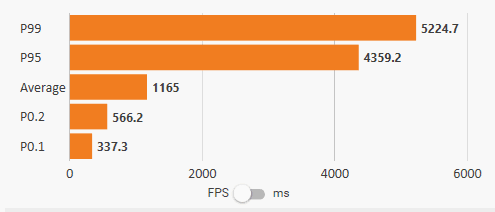
Extreme optimization, for the best & smoothest performance for PvP or SMPs, outperforming Fabulously Optimized & others in FPS & latency, w/o cheats/hacks. Reach high tiers in Sword, Mace, PvPHQ, MCPvP, MCTiers/PvPTiers & Tier Lists with ultra-fast FPS.
- Downloads
- 12.1K
- Followers
- 0
- Loader
- Fabric
- Minecraft
- 1.21.11 – 1.21.8
- Updated
- –
Screenshots
What Ranked Optimized looks like


Images: Ranked Optimized on Modrinth, published by the project team.
Releases
Published pack releases
The server and players need the same pack release. Pick it in the modpack browser to match your group’s clients.
Ranked Optimized · ModrinthOriginal description by the project author
 Ranked Optimized


Extreme optimization, for the best performance for PvP or SMPs, w/ mods you'll need for an advantage without cheats or hacks. Reach high ranked tiers in modes like Crystal, Mace, Sword, Pot, Hoplite, Hypixel etc with Sodium and more in one mod pack, reaching fast amounts of FPS.
Modpack created by a group of top players striving the smoothest and most well-configured optimization, while having versatility for different scenarios.
🤝 Join Our Discord
*Get 24/7 FREE curated 1-on-1 support on EVERYTHING (even outside RO!), Modpack Setup, Tips and Updates just by joining our Discord.*
📜 Mod List
⚠️ Why use this pack instead of just copying the mods?
Anyone can throw performance mods into a folder, but they will NEVER have the same effect as Ranked Optimized. MONTHS are spent into optimizing and configuring each mod to its limits. We don't even add every optimization mod we see - we measure each in controlled and real-world environments with the best configuration and mod version, see if another mod does it better, then pick the best option. Even our QoL mods are hand-picked for the best value. All with ZERO AI mods. Building a custom pack with the exact same mod list will NEVER yield the same FPS, hit-reg, or stability.
Mod list last updated: 1.2.0
🚀 Quick Start Guide
New to the modpack? This guide will help you to set it up instantly, with all the options you should change.
Once your game has launched, you'll only need to change things that are related to YOUR personal preference.
Here's a quick list:
- Video Settings:
- Click Options...
- Click Video Settings...
- Adjust GUI Scale: Drag the scale to your preferred scale. By default, it's
2x. For 1080p, 27" displays we recommend2x. For 1440p, 27" displays we recommend3x.
- Adjust GUI Scale: Drag the scale to your preferred scale. By default, it's
- <- Exit to the previous menu.
- FOV, Mouse & Keybinds:
- Adjust FOV: By default, it's
90. We recommend80-105, however this is purely your personal preference. - Click Controls...
- By default, Toggle Sprint is on. You can turn it off in this menu. The inverse applies for the Sneak function.
- Click Mouse Settings...
- Adjust Horizontal Sensitivity and Vertical Sensitivity to your preferred sensitivity.
- <- Exit to the previous menu.
- Click Key Binds...
- At the top search bar, search for the listed key binds and configure them if you wish to do so, or you can skip them entirely:
perspective: Toggle Perspectivehotbar: Hotbar Slot 1-9drop: Drop Selected Iteminventory: Open/Close Inventoryhand: Swap Item With Off Handzoom: Zoom (Hold)voice: Voice Chat Menu, Voice Chat Settings
- These are mainly the ones you would typically adjust. Scroll through once to make sure all key binds are set to your liking.
- <- Once done, exit to the previous menu.
- At the top search bar, search for the listed key binds and configure them if you wish to do so, or you can skip them entirely:
- Adjust FOV: By default, it's
- Visual:
- Click Accessibility Settings...
- At the bottom, you will find three sliders:
Hand Bobbing (47%),Camera Bobbing (0%)andHand Sway Strength (70%). You can adjust these to your liking, however this is our recommended configuration. - <- Once done, exit to the previous menu.
- At the bottom, you will find three sliders:
- Click the Secps Player Head to the right of Credits & Attribution...
- Enter BetterHurtCam menu: Here, you can adjust your Hurtcam settings.
- Our Default:
Hurtcam Enabled: OFF. This will COMPLETELY disable your Hurtcam, and some people may not like this. - <1.19.3 Old Hurtcam:
Hurtcam Enabled: ON. Then, adjust the Hurtcam Multiplier (default0.70). Your Hurtcam Type is set to Old, so you won't need to worry about setting it again. - Vanilla Default: Remove the
BetterHurtCammod entirely from your mod library.
- Our Default:
- Never enable Health Bar Blinking!
- Enter BetterHurtCam menu: Here, you can adjust your Hurtcam settings.
- Finally... Head back to the Main Menu and click on Mods. In this menu, left click on the turtle head image of BactroMod. Here, you can adjust your
Brightness Boost (15),Pumpkin Blur (OFF),Fire offset (-100)(which is OFF),Shield Offset (-30)(near invisible) and other QoL features. Our default is used by top PvPers, and we recommend this as well.
- Click Accessibility Settings...
That's mostly all! You can adjust the resource packs if you choose to do so, but we highly recommend our default. If you don't like the dark menu, remove Unique Dark Lite. And, you don't need RO Assets - it's just our own nice QoL pack featuring a smaller crosshair + some fun title splashes, without editing ANY of your textures.
⚡ Performance Mods
| Mod | Category | What it does | Remove it? |
|---|---|---|---|
Sodium mc1.21.11-0.8.14-fabric |
High Priority | The rendering engine rewrite. Main reason you get way more FPS | Keep, most of the pack needs it |
Sodium Extra mc1.21.11-0.9.4+fabric |
High Priority | Extra performance and video options on top of Sodium | Keep |
ModernFix-mVUS 5.26.3-build.2 |
High Priority | All-in-one fix for memory leaks and faster loading | Keep |
Krypton 0.2.10 |
High Priority | Network optimizations for better server connections | Keep |
ScalableLux 0.1.6+fabric.c25518a |
Medium Priority | Faster lighting engine, less stutter | Keep |
Gnetum 4.6.3+1.21.11-fabric |
Medium Priority | Caches the HUD and renders it at a lower framerate (30 FPS) so the game itself gets more FPS. Crosshair, hand and F3 stay at full FPS | Keep |
Bobby 5.2.11.1+mc1.21.11 |
Medium Priority | Caches chunks so you can see further than the server's render distance | Safe to remove |
Ixeris 4.6.8+1.21.11-fabric |
Medium Priority | Moves window and input (GLFW) calls off the render thread, so less input lag and smoother frames | Keep |
Tick Sync 1.4.0 |
Medium Priority | Lines up your client ticks with server packets so players move on your screen sooner | Keep |
Disable Lighting 1.0.0 |
Medium Priority | Fullbright that also skips lighting calculations, so it's free FPS | Safe to remove if you want normal lighting |
FerriteCore 8.2.0-fabric |
Core | Big memory usage reduction | Keep |
Lithium mc1.21.11-0.21.4-fabric |
Core | CPU optimizations for game logic | Keep |
ImmediatelyFast 1.14.3+1.21.11-fabric |
Core | Optimizes HUD, entity and text rendering | Keep |
Entity Culling 1.11.3 |
Core | Stops rendering entities and block entities you can't see | Keep |
Signs Faster 1.0.3 |
Core | Faster sign text rendering | Safe to remove |
Fullscreen Tweaks 2.0.2+1.21.11-fabric |
Low Priority | Proper borderless fullscreen that works with Sodium, easy alt-tabbing. Loading screen stays windowed so your cursor doesn't vanish | Keep |
⚔️ PvP Mods
| Mod | Category | What it does | Remove it? |
|---|---|---|---|
Health Indicators (DISABLED) 21.11.1 |
High Priority | Shows enemy health above their head. Allowed on most servers | Optional, disabled by default |
Armor Hud by Mcjunky33 0.9 |
High Priority | Clean armor and durability display | Safe to remove |
BetterHurtCam 1.12.0+mc1.21.11 |
High Priority | Fully configurable hurtcam (old, yaw-based or none) | Safe to remove (gives vanilla hurtcam) |
BactroMod 3.5 |
High Priority | Fog control, brightness, shield and fire offsets, no pumpkin blur | Keep |
Effect Timer Plus 2.2.7+1.21.11 |
High Priority | Shows your effects and when they're about to run out | Safe to remove |
AppleSkin 3.0.8+mc1.21.11 |
High Priority | Hunger and saturation overlay (health overlay off) | Safe to remove |
PartialHearts 1.1.1-1.21.11 |
High Priority | Shows exact health with parts of a heart | Safe to remove |
HitColor X 1.1.0-1.21.11 |
High Priority | Tints the hit colour (red flash) to whatever you want, on armour too | Safe to remove |
Tiers 0.8.4+1.21.11 |
High Priority | Shows a player's PvPTiers rank on their nametag (MCTiers is down for now) | Safe to remove |
Shield Fixes 2.0.4+1.21.11 |
Medium Priority | Shield sound and animation fixes. Allowed on 99% of PvP servers | Keep |
Combat Hitboxes 1.0.10 |
Medium Priority | Custom hitbox colours, changes colour when you're targeting someone | Safe to remove |
Crosshair Addons Public 2.1.0-1.21.11 |
Medium Priority | Icons around the crosshair for when you can hit an enemy, break a shield, have elytra on and more. Fully configured | Safe to remove |
Advanced Mouse Sensitivity 1.0.1 |
Medium Priority | Separate horizontal and vertical sensitivity | Safe to remove |
Marlow's Crystal Optimizer 2.0.0+mc1.21.11 |
Low Priority | Legal crystal PvP optimization. Allowed on most servers | Keep for Crystal |
Hero's Anchor Optimizer 1.1.4-1.21.11+ |
Low Priority | Optimized anchor explosions for PvP. Allowed on most servers | Keep for Crystal |
🛠️ Quality of Life (QOL)
| Mod | Category | What it does | Remove it? |
|---|---|---|---|
ViaFabricPlus 4.4.15 |
Medium Priority | Join servers on any version, including old 1.8 combat | Keep (disable it on servers that kick for it, like PvP Club) |
Mod Menu 17.0.1 |
Medium Priority | Needed to configure every mod | Keep |
BetterF3 17.0.0 |
Medium Priority | Cleaner, readable F3 screen | Safe to remove |
Perspektive 1.4.5 |
Medium Priority | Look around without moving your player | Safe to remove |
Zoomify (Zoom) 2.15.2+1.21.11 |
Medium Priority | Fully configurable zoom | Safe to remove |
Xaero's World Map (DISABLED) fabric-1.21.11-1.47.0 |
Medium Priority | World map that fills in as you move around | Optional, disabled by default |
Xaero's Minimap (DISABLED) fabric-1.21.11-26.6.0 |
Medium Priority | Minimap that shows your surroundings | Optional, disabled by default |
Simple Update Checker 1.4.0+1.21.11 |
Medium Priority | Tells you in-game when a new RO update is out | Keep |
Reese's Sodium Options mc1.21.11-2.2.4+fabric |
Low Priority | Better Sodium settings menu with tabs | Keep |
Controlling 29.0.1 |
Low Priority | Search bar and conflict filter in the keybinds menu | Keep |
Horizon Fix 1.0.2 |
Low Priority | Removes the ugly line at the horizon | Safe to remove |
Custom Window Title 1.4.3 |
Low Priority | RO branding on the game window | Safe to remove |
Shulker Box Tooltip 5.2.16+1.21.11-fabric |
Low Priority | See what's in a shulker without opening it | Safe to remove |
Simple Voice Chat fabric-1.21.11-2.6.22 |
Low Priority | Proximity voice chat for SMPs | Safe to remove |
WorldEdit 7.4.2 |
Low Priority | Building tools | Safe to remove |
WorldEdit CUI 1.21.11+01 |
Low Priority | Shows your WorldEdit selection | Safe to remove (needs WorldEdit) |
Flyspeed (Creative Flight) 1.0.3 |
Low Priority | Faster creative flight | Safe to remove |
Smooth Scrolling Refurbished 1.5.2 |
Low Priority | Smooth scrolling in menus | Safe to remove |
Flashback 0.39.10 |
Low Priority | Record your gameplay and replay it, great for clips | Safe to remove |
Better "Add Server" 1.3.0-1.21.9 |
Low Priority | Auto-names the server to the IP and moves the IP to the top in "Add Server" | Safe to remove |
Better Tab 2.1.5+1.21.11 |
Low Priority | Better tab list, scrollable with number ping | Safe to remove |
BoatView360 v1.0.6-mc1.21.11-fabric |
Low Priority | Look around freely in a boat | Safe to remove |
Chat Patches 8.0.0+1.21.11-fabric |
Low Priority | Fixes and upgrades for vanilla chat, saves unsent chats | Safe to remove |
Emoji Type 3.0.0-1.21.10-fabric |
Low Priority | Type emojis in chat with shortcodes | Safe to remove |
Horse Statistics 3.4.0 |
Low Priority | Shows horse speed, jump height and health | Safe to remove |
No Realms Button 3.0.4+1.21-fabric |
Low Priority | Removes the useless Realms button | Safe to remove |
No Resource Pack Warnings 1.4.0 |
Low Priority | Removes the warning for older resource packs | Safe to remove |
No Worldborder Tint 1.2.0 |
Low Priority | Removes the red tint near the world border | Safe to remove |
Not Enough Animations 1.12.6 |
Low Priority | Adds missing third-person animations (eating, drinking, etc) | Safe to remove |
Riding Mouse Fix 1.0.1 |
Low Priority | Fixes laggy mouse when riding entities | Safe to remove |
Shut Up Narrator 1.0.0 |
Low Priority | Kills the narrator hotkey for good | Safe to remove |
View Bobbing Options 0.4.1+1.21.11 |
Low Priority | Customizable view bobbing | Safe to remove |
⚙️ Technical & Minor Tweaks
| Mod | Category | What it does | Remove it? |
|---|---|---|---|
Async Pack Scan 0.2.14 |
Tweak | Stops the game hanging when you open the resource pack menu | Keep |
Fadeless 2.0.7-1.21.11 |
Tweak | Removes fade animations | Safe to remove |
FastQuit 3.1.3+mc1.21.11 |
Tweak | Go back to the menu while your world is still saving | Safe to remove |
In-Game Account Switcher 9.0.8+1.21.11-fabric |
Tweak | Swap accounts without restarting | Safe to remove |
Iris Shaders 1.10.8+1.21.11-fabric |
Tweak | Shader support | Keep if you use shaders |
No Chat Reports Fabric-1.21.11-v2.18.0 |
Tweak | Makes chat unreportable where possible | Keep |
Skyboxify 3.4 |
Tweak | Custom skies from resource packs | Safe to remove |
ServerAddressSpaceFix 0.2.1 |
Fix | Fixes "unknown host" when a server IP has a space | Keep |
Server Pinger Fixer 1.0.6 |
Fix | Makes the server list ping faster and more reliably | Keep |
Remove Reloading Screen 5.1.15+mc1.21.11-fabric |
Tweak | Removes the reloading screen when reloading resource packs | Keep |
📚 Libraries & Resources
Libraries
| Mod | Category | What it does | Remove it? |
|---|---|---|---|
LibJF 3.19.12 |
Library | Utility library | Required by other mods |
Fabric API 0.141.6+1.21.11 |
Core API | Needed by almost every mod | Required |
Architectury API 19.0.1+fabric |
Core API | Multi-loader API | Required by other mods |
Fabric Language Kotlin 1.14.2+kotlin.2.4.21 |
Core API | Kotlin support for mods | Required by other mods |
Forge Config API Port 21.11.1 |
Core API | Config system some mods use | Required by other mods |
WalksyLib 0.9.992+1.21.11 |
Library | Config library | Required by other mods |
YetAnotherConfigLib (YACL) 3.8.2+1.21.11-fabric |
Config Library | Config screens | Required by other mods |
Cloth Config API 21.11.153+fabric |
Config Library | Config screens | Required by other mods |
MidnightLib 1.9.3+1.21.11-fabric |
Config Library | Config screens | Required by other mods |
Fzzy Config 0.7.7+1.21.11 |
Config Library | Config screens | Required by other mods |
Balm 21.11.9.1+fabric-1.21.11 |
Library | Multi-loader layer | Required by other mods |
Searchables 1.0.4 |
Library | Search helpers | Required by Controlling |
Text Placeholder API 2.8.2+1.21.10 |
Library | Text placeholders | Required by other mods |
ukulib 1.10.2+1.21.11 |
Library | Utility library | Required by other mods |
Utilize 1.1.2+1.21.9-1.21.11 |
Library | Utility library | Required by other mods |
Resource Packs & Shaders
| Pack | Category | What it does | Remove it? |
|---|---|---|---|
| RO Assets (our own pack) | Resource Pack | Smaller crosshair + custom splash texts. Doesn't touch any of your textures. Keep it at the top | Safe to remove |
Unique Dark (Lite) 2.9.1 |
Resource Pack | Dark menus and GUI | Safe to remove |
Alternative Rain Sounds 1.21.9-1.21.11 |
Resource Pack | Nicer rain and thunder sounds | Safe to remove |
| Brewing Guide (Vanilla Tweaks) | Resource Pack | Brewing recipes right in the brewing stand | Safe to remove |
Small Held Items 2.1.1+1.21 |
Resource Pack | Smaller held items. Off by default, turn it on in Resource Packs | Optional, off by default |
| Dark GUI (Vanilla Tweaks) | Resource Pack | Dark GUI alternative. Off by default | Optional, off by default |
| Transparent GUI (Vanilla Tweaks) | Resource Pack | Transparent GUI. Off by default | Optional, off by default |
BSL Shaders 10.1.8 |
Shader | Bright, colourful classic shader | Safe to remove |
Complementary Reimagined r5.9.3 |
Shader | Great visuals that still look like Minecraft | Safe to remove |
Solas Shader 3.7b |
Shader | Fantasy style shader with coloured lighting | Safe to remove |
❓ Frequently Asked Questions
Can't I just copy these mods and make my own pack?
Same as what we mentioned before:
Anyone can throw performance mods into a folder, but they will NEVER have the same effect as Ranked Optimized. MONTHS are spent into optimizing and configuring each mod to its limits. We don't even add every optimization mod we see - we measure each in controlled and real-world environment**s** with the best configuration and mod version, see if another mod does it better, then pick the best option. Even our QoL mods are hand-picked for the best value. All with ZERO AI mods. Building a custom pack with the exact same mod list will NEVER yield the same FPS, hit-reg, or stability.
Do I need to change anything after downloading?
Yes, but not much. You'll only have to put your personal settings; GUI Scale, FOV, sensitivity, controls. Some mods' features you may want to configure are View/Hand bobbing, BetterHurtCam for the hurt cam when you get hit and BactroMod for shields and fire offsets. The rest is already configured and set up for the most optimized gameplay experience. Check the 🚀 Quick Start Guide above.
My mods are not updated; should I update the mods?
No, we highly do not recommend updating the mods as we've picked out the most stable and compatible versions of each mod, for maximum performance. They are this way as intended and resolve other issues from arising.
[1.2.0, 1.21.11] My chat isn't showing/working at all!
Remove the mod Chat Patches. Thanks to @.angrysheep_ for reporting this bug.
Why is my UI dark and my crosshair small?
This modpack has pre-installed resource packs. Please, check your resource packs before playing. We recommend keeping the RO Assets texture pack; it's very light, doesn't interfere with ANY texture packs, and just adds custom splash texts along with our better crosshair.
Why is my shield so low and fire invisible?
That's BactroMod. Our default is Shield Offset (-30) (near invisible) and Fire offset (-100) (the minimum, so fire is basically off), which is what top PvPers use. Want it back? Head to the Main Menu, click Mods, left click on the turtle head image of BactroMod, and drag the Shield Offset and Fire offset sliders back towards 0.
Why is everything so bright? How do I turn fullbright on/off?
We have a full guide on this in our Discord. Fullbright comes from Disable Lighting. It skips lighting calculations entirely, so it's free FPS too. It has no keybind or settings, it's just always on. To get normal lighting back, disable Disable Lighting in the Modrinth App's mod list (and re-enable it whenever you want fullbright again). BactroMod's Brightness Boost won't do anything while Disable Lighting is on.
Why isn't (insert mod) in the pack? (C2ME, VMP, Essential etc)
Because we tested it and it either did nothing, did worse than something we already have, or broke stuff. A few examples:
- C2ME: speeds up chunk generation, which is server side. On multiplayer it does basically nothing for you, and it needs Java 22+.
- VMP, ThreadTweak: no real gain on top of what's already in the pack (ThreadTweak is now useless).
- BadOptimizations, MoreCulling: other mods in the pack already do it better.
- Exordium: replaced by Gnetum, which does the same job better.
- Essential: caused crashes, and it's heavy and EXTREMELY bloaty.
- GPUBooster: showed a warning screen on every launch with no real gain.
- ViaFabric / ViaVersion / ViaBackwards: replaced by ViaFabricPlus.
- FullBright: replaced by Disable Lighting (faster).
If you think we missed something, tell us in the Discord!
Why is the game in borderless and not real fullscreen?
Borderless makes alt-tabbing instant with no black screen, and on Windows 10/11 the input delay is near none. If you want real (exclusive) fullscreen for the lowest possible latency, change it in Fullscreen Tweaks' settings in Mod Menu.
The game crashed / won't launch, what do I do?
First, make sure you didn't update any mods (see above). Then join our Discord and send your crash log (Modrinth App, the modpack's Logs tab, then upload it to mclo.gs) and we'll help you out in our #player-support channel.
I want to suggest a mod but it crashes the modpack; can you include the mod in the next version?
Feel free to contact us on Discord by joining our Discord(PUT INLINE LINK HERE), and we'll look into your request. Chances are if the mod isn't conflicting with the core of the modpack, not already added etc, and we approve of it, we'll add it!
Is this pack bannable?
No, as it uses "Fair Play" mods and optimizations. However, PvP Club will kick you for using ViaFabricPlus - but not to worry, as you won't get banned and all you have to do is temporarily disable the mod. No other known servers have this issue.
How much RAM do I allocate?
For 8 GB systems; 2 GB. For 16 GB systems; 4 GB. For 32 GB and higher systems: 6-8 GB. Allocating 10GB+ causes stutters during garbage collection*, regardless of how much RAM you have; 8GB is the stable sweet spot for this pack.
⚡ GraalVM setup (HIGHLY RECOMMENDED - BUTTER SMOOTH)
How to set-up GraalVM for extreme performance
Using GraalVM makes your game feel significantly smoother during gameplay, providing benefits beyond simple FPS gains.
- Download: Download GraalVM for JDK 21 from the direct link.
- Extract: Paste the ZIP file into a folder and select "Extract Here." You may delete the ZIP file afterward.
- Locate: Navigate into the
bin/folder and find thejavaw.exefile. Copy the full file path. - Modrinth Configuration: Open Modrinth and click the Gear Icon (bottom left).
- Go to Java Installation.
- Paste the copied path into the Java 21 Location parameter.
- Windows Graphics Settings:
- Go to System > Display > Graphics.
- Add
javaw.exeto your applications. - Set it to High Performance.
- JVM Arguments:
- Locate the Java and Memory section for the modpack in Modrinth.
- Paste the following into the Java Arguments field:
-Xmx8G -XX:+UseG1GC -XX:+ParallelRefProcEnabled -XX:MaxGCPauseMillis=200 -XX:+UnlockExperimentalVMOptions -XX:+DisableExplicitGC -XX:+AlwaysPreTouch
Change -Xmx8G to match the RAM FAQ above (e.g. -Xmx2G, -Xmx4G).
Relaunch the game once these steps are completed.
Having any issues? Join our Discord and ask in #player-support!
Resource packs from: Vanilla Tweaks
Icons used in this project are by LopyMine, licensed under CC BY-ND 4.0.
Similar packs
More server-ready modpacks
 Server-ready

Zombie Invade 100 Days
by FlameFire
僵尸入侵 100 天(高版本惊变重制)—— Same as Forge Labs 100 Days Zombie Apocalypse in new Minecraft
 Server-ready

BattleArmory TACZ
by JZ_zhenmeng
厌倦了每次开局都是一样的钻石剑和弓?BattleArmory 让你每场重生都像开盲盒——400+ 现代枪械随机配发,从使命召唤的经典步枪到赛博朋克科幻杀器,配上 CS 经典地图和战术投掷物,开局就是 80 帧+丝滑刚枪。** 这不是模组体验卡,这是完全免费的 1.20.1 战术枪战整合包,下载启动,直接开战。
 Server-ready

Better MC [FABRIC] - BMC2
by SHXRKIE
Version 1.20 | A Proper Vanilla+ Modpack | Don't play Vanilla play this!
 Server-ready

Better MC [FORGE] - BMC4
by SHXRKIE
Version 1.20.1 | A Proper Vanilla+ Modpack | Don't play Vanilla play this!
Looking for a pack for your own server?
The catalog lists modpacks with confirmed server support.