
Spunky Optimized
One of The Best optimization modpack for Minecraft designed to enhance performance and improve gameplay experience.
Screenshots

About this Modpack
Spunky Optimized
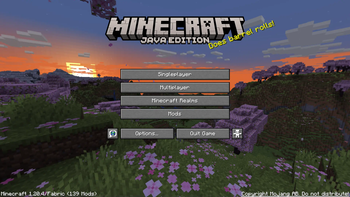
Spunky Optimized is the best optimization modpack to optimize and boost your Minecraft experience with better performance and amazing visuals. Improve FPS, reduce lag, enjoy smooth gameplay with this lightweight and powerful modpack. Perfect for all Minecraft players.
⚠️ Attention Content Creators
If you're a content creator making a video about the Spunky Optimized, please make sure to:
- Provide the Official Link: Share the official Modrinth link in your video description.
- Give Proper Credits: Mention the modpack name and give credits in your video to support its creators.
Your support helps the community grow and keeps modders motivated to create amazing content!
Feature Overview
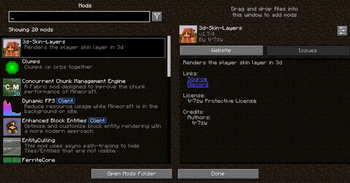
Performance Boost: Powered by Sodium, Lithium, and ImmediatelyFast, this modpack drastically improves frame rates, reduces lag, and optimizes chunk loading for a buttery-smooth experience.
Visual Enhancements: With Iris Shaders, enjoy breathtaking lighting effects, realistic shadows, and enhanced textures for a visually captivating world.
Improved Efficiency: Mods like More Culling, Dynamic FPS, and Entity Culling ensure your system runs efficiently by minimizing unnecessary rendering and resource usage.
Stability & Fixes: Say goodbye to memory leaks and lag spikes with Memory Leak Fix and ModernFix, ensuring a stable and crash-free gameplay experience.
User-Friendly Configuration: Easily tweak your settings with the intuitive YetAnotherConfigLib (YACL) and Cloth Config API.
Additional Enhancements: Enjoy faster chunk management with Concurrent Chunk Management Engine, better mob rendering with Enhanced Block Entities, and smoother animations with 3D Skin Layers.
Included Dependencies: The modpack comes preloaded with carefully selected mods to deliver peak performance and visual excellence:
Included Dependencies:
The modpack comes preloaded with carefully selected mods to deliver peak performance and visual excellence:
- Sodium Extra and Reese's Sodium Options for advanced performance settings.
- Krypton to optimize server and client networking.
- FerriteCore and LazyDFU for reduced memory usage.
- Zoomify for precision zoom functionality.
- Clumps for simplified experience orb collection.
- Model Gap Fix for enhanced block model rendering.
Available Versions
How to Set Up a Spunky Optimized Server
Order Server
Choose at least 4 GB RAM (6 GB recommended for Spunky Optimized). Based on player count: per 8 players.
Install Modpack in Dashboard
Open the modpack browser in the dashboard, search for "Spunky Optimized" and click "Install". The fabric loader and Minecraft 26.3 are configured automatically.
Start Server & Play
Start the server – all mods are loaded automatically. Share the server IP with friends and play together!
Frequently Asked Questions
Spunky Optimized server crashes or won't start – what to do?
Most common causes: insufficient RAM or wrong fabric loader. Check latest.log for "OutOfMemoryError" → increase RAM to at least 6 GB. For "Mixin" or "ClassNotFoundException" errors: modpack version and loader don't match. With Mado Hosting, loader and Minecraft version are auto-configured on modpack install – preventing most startup issues.
How much RAM does a Spunky Optimized server really need?
Minimum 4 GB, recommended 6 GB for stable performance. per 8 players. Important: Minecraft modpacks need more RAM than vanilla – plan extra per additional player. With Mado Hosting, you can scale RAM up live at any time without data loss (from €5.2/month).
Can I add custom mods to Spunky Optimized without conflicts?
Yes, but check compatibility: only use mods for the same loader (fabric) and same Minecraft version (26.3). Common issues: ID conflicts with recipe mods and incompatible coremod versions. The Mado dashboard mod browser only shows compatible mods and warns about known conflicts.
Spunky Optimized server lagging – performance tips
1) Increase RAM to 6 GB+. 2) Reduce server view-distance to 8 (server.properties). 3) Pre-generate chunks with the "Chunky" plugin. 4) Use /spark profiler to check which mods consume the most tick time. With Mado Hosting, all servers run on NVMe SSDs with dedicated CPU cores – eliminating hardware as a bottleneck.
Similar Modpacks


![Better MC [FABRIC] - BMC2](https://cdn.modrinth.com/data/shFhR8Vx/a19c2bcb51d38f32f138d3607e91cb2b7b8e387f_96.webp)
![Better MC [FORGE] - BMC4](https://cdn.modrinth.com/data/4BV47HRn/7f5ef7cc61b2593609aabef3ed07a866a4f11b73_96.webp)


Rent Spunky Optimized Server
Start your own server with automatic modpack installation.
Details
- License
- LicenseRef-All-Rights-Reserved
- Server-side
- Unsupported
- Client-side
- Required
Supported Versions
Start your Spunky Optimized Server now
From €5.20/month; 6 GB RAM is recommended for best performance.
Configure Server →