
Steam Deck Optimized
Modded Minecraft optimized for the Steamdeck
Screenshots
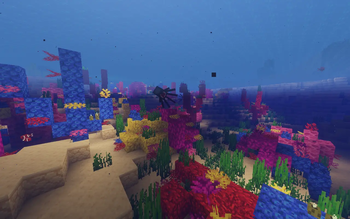
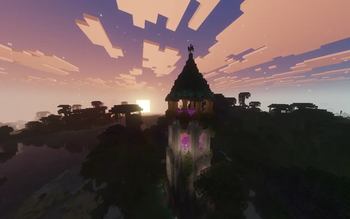
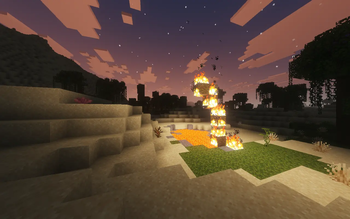
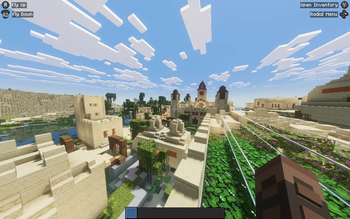
About this Modpack
🎮 Steam Deck Optimized (Fabric)
A lightweight Fabric modpack built specifically for the Steam Deck. Designed to deliver high FPS, full controller integration, sleek visuals with light shaders, and essential Quality-of-Life mods without killing your battery.
Features
- Vulkan Engine (
VulkanMod) – Uses Vulkan instead of OpenGL for massive performance gains on Steam Deck hardware. - Native Deck Controls (
Controlify) – Full controller support with native Steam Deck button glyphs and analog control. - Minimal Built-in Shaders (
Beryl) – Subtle lighting, dynamic shadows, and clean visuals with minimal performance hit. - Overhauled World Gen (
Terralith) – Beautiful vanilla-style terrain and biomes. - Dynamic Audio (
Sound Physics Remastered+AmbientSounds) – Realistic cave acoustics, echoes, and background ambience. - QoL Essentials – Dynamic lighting, 3D skin layers, AppleSkin, Jade, JEI, Xaero's World Map, Zoomify, and more.
Performance (Steam Deck LCD 256GB)
- FPS: 70 – 100 FPS average (after ~5 minutes of chunk generation).
- Frametimes: Rock solid frametimes thanks to Lithium, C2ME, and ScalableLux.
- Battery: Optimized for low power usage compared to traditional Iris/OptiFine setups.
Mod List
Performance & Rendering
- VulkanMod & Vulkan Border Fix – Vulkan rendering backend for SteamOS.
- Beryl – Light shader support under Vulkan.
- C2ME – Multithreaded chunk loading.
- Lithium & BadOptimizations – Core game logic and server-side optimizations.
- Entity Culling & Clumps – Hides unseen entities and groups XP orbs.
- FerriteCore – Reduces RAM usage.
- ScalableLux & Noisium – Fast lighting and terrain calculations.
- Dynamic FPS – Reduces resource usage when unfocused.
Controls & UI
- Controlify – Deck controller integration & keybindings.
- Mod Menu, Cloth Config & YACL – In-game settings menus.
- BetterF3 – Cleaner debug screen.
- Jade & JEI – Item recipes and block info overlay.
- AppleSkin, Chat Heads & Blur – Food stats, player head icons, and menu blur.
Visuals, Sound & World
- Terralith – Custom world generation without adding new blocks.
- Sound Physics Remastered & AmbientSounds – Reverb, acoustics, and environmental audio.
- Continuity, Visuality & 3D Skin Layers – Connected textures, subtle particle effects, and 3D skins.
- LambDynamicLights – Handheld light sources (torches, lanterns).
- Xaero's World Map – Fast and clean world map.
- Zoomify – Smooth zoom key.
How to Install
Since the modrinth launcher has a few issues on SteamOS, i reccomend using Prism Launcher:
- Switch to desktop mode
- install prism launcher via Discover (the build in app store)
- Import the .mrpack
- create a shortcut for the mincraft installation
Make sure the shortuct program is
flatpackand The arguments are"run" "org.prismlauncher.PrismLauncher" "--launch "YOUR_INSTALLATION NAME""
- Import the .desktop shortcut into steam
- Launch the game
Recommended Settings
The Modpack comes with preset settings for better performance. Feel free to change them
Available Versions
How to Set Up a Steam Deck Optimized Server
Order Server
Choose at least 6 GB RAM (8 GB recommended for Steam Deck Optimized). Based on player count: per 5 players.
Install Modpack in Dashboard
Open the modpack browser in the dashboard, search for "Steam Deck Optimized" and click "Install". The fabric loader and Minecraft 26.1.2 are configured automatically.
Start Server & Play
Start the server – all mods are loaded automatically. Share the server IP with friends and play together!
Frequently Asked Questions
Steam Deck Optimized server crashes or won't start – what to do?
Most common causes: insufficient RAM or wrong fabric loader. Check latest.log for "OutOfMemoryError" → increase RAM to at least 8 GB. For "Mixin" or "ClassNotFoundException" errors: modpack version and loader don't match. With Mado Hosting, loader and Minecraft version are auto-configured on modpack install – preventing most startup issues.
How much RAM does a Steam Deck Optimized server really need?
Minimum 6 GB, recommended 8 GB for stable performance. per 5 players. Important: Minecraft modpacks need more RAM than vanilla – plan extra per additional player. With Mado Hosting, you can scale RAM up live at any time without data loss (from €7.800000000000001/month).
Can I add custom mods to Steam Deck Optimized without conflicts?
Yes, but check compatibility: only use mods for the same loader (fabric) and same Minecraft version (26.1.2). Common issues: ID conflicts with recipe mods and incompatible coremod versions. The Mado dashboard mod browser only shows compatible mods and warns about known conflicts.
Steam Deck Optimized server lagging – performance tips
1) Increase RAM to 8 GB+. 2) Reduce server view-distance to 8 (server.properties). 3) Pre-generate chunks with the "Chunky" plugin. 4) Use /spark profiler to check which mods consume the most tick time. With Mado Hosting, all servers run on NVMe SSDs with dedicated CPU cores – eliminating hardware as a bottleneck.
Similar Modpacks
![Cobblemon Official Modpack [Fabric]](https://cdn.modrinth.com/data/5FFgwNNP/e7f9ee2e9d361623847853fe2ddce42f519ee64f.png)
![COBBLEVERSE - Pokemon Adventure [Cobblemon]](https://cdn.modrinth.com/data/Jkb29YJU/581ecf54530972afb18a04660afd820f2f24f6c7.png)
![Better MC [FABRIC] - BMC2](https://cdn.modrinth.com/data/shFhR8Vx/a19c2bcb51d38f32f138d3607e91cb2b7b8e387f_96.webp)


![Better MC [FORGE] - BMC4](https://cdn.modrinth.com/data/4BV47HRn/7f5ef7cc61b2593609aabef3ed07a866a4f11b73_96.webp)
Rent Steam Deck Optimized Server
Start your own server with automatic modpack installation.
Details
- License
- Creative Commons Attribution Share Alike 4.0 International
- Server-side
- Optional
- Client-side
- Optional
Supported Versions
Start your Steam Deck Optimized Server now
From €7.80/month; 8 GB RAM is recommended for best performance.
Configure Server →