
AcceleratedRendering-reFabricated
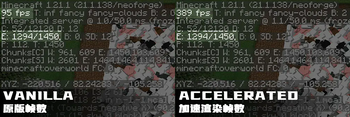
A client side only entity rendering optimization MOD, aiming at improving performance when rendering large amount of entities or complex modded entities
Screenshots
About this Mod
AcceleratedRendering
This is the Fabric port of AcceleratedRendering, if you need the NeoForge supported version, please visit here
This is a client side only entity rendering optimization MOD, aiming at improving performance when rendering large amount of entities
or complex modded entities with significant amount of vertices with compute shaders on GPU while being compatible with shader packs,
other MODs and their entities.
🍝Sponsorship
This MOD is almost done by myself and takes thousands of hours of my own time working and testing on it to be released.
Sponsorships from players can ensure the future development, innovation and optimization of this MOD. Thanks for everyone
that support this MOD! If you like it and want to support my work on development of AcceleratedRendering, please consider sponsor me at 爱发电
✨Why need this MOD
Minecraft has a poor immediate rendering system for rendering entities (including block entities) that is inherited from
OpenGL immediate rendering mode that older versions of Minecraft uses. It transforms and uploads vertices on the single render thread on CPU
every frame the entities are rendered, which takes a huge amount of time spending on these operations and left CPU and GPU idle with a very low FPS
when rendering large amount of vertices.
⚙️How it works
AcceleratedRendering constructs a unique rendering pipeline that caches the "original" vertices (vertices before the transform)
into meshes and transforms them parallel in GPU using compute shaders. Then draw the transformed vertices with the original shader.
In this way, this MOD can make entity rendering much more efficient by moving off transforming stress from the CPU
at the same time being compatible with shader packs (currently support Iris Shaders). All acceleration features can be disabled
for better compatibility.
🖥️Hardware Requirements
AcceleratedRendering requires OpenGL 4.6 to work properly for the usage of persistently mapped buffers and compute shaders.
Graphics cards like NVIDIA GT 400 Series and Intel HD Graphics 520/530 or newer will fit this requirement.
This MOD has been tested on NVIDIA GTX 1660Ti Max-Q, NVIDIA RTX 3070Ti Laptop, NVIDIA RTX 4090 Laptop, RX 580, RX 5600XT.
Mobile devices are not currently supported.
🛠️Configuration
Configuration file can be found in <your Minecraft>/.minecraft/config/acceleratedrendering-client.toml. You can modify
acceleration features in this file or in game (some specific configurations needs to restart the game to take effect).
In game configuration editor can be found in Mods > Accelerated Rendering > Config.
"Force Translucent Acceleration" in "Core Settings" is required to be enabled in order that accelerated item rendering can work properly.
Available Versions
How to Install AcceleratedRendering-reFabricated on Your Client
Install the Mod Loader Locally
Install fabric for your local Minecraft version.
Download the Matching File
Choose the AcceleratedRendering-reFabricated file for fabric and Minecraft 1.21.1.
Install Mod
Place the .jar file in your local .minecraft/mods folder and restart Minecraft. No server-side installation is required.
Compatibility
Mod Loaders
Minecraft Versions
1.21.1, 1.21, 1.20.1 (+1 more)
Server-side
✗ UnsupportedRecommended RAM
4 GB(min. 3 GB)Frequently Asked Questions
Does AcceleratedRendering-reFabricated need to be installed on the Minecraft server?
No. Modrinth marks AcceleratedRendering-reFabricated as unsupported on the server side. Install it only in your local Minecraft mods folder. Your server can remain unchanged unless the mod page lists an additional dependency.
Which version and loader does AcceleratedRendering-reFabricated require?
Use a file for fabric and your exact Minecraft version. Supported versions include 1.21.1, 1.21, 1.20.1. Files for different loaders are not interchangeable.
AcceleratedRendering-reFabricated is not working – what should I check?
First check the Minecraft version, loader version and required dependencies. Put the .jar file in your local .minecraft/mods folder and remove older duplicates. Because this mod is client-side, adding server RAM will not fix it.
Similar Mods


Minecraft Server for Your Group
AcceleratedRendering-reFabricated stays on your client. Host a compatible world for your group.