
Entity Culling
Using async path-tracing to hide Block-/Entities that are not visible
Screenshots
About this Mod





Minecraft skips rendering things that are behind you, so why is it rendering everything that you still can't see because of walls or ceilings in the way?
This mod introduces asynchronous path-tracing to efficiently determine what's actually visible to the player. Using other available CPU cores, it calculates line-of-sight visibility in real time and eliminates unnecessary draw calls/processing for hidden block entities and entities.
This can drastically improve the frame rate, depending on the number of entities and the position in the world.

Asynchronous Path-Tracing
- Uses spare CPU threads to calculate visibility
- Runs alongside the main game thread without blocking (every few ticks, required data will be collected on the main thread)
- Updates visibility data in real time, keeping pop-ins to a minimum
Entity Tick Optimization
- Reduces client impact from entities that are not visible
- Fully configurable and compatible with most mods
- No impact on server-side simulation, farms, or mob behavior
Fully Configurable
- All features of the mod can be toggled on/off in the config screen
- Whitelist entities and block entities that should not be culled or tick-culled
- When playing with fast graphics or custom leaves, there is an option to treat leaves as solid blocks for Entity Culling. This can help to increase the performance in forested areas


| Minecraft | Loader | Status | Version | Note |
|---|---|---|---|---|
| 1.19.4+ | Fabric/Forge/NeoForge | ✅ Supported | Latest | |
| 1.16.5-1.19.2 | Fabric/Forge | ❌ Not supported | Outdated | Might get new updates at some point |
| 1.12.2/1.8.9 | Forge | ❌ Not supported | Outdated | Might get new updates at some point |
| 1.7.10 | Forge | ❌ Not supported | Outdated | No updates planned |
| b1.7.3 | Babric | ❌ Not supported | Outdated | No updates planned |

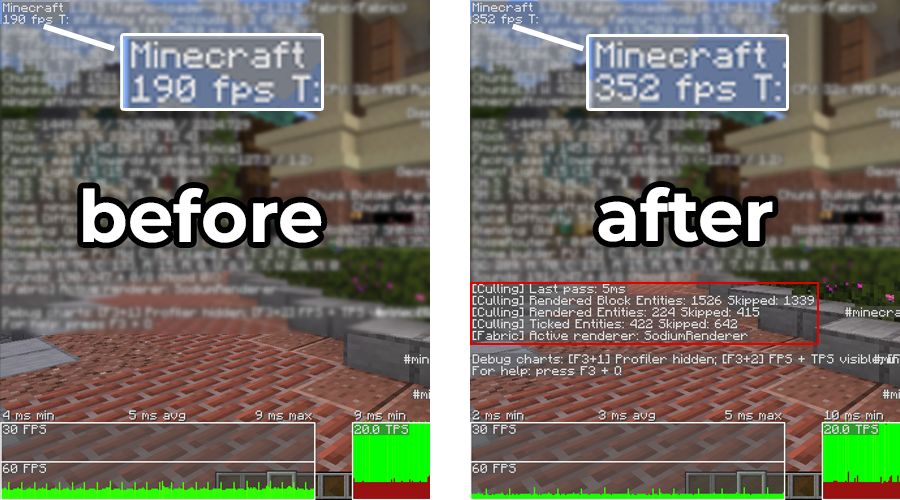
A direct comparison with and without EntityCulling active. Testing was conducted in Scarland (Hermitcraft Season 9) with render distance set to 16 chunks. The mods Sodium, Iris and ImmediatelyFast were used alongside EntityCulling, running on Minecraft 1.21.5 with the Fabric mod loader.

Client-side entities, commonly used by magic mods for animations, may not behave as expected. Whitelist the relevant entities via the config screen for tick culling and/or entity culling. Consider reporting the ids of any entities that are not behaving correctly on the Github for inclusion in future updates.
You’ll also need to whitelist block entities that render well beyond their normal bounds. Examples include the vanilla beacon, pulleys from Create, and certain Botania blocks.

Does this need to be installed on the server?
No. This is a fully client-side mod and does not need to be installed on the server.
Will this affect mob behavior or farms?
No. This mod only skips the rendering of entities and has no impact on their logic. Mobs will continue to spawn, move, and drop items as expected. Your farms and other gameplay mechanics will remain unaffected. The tick culling feature is fully limited to the client side world, so it will not affect the server-side simulation.
I have "Use Entity Culling" enabled in Sodium - does this still help?
Yes! While Sodium performs basic visibility checks based on loaded chunks, this mod goes further. It analyzes the actual line-of-sight visibility, skipping entities that are within visible chunks but not actually visible to the player. It’s a much more aggressive and accurate approach.
How can I test the performance impact of this mod?
In the controls menu, you can bind a debug key to toggle the mod on and off on the fly. This allows you to compare performance with and without the mod active, without needing to restart the game. This can also be used to check if visibility issues are caused by this mod or another mod.
Consider doing this, when playing on a really old computer, that is already struggling to run Minecraft. When the CPU is already maxed out, there is no spare CPU time to run the visibility calculations. Outside of this case, the mod should never cause a negative performance impact on the game, and at worst have no effect at all, when there is just nothing to cull.
The F3 numbers do not seem right, what is going on?
The F3 debug screen numbers (in later versions hidden by default, can be turned on via F3+F6) are internally collected and may not necessarily reflect the actual render counts. Having active shaders for instance will cause higher numbers due to the shadow rendering.
Also keep in mind that the mod tries to error on the side of caution, so entities too close to walls or ceilings may be rendering through them, due to the possibility of clipping.
Why is this mod running on the CPU, not the GPU?
The goal is to reduce the GPU load and have less unnecessary data transfers between the GPU and CPU. Doing the calculations would probably increase the GPU load, and main (render) thread load of the CPU. But feel free to prove me wrong and create a PR with a GPU-based implementation. Honestly, I lack the knowhow and time to implement this myself.

👤 Thanks to RoboTricker for his Transport-Pipes plugin, which created the foundation for this mod.
👤 Thanks to vicisacat for the Babric Beta 1.7.3 backport.
👤 Thanks to Pelotrio for the Forge 1.7.10 backport.
👤 Thanks to the awesome translators and contributors on GitHub!
📄 License: tr7zw Protective License
Feel free to use this mod in your Modrinth and CurseForge-hosted modpacks or YouTube videos without asking for permission. Do not redistribute the JAR files anywhere else!
Available Versions
How to Install Entity Culling on Your Client
Install the Mod Loader Locally
Install babric for your local Minecraft version.
Download the Matching File
Choose the Entity Culling file for babric and Minecraft 26.3.
Install Mod
Place the .jar file in your local .minecraft/mods folder and restart Minecraft. No server-side installation is required.
Compatibility
Mod Loaders
Minecraft Versions
26.3, 26.2, 26.1.2 (+42 more)
Server-side
✗ UnsupportedRecommended RAM
4 GB(min. 3 GB)Frequently Asked Questions
Does Entity Culling need to be installed on the Minecraft server?
No. Modrinth marks Entity Culling as unsupported on the server side. Install it only in your local Minecraft mods folder. Your server can remain unchanged unless the mod page lists an additional dependency.
Which version and loader does Entity Culling require?
Use a file for babric, fabric, forge, neoforge, quilt and your exact Minecraft version. Supported versions include 26.3, 26.2, 26.1.2. Files for different loaders are not interchangeable.
Entity Culling is not working – what should I check?
First check the Minecraft version, loader version and required dependencies. Put the .jar file in your local .minecraft/mods folder and remove older duplicates. Because this mod is client-side, adding server RAM will not fix it.
Similar Mods


Minecraft Server for Your Group
Entity Culling stays on your client. Host a compatible world for your group.