
AutoBuild
AutoBuild lets you automatically place blocks to build faster and easier in Minecraft. Perfect for large and repetitive builds.
Screenshots
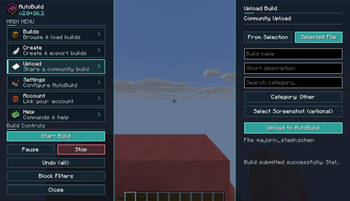

About this Mod
AutoBuild
AutoBuild is a Fabric mod for loading, previewing, transforming, and automatically building Minecraft schematics.
Load a .schem or .litematic file, position the ghost preview exactly where you want it, choose a building mode, and let AutoBuild place the structure while you remain in control.
AutoBuild also connects to its own community platform, where you can discover schematics, share creations, create a builder profile, and load community builds directly into the mod.
Preview

Features
Load and Preview Schematics
- Load
.schemand.litematicfiles - Preview structures using transparent ghost blocks
- Move previews in every direction
- Raise and lower the preview
- Rotate structures
- Flip previews across the X or Z axis
- Move the preview directly to your position
- Adjust preview transparency
- Hide selected blocks using block filters
Flexible Building Modes
Choose how AutoBuild places your structure:
- Per Block, Places a configurable number of blocks per tick
- Per Layer, Builds the structure layer by layer
- Instant, Places the complete structure immediately
You can also:
- Pause, resume, stop, or unload a build
- Keep or hide the preview after pausing or stopping
- Enable or disable block-placement sounds
- Undo recent building steps or the complete build history
- Adjust the building speed
Survival-Friendly Building
AutoBuild is designed for Survival projects as well as Creative building.
- Uses materials from your inventory
- Shows all materials required for a structure
- Reports which materials are missing
- Can collect materials from nearby chests, trapped chests, and barrels
- Includes a configurable container search radius
- Offers an optional safety check to prevent replacing existing blocks
- Allows Creative players to receive missing materials instantly
Community Schematic Library
AutoBuild connects directly to the AutoBuild community platform.
- Browse public schematics
- Link your website account to the mod
- Load community builds directly in-game
- Upload and publish your own schematics
- Add screenshots, categories, and visibility settings
- Create a public builder profile
- Track downloads and AutoBuild loads
- Discover builds shared by other creators
Find a build → Load it into AutoBuild → Position the preview → Start building
Export Your Own Schematics
Use the included Selection Tool to select two corners in your world and export the selected structure as a schematic.
Keep exported structures locally or publish them on your AutoBuild profile to share them through the community library.
In-Game Controls
AutoBuild includes configurable keybinds for:
- Moving the preview left, right, forward, and backward
- Raising and lowering the preview
- Rotating the structure
- Flipping across the X or Z axis
- Moving the preview to the player
- Undoing a build step
- Starting a build
- Opening the AutoBuild menu
Controls can be changed through Minecraft’s keybind settings.
Commands
/autobuild list— List local schematics/autobuild load <file>— Load a local schematic/autobuild start— Start or resume building/autobuild pause— Pause the current build/autobuild stop— Stop the current build/autobuild unload— Unload the current schematic/autobuild preview <on|off>— Show or hide the preview/autobuild speed <value>— Adjust the building speed/autobuild undo <steps|all>— Undo placed blocks/autobuild materials— View the required materials/autobuild missing— Receive missing materials in Creative/autobuild give previewtool— Get the Preview Mover Tool/autobuild give selectiontool— Get the Selection Tool/autobuild menu— Open the AutoBuild menu
Perfect For
- Large Survival projects
- Fast Creative building
- Multiplayer server projects
- Technical farms and redstone builds
- Repetitive construction work
- Testing schematic placement
- Videos, streams, and other content
- Community building events
- Sharing your own Minecraft creations
Multiplayer Support
AutoBuild supports separate building states and settings for multiple players.
Important: AutoBuild must be installed on both the client and the server when playing multiplayer.
Requirements
- Fabric Loader
- Fabric API
- AutoBuild installed on the client and server for multiplayer
Videos
AutoBuild combines schematic discovery, accurate previews, material management, automatic construction, exporting, and community sharing in one complete Minecraft building workflow.
Available Versions
How to Install AutoBuild on Your Server
Order Server
Order a Minecraft Java server with at least 3 GB RAM (4 GB recommended).
Set fabric Loader
In the panel under "Egg", select the fabric loader and matching Minecraft version (26.2).
Install Mod
Open the mod browser in the dashboard and search for "AutoBuild". Click "Install" – done! Alternatively, upload the .jar via SFTP to the /mods folder.
Compatibility
Mod Loaders
Minecraft Versions
26.2, 26.1.2, 1.21.11 (+11 more)
Server-side
✓ RequiredRecommended RAM
4 GB(min. 3 GB)Frequently Asked Questions
AutoBuild server crashes on startup – what to do?
Most common cause: wrong fabric version or insufficient RAM. Check the server log (latest.log) for "OutOfMemoryError" or "Mixin" errors. With Mado Hosting: ensure at least 3 GB RAM is allocated and the loader matches the mod version (26.2). You can switch loaders with one click in the panel.
Is AutoBuild compatible with fabric?
AutoBuild officially supports fabric for Minecraft 26.2, 26.1.2, 1.21.11. The Mado dashboard automatically detects incompatible loader combinations.
Server lagging with AutoBuild – how to optimize performance?
Recommended RAM: 4 GB (per 8 players). Use /spark profiler to check if AutoBuild consumes the most tick time. Common fixes: reduce server view-distance to 8-10, install "performant" or "starlight" as supplementary mods on Forge. With Mado Hosting, your server runs on NVMe SSDs with dedicated CPU cores for minimal latency.
Similar Mods

![[ETF] Entity Texture Features](https://cdn.modrinth.com/data/BVzZfTc1/af683d206d50b05258d865b0d6e4aa2f2cee12f2_96.webp)
![[EMF] Entity Model Features](https://cdn.modrinth.com/data/4I1XuqiY/6e5bbd0d06b1741bfdab6c0cfab6de8fdaf0064c_96.webp)



Rent Modded Server
Install AutoBuild with just one click on your server.