
Beautify!
Adds lots of vanilla-styled ways to spice up your builds.
Screenshots
![Example Image1 [V.1.4.0]](https://cdn.modrinth.com/data/9BPuv4vL/images/e888c0590c9d840a94b50938a7c3e202b3d737cf_350.webp)
![Example Image2 [V.1.4.0]](https://cdn.modrinth.com/data/9BPuv4vL/images/f8dbdad558a8a481cdbbb2fca1a24d6f4a7174ba_350.webp)

About this Mod


What is Beautify?
Beautify is a client and serverside deco-mod that adds lots of vanilla-styled ways to spice up your builds with custom models.
My goal with this mod is to increase the detail in builds without killing the need for imagination and creativity.
Additionally, most blocks include new features. For example, potted plants (such as 1 tall flowers) can be duplicated using bone meal.
Versions [Forge]: 1.18.2 | 1.19 | 1.19.1 | 1.19.2 | 1.20.1
!
Feature summary:
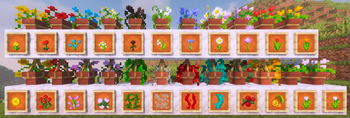
- Hanging Pots with custom flower models and a wide variety of supported plants
- Book Stacks with different models that can power an enchantment table
- Blinds to add details to your windows or create new types of entrances
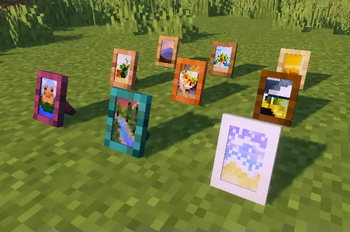
- Picture Frames with all 16x16 Vanilla Painting motives and more
- Rope that Hanging Pots and other Blocks can be attached to and Players can climb
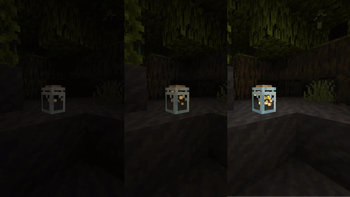
- New forms of light sources: Bamboo Lantern, Candelabras/ Chandeliers, Glowessence Jar, Light Bulbs
- Lattices for putting plants on walls and ceilings
- more coming soon
For more info on the blocks and their uses, please visit the wiki!
I'm thankful for any suggestions, feedback etc. and will be working on this in the future!
Available Versions
How to Install Beautify! on Your Server
Order Server
Order a Minecraft Java server with at least 3 GB RAM (4 GB recommended).
Set forge Loader
In the panel under "Egg", select the forge loader and matching Minecraft version (1.21.1).
Install Mod
Open the mod browser in the dashboard and search for "Beautify!". Click "Install" – done! Alternatively, upload the .jar via SFTP to the /mods folder.
Compatibility
Mod Loaders
Minecraft Versions
1.21.1, 1.21, 1.20.2 (+5 more)
Server-side
✓ RequiredRecommended RAM
4 GB(min. 3 GB)Frequently Asked Questions
Beautify! server crashes on startup – what to do?
Most common cause: wrong forge version or insufficient RAM. Check the server log (latest.log) for "OutOfMemoryError" or "Mixin" errors. With Mado Hosting: ensure at least 3 GB RAM is allocated and the loader matches the mod version (1.21.1). You can switch loaders with one click in the panel.
Is Beautify! compatible with forge and neoforge?
Beautify! officially supports forge, neoforge for Minecraft 1.21.1, 1.21, 1.20.2. The Mado dashboard automatically detects incompatible loader combinations.
Server lagging with Beautify! – how to optimize performance?
Recommended RAM: 4 GB (per 8 players). Use /spark profiler to check if Beautify! consumes the most tick time. Common fixes: reduce server view-distance to 8-10, install "performant" or "starlight" as supplementary mods on Forge. With Mado Hosting, your server runs on NVMe SSDs with dedicated CPU cores for minimal latency.
Similar Mods

![[ETF] Entity Texture Features](https://cdn.modrinth.com/data/BVzZfTc1/af683d206d50b05258d865b0d6e4aa2f2cee12f2_96.webp)
![[EMF] Entity Model Features](https://cdn.modrinth.com/data/4I1XuqiY/6e5bbd0d06b1741bfdab6c0cfab6de8fdaf0064c_96.webp)



Rent Modded Server
Install Beautify! with just one click on your server.