
Cape Provider X (also PiCapes Mod)
Fork of Cape Provider Mod with upgrades by xsyanic and extended providers (PiCapes, Cosmetica, SkinMC, etc.)
Screenshots
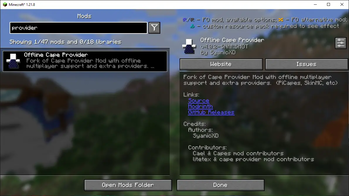
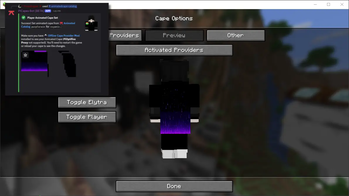
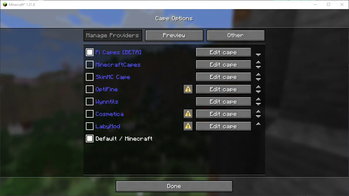
About this Mod
Cape Provider X

Adds capes to your game!
Choose from multiple providers or configure your own.
✨ About
Cape Provider X is a modified version of the Cape Provider mod, maintained by @xsyanic.
It contains everything from the original mod, plus additional improvements and integrations.
📙 How to apply capes from PiCapes?
⚠️ Compatibility Notice
You must remove any other cape-related mods before using Cape Provider X.
Having multiple cape mods installed at the same time will cause conflicts and game crashes.
🔧 Changes in This Version
- Tweaks and improvements by @xsyanic
- Added support for ✨ PiCapes
- Added support for SkinMC Capes
- Added proper support for Cosmetica Capes (
-p3and above) [Including Animated Cape Support] - General fixes and stability improvements
- Cape visible in Offline mode servers too
- Config file renamed to
config/cape-provider-x.json5(to avoid conflicts with the original mod’s config)
📖 Configuration & Custom Providers
- The programmatic cape provider and
fabric.mod.jsonfunction exactly the same as in the original. - For implementing your own provider, see the custom cape provider guide.
- Just note: the config path has changed to:
config/cape-provider-x.json5
🙌 Credits & Contributions
- Original Mod: Cape Provider by @litetex
- Modifications & Maintenance: @xsyanic
- Ports for Forge 1.8.9 & Fabric 1.21.4: @aka5h
- PiCapes Integration: PiCapes Project
- Community feedback, bug reports, and testing by all contributors ❤️
💡 This project builds upon the original work, ensuring compatibility while adding modern cape sources and quality-of-life updates.
Available Versions
How to Install Cape Provider X (also PiCapes Mod) on Your Client
Install the Mod Loader Locally
Install fabric for your local Minecraft version.
Download the Matching File
Choose the Cape Provider X (also PiCapes Mod) file for fabric and Minecraft 26.2.
Install Mod
Place the .jar file in your local .minecraft/mods folder and restart Minecraft. No server-side installation is required.
Compatibility
Mod Loaders
Minecraft Versions
26.2, 26.1.2, 26.1.1 (+7 more)
Server-side
✗ UnsupportedRecommended RAM
4 GB(min. 3 GB)Frequently Asked Questions
Does Cape Provider X (also PiCapes Mod) need to be installed on the Minecraft server?
No. Modrinth marks Cape Provider X (also PiCapes Mod) as unsupported on the server side. Install it only in your local Minecraft mods folder. Your server can remain unchanged unless the mod page lists an additional dependency.
Which version and loader does Cape Provider X (also PiCapes Mod) require?
Use a file for fabric, forge and your exact Minecraft version. Supported versions include 26.2, 26.1.2, 26.1.1. Files for different loaders are not interchangeable.
Cape Provider X (also PiCapes Mod) is not working – what should I check?
First check the Minecraft version, loader version and required dependencies. Put the .jar file in your local .minecraft/mods folder and remove older duplicates. Because this mod is client-side, adding server RAM will not fix it.
Similar Mods

![[ETF] Entity Texture Features](https://cdn.modrinth.com/data/BVzZfTc1/af683d206d50b05258d865b0d6e4aa2f2cee12f2_96.webp)
![[EMF] Entity Model Features](https://cdn.modrinth.com/data/4I1XuqiY/6e5bbd0d06b1741bfdab6c0cfab6de8fdaf0064c_96.webp)



Minecraft Server for Your Group
Cape Provider X (also PiCapes Mod) stays on your client. Host a compatible world for your group.