
Cirrus
Cloud & skybox overhaul mod.
Screenshots




About this Mod

The sky's the beginning.




Cirrus is designed to be used without Iris or shader packs.
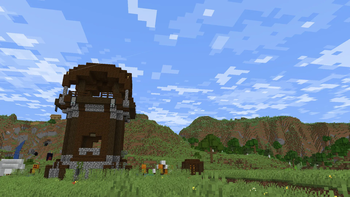
Cirrus is a client-side skybox overhaul that stays close to Minecraft's vanilla style. It adds layered clouds, richer nights, and weather-aware effects, all with an in-game config.
Client-side only. You can use Cirrus on multiplayer servers without installing it on the server.


What It Adds
- Three independently moving cloud layers with adjustable height, speed, opacity, and render distance
- Customizable morning, day, evening, and night gradients with smooth palette transitions
- Clouds that darken with storms and light up around lightning
- Narrow, layered lightning bolts with deterministic branching and electric glow
- Configurable stars with twinkle, color variation, and a North Star
- Occasional shooting stars with customizable trails, speed, color, and glow
- A rotating Milky Way and a subtle night-sky color palette
- Animated northern lights that appear in cold biomes by default (configurable!)
- A configurable End sky with moving clouds, lightning, and waves of spreading darkness
Every major effect can be adjusted or turned off!!!


Requirements and compatibility
- Minecraft 1.21.1 - NeoForge
- Requires Architectury API and YetAnotherConfigLib
- Minecraft 1.21.1 - Fabric
- Requires Fabric API, Architectury API, and YetAnotherConfigLib
- Minecraft 1.21.10 - Fabric
- Requires Fabric API and YetAnotherConfigLib
- Minecraft 1.21.11 - Fabric
- Requires Fabric API and YetAnotherConfigLib
- Minecraft 26.1 - Fabric
- Requires Fabric API and YetAnotherConfigLib
- Minecraft 26.2 - Fabric
- Requires Fabric API and YetAnotherConfigLib
Optional mod compatibility
- Distant Horizons 3.2+ is supported on all listed versions above
- Caelum compatibility is available only on Minecraft 1.21.1 NeoForge
- Where Winds Blow compatibility is available only on Minecraft 1.21.1 NeoForge
- Shader packs and mods that replace cloud or sky rendering may override Cirrus or cause visual conflicts


Modpacks, credits & license
Modpacks
You may use this mod in modpacks, videos, servers, and other projects. A link back to the Modrinth page is appreciated.
Credits
Created by me :D
License
All Rights Reserved.
Feel free to use this mod in modpacks, videos, etc. Just provide a link back to this page if possible :)
Please don't port this mod without express permission from me.
For general questions, contact me on Twitter (@prodbyjvn) or Discord (ijvn).
Cirrus is officially distributed only through CurseForge and Modrinth. Downloads from other sites are not official releases.
Available Versions
How to Install Cirrus on Your Client
Install the Mod Loader Locally
Install fabric for your local Minecraft version.
Download the Matching File
Choose the Cirrus file for fabric and Minecraft 26.3.
Install Mod
Place the .jar file in your local .minecraft/mods folder and restart Minecraft. No server-side installation is required.
Compatibility
Mod Loaders
Minecraft Versions
26.3, 26.2, 26.1.2 (+5 more)
Server-side
✗ UnsupportedRecommended RAM
4 GB(min. 3 GB)Frequently Asked Questions
Does Cirrus need to be installed on the Minecraft server?
No. Modrinth marks Cirrus as unsupported on the server side. Install it only in your local Minecraft mods folder. Your server can remain unchanged unless the mod page lists an additional dependency.
Which version and loader does Cirrus require?
Use a file for fabric, neoforge and your exact Minecraft version. Supported versions include 26.3, 26.2, 26.1.2. Files for different loaders are not interchangeable.
Cirrus is not working – what should I check?
First check the Minecraft version, loader version and required dependencies. Put the .jar file in your local .minecraft/mods folder and remove older duplicates. Because this mod is client-side, adding server RAM will not fix it.
Similar Mods

![[ETF] Entity Texture Features](https://cdn.modrinth.com/data/BVzZfTc1/af683d206d50b05258d865b0d6e4aa2f2cee12f2_96.webp)
![[EMF] Entity Model Features](https://cdn.modrinth.com/data/4I1XuqiY/6e5bbd0d06b1741bfdab6c0cfab6de8fdaf0064c_96.webp)



Minecraft Server for Your Group
Cirrus stays on your client. Host a compatible world for your group.