
CobbleFurnies
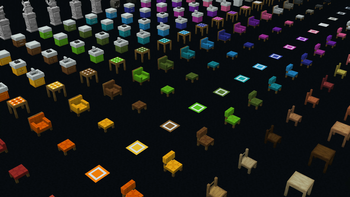
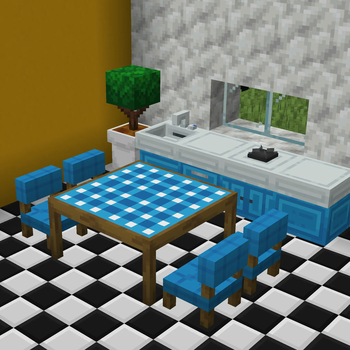
CobbleFurnies is here to bring your creations to life with beautifully crafted, Cobblemon-inspired furniture that blends seamlessly into your Minecraft world!
Screenshots
About this Mod


Whether you're building a professor's lab, a bustling Pokécenter, or just a cozy cabin in the woods, CobbleFurnies is here to bring your creations to life with beautifully crafted, Cobblemon-inspired furniture that blends seamlessly into your Minecraft world!


Frequently Asked Questions
Q: Can I use this mod in my modpack or create content with it? A: Absolutely! You're welcome to include CobbleFurnies in your modpack or feature it in your videos. Just remember to credit the mod appropriately and avoid claiming it as your own work.
Q: Some blocks turn into stoves or other CobbleFurnies blocks on my screen. What’s happening?
A: This issue occurs when the server and client are using different versions of CobbleFurnies. Because block registries must match exactly, using mismatched versions can cause blocks from other mods—or even vanilla blocks—to appear incorrectly.
To fix it, make sure both the server and all players are using the same CobbleFurnies version.
Credits
Special thanks to Starfish Studios, the creators of Another Furniture for their contributions to the registry, table, and chair code, which helped make this mod possible.
Special thanks to MrCrayfish, the creator of Refurbished Furniture, which I had inspiration for making the custom crafting.
CobbleFurnies is not affiliated with Cobblemon nor Minecraft.
Minecraft is a trademark of Mojang Synergies AB | Cobblemon is a trademark of CobbledStudios
Available Versions
How to Install CobbleFurnies on Your Server
Order Server
Order a Minecraft Java server with at least 3 GB RAM (4 GB recommended).
Set fabric Loader
In the panel under "Egg", select the fabric loader and matching Minecraft version (1.21.1).
Install Mod
Open the mod browser in the dashboard and search for "CobbleFurnies". Click "Install" – done! Alternatively, upload the .jar via SFTP to the /mods folder.
Compatibility
Mod Loaders
Minecraft Versions
1.21.1
Server-side
✓ RequiredRecommended RAM
4 GB(min. 3 GB)Frequently Asked Questions
CobbleFurnies server crashes on startup – what to do?
Most common cause: wrong fabric version or insufficient RAM. Check the server log (latest.log) for "OutOfMemoryError" or "Mixin" errors. With Mado Hosting: ensure at least 3 GB RAM is allocated and the loader matches the mod version (1.21.1). You can switch loaders with one click in the panel.
Is CobbleFurnies compatible with fabric and neoforge?
CobbleFurnies officially supports fabric, neoforge for Minecraft 1.21.1. The Mado dashboard automatically detects incompatible loader combinations.
Server lagging with CobbleFurnies – how to optimize performance?
Recommended RAM: 4 GB (per 8 players). Use /spark profiler to check if CobbleFurnies consumes the most tick time. Common fixes: reduce server view-distance to 8-10, install "performant" or "starlight" as supplementary mods on Forge. With Mado Hosting, your server runs on NVMe SSDs with dedicated CPU cores for minimal latency.
Similar Mods

![[ETF] Entity Texture Features](https://cdn.modrinth.com/data/BVzZfTc1/af683d206d50b05258d865b0d6e4aa2f2cee12f2_96.webp)
![[EMF] Entity Model Features](https://cdn.modrinth.com/data/4I1XuqiY/6e5bbd0d06b1741bfdab6c0cfab6de8fdaf0064c_96.webp)



Rent Modded Server
Install CobbleFurnies with just one click on your server.