
Crafting Station: JEI Edition
A port of the Crafting Station mod to add JEI integration, and some other fixes
Screenshots
About this Mod
This is just a fork of tfarecnim's Crafting Station mod, with added JEI support. tfarecnim wasn't interested in adding it but there was enough demand, and its an MIT licence, so here we are!
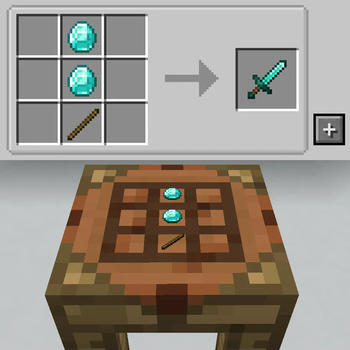
Crafting Station is a slight tweak to how crafting tables work. Origanlly from Tinkers Construct, this crafting station keeps your items stored and displays them on top. It also has access to any neighbouring inventories (with an optional blacklist for modpack creators)
Players with JEI can now get the "+" icon on their crafting station to import a recipe, just like you'd expect on any other crafting bench.
Version 1 (including 1b and 1c) are fully backwards compatible with the original. That means if you're playing a server with the original version of the mod, you can safely use these tweaked versions to get the JEI support you need. 1c also includes fixes to the table rendering.
Version 1.1 onwards are a complete fork - you'll need this version of the mod on the server too. This version adds support for Polymorph if installed (so you can select from conflicting recipes), and also adds the crafting station to the creative tab menu.
My future plans are for a ground-up rewrite with new features, a new look and generally a bit of a more involved mod - but thats a ways off yet. This should help for now!
GIF to show functionality:

Available Versions
How to Install Crafting Station: JEI Edition on Your Client
Install the Mod Loader Locally
Install forge for your local Minecraft version.
Download the Matching File
Choose the Crafting Station: JEI Edition file for forge and Minecraft 1.20.1.
Install Mod
Place the .jar file in your local .minecraft/mods folder and restart Minecraft. No server-side installation is required.
Compatibility
Mod Loaders
Minecraft Versions
1.20.1
Server-side
✗ UnsupportedRecommended RAM
4 GB(min. 3 GB)Frequently Asked Questions
Does Crafting Station: JEI Edition need to be installed on the Minecraft server?
No. Modrinth marks Crafting Station: JEI Edition as unsupported on the server side. Install it only in your local Minecraft mods folder. Your server can remain unchanged unless the mod page lists an additional dependency.
Which version and loader does Crafting Station: JEI Edition require?
Use a file for forge and your exact Minecraft version. Supported versions include 1.20.1. Files for different loaders are not interchangeable.
Crafting Station: JEI Edition is not working – what should I check?
First check the Minecraft version, loader version and required dependencies. Put the .jar file in your local .minecraft/mods folder and remove older duplicates. Because this mod is client-side, adding server RAM will not fix it.
Similar Mods

![[ETF] Entity Texture Features](https://cdn.modrinth.com/data/BVzZfTc1/af683d206d50b05258d865b0d6e4aa2f2cee12f2_96.webp)
![[EMF] Entity Model Features](https://cdn.modrinth.com/data/4I1XuqiY/6e5bbd0d06b1741bfdab6c0cfab6de8fdaf0064c_96.webp)



Minecraft Server for Your Group
Crafting Station: JEI Edition stays on your client. Host a compatible world for your group.