
Create Efficient Visuals
Create factory gauge client-side optimization. based on flywheel
Screenshots
About this Mod
This mod does a low-hanging-fruit optimization for Create factory gauge rendering.
Why It was Slow
Factory Gauge is a block entity, and the base mod renderer does vertex transform for gauge paths every frame. this has very high overhead considering the path is mostly unchanged across frames. Existing approaches such as createbetterfps, Flerovium does not change this immediate mode model; This mod utilizes flywheel to provide instancing support.
Limitations
Item may have custom renderer. those item will fallback to slow path.
This mod is client only. it doesn't optimize server ticks.
This mod is ad-hoc, low-hanging fruit optimization for create factory gauge rendering. it doesn't provide a full solution to making your fps better.
This mod optimizes CPU frame time more than GPU frame time. if shader used, improvement may be small.
Evaluation
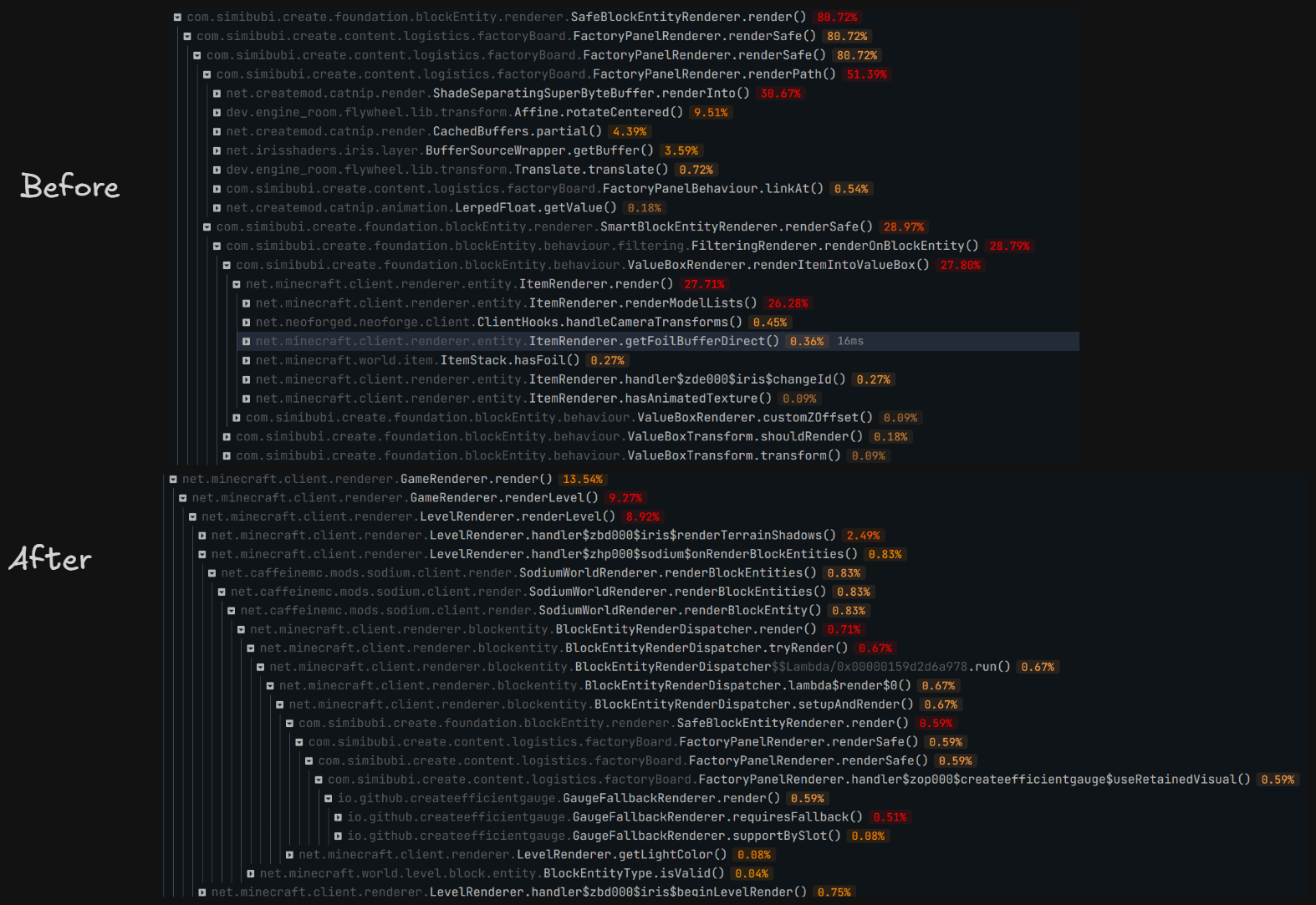
Evaluated in controlled scenario: superflat world, with a 10x30 wall, each block has 4 gauges. significant improvement in sparkc profiler. result in figure.
Evaluated in realworld scenario: referencial 80h+ survival world, same spot standing still. VSync off, max frame no limit, sodium: CPU render ahead 1 frame, photon shader ultra preset.after warm up, PresentMon shows (10s interval)
| Metric | Without | With | Change |
|---|---|---|---|
Avg frame interval MsBetweenPresents |
11.291 ms | 10.618 ms | Decreased by 0.673 ms, ~5.96% |
| Corresponding throughput | 88.57 FPS | 94.18 FPS | Increased by ~6.3% |
| p50 frame interval | 10.644 ms | 10.252 ms | Decreased by ~3.7% |
MsGPUTime |
11.290 ms | 10.617 ms | Decreased by 0.673 ms |
MsGPUBusy |
10.802 ms | 10.498 ms | Decreased by 0.304 ms, ~2.8% |
MsGPUWait |
0.489 ms | 0.120 ms | Decreased by 0.369 ms, ~75% |
MsGPULatency |
12.594 ms | 14.526 ms | Increased by 1.932 ms |
MsInPresentAPI |
0.124 ms | 0.109 ms | Both very small |
CPUUtilization reported by PresentMon |
29.10% | 20.16% | Decreased by ~31% |
Available Versions
How to Install Create Efficient Visuals on Your Client
Install the Mod Loader Locally
Install neoforge for your local Minecraft version.
Download the Matching File
Choose the Create Efficient Visuals file for neoforge and Minecraft 1.21.1.
Install Mod
Place the .jar file in your local .minecraft/mods folder and restart Minecraft. No server-side installation is required.
Compatibility
Mod Loaders
Minecraft Versions
1.21.1
Server-side
✗ UnsupportedRecommended RAM
6 GB(min. 4 GB)Frequently Asked Questions
Does Create Efficient Visuals need to be installed on the Minecraft server?
No. Modrinth marks Create Efficient Visuals as unsupported on the server side. Install it only in your local Minecraft mods folder. Your server can remain unchanged unless the mod page lists an additional dependency.
Which version and loader does Create Efficient Visuals require?
Use a file for neoforge and your exact Minecraft version. Supported versions include 1.21.1. Files for different loaders are not interchangeable.
Create Efficient Visuals is not working – what should I check?
First check the Minecraft version, loader version and required dependencies. Put the .jar file in your local .minecraft/mods folder and remove older duplicates. Because this mod is client-side, adding server RAM will not fix it.
Similar Mods


Minecraft Server for Your Group
Create Efficient Visuals stays on your client. Host a compatible world for your group.