
Dynamic Performance
A vanilla-preserving and lightweight performance mod that dynamically adjusts view distance, simulation distance, and the mob cap based on the server's load.
Screenshots
About this Mod
Dynamic Performance
A vanilla-preserving and lightweight performance mod that dynamically adjusts view distance, simulation distance, and the mob cap based on the server's load.
Ideal for server owners who want to keep the best possible playing experience even on weaker hardware.
Why use this mod?
- Dynamic Scaling:
By checking the server's MSPT (milliseconds per tick), it dynamically scales to ideal settings, ensuring that the server runs as well as it is able to. - Extensible Configuration:
The kind of scaling, as well as the check interval, is fully configurable for your hardware's capabilities. - Flexible and Compatible:
This mod works in singleplayer and multiplayer, supports Fabric and NeoForge, and is compatible with all other performance mods. - Comprehensible:
By using the provided commands to check the current server status, review the active config, and reload config changes, it's easy to understand exactly what's going on.
How it works
Dynamic Performance monitors the current MSPT by checking it every 15 seconds or so. For further information, consult the Configuration section.
Side Info: A healthy server targets 20 TPS (ticks per second) and, therefore, 50 MSPT at max. So, the lag threshold should be around this value.
Furthermore, if the MSPT exceeds the lag threshold, the server starts scaling down as configured in the performance levels until it no longer exceeds the threshold. The same is true for recovery: If the MSPT is lower than the recovery threshold, the server starts scaling up based on the mentioned levels, now in reverse.
If the MSPT stays between the lag and recovery thresholds, no scaling changes are made. The server is then considered stable. See the Performance States section for more details.
Installation
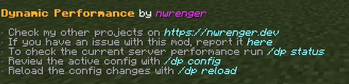
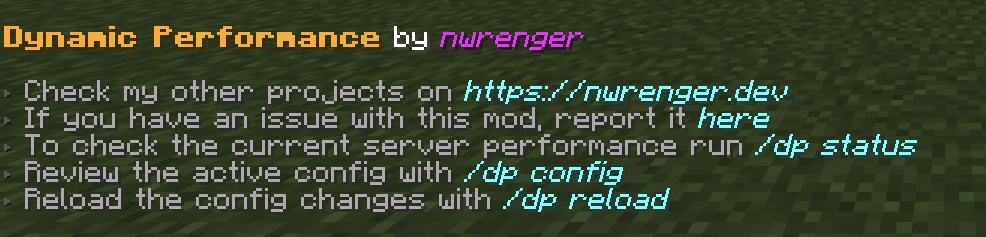
After adding the mod to your world or server, you should be able to open the about panel, which is fully controllable with the mouse:
/dp about
or
/dynamicperformance about
Status
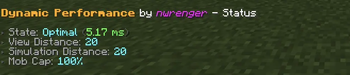
The current performance state, MSPT, view distance, simulation distance, and mob cap percentage can be checked with:
/dp status
or
/dynamicperformance status
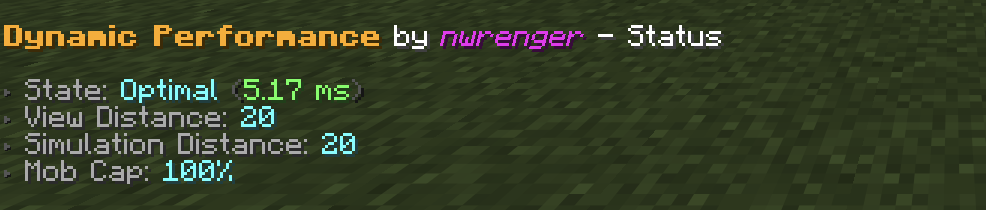
Performance States
The following performance states are reported:
Optimal: All configured levels are restored.Stable: MSPT is between the recovery and lag thresholds.Scaling Down: MSPT is high and settings can still be reduced.Lagging: MSPT is high, but all configured levels are already at their minimum values.Scaling Up: Settings are being restored.
Configuration
A config file is created at:
./config/dynamic-performance.json
Default contents:
{
  "interval": 15,
  "lag_threshold": 45.0,
  "recovery_threshold": 30.0,
  "levels": [
    {
      "type": "SIMULATION_DISTANCE",
      "max": 16,
      "min": 8,
      "increment": 1
    },
    {
      "type": "MOB_CAP_PERCENTAGE",
      "max": 100,
      "min": 75,
      "increment": 5
    },
    {
      "type": "SIMULATION_DISTANCE",
      "max": 8,
      "min": 5,
      "increment": 1
    },
    {
      "type": "MOB_CAP_PERCENTAGE",
      "max": 75,
      "min": 30,
      "increment": 15
    },
    {
      "type": "VIEW_DISTANCE",
      "max": 20,
      "min": 4,
      "increment": 2
    }
  ]
}
This config keeps the most visible change, view distance, as the last fallback while reducing server-side load earlier through simulation distance and mob spawning.
Options
interval: How often, in seconds, the server performance is checked and adjusted.lag_threshold: MSPT value at which scaling down starts.recovery_threshold: MSPT value at or below which scaling back up starts.levels: Ordered scaling rules for view distance, simulation distance, and mob cap percentage.
Level Types
Supported level types:
VIEW_DISTANCE: Adjusts the server view distance.SIMULATION_DISTANCE: Adjusts the server simulation distance.MOB_CAP_PERCENTAGE: Adjusts the mob cap as a percentage of vanilla mob caps.
Each level has:
max: Highest value the mod may restore this setting to.min: Lowest value the mod may reduce this setting to.increment: Step size used when scaling up or down.
The order matters. Scaling down follows the list from top to bottom, while scaling back up follows it from bottom to top.
Active Configuration
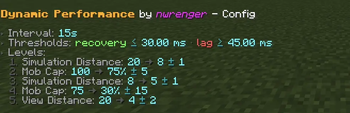
The active configuration can be reviewed in-game with:
/dp config
or
/dynamicperformance config
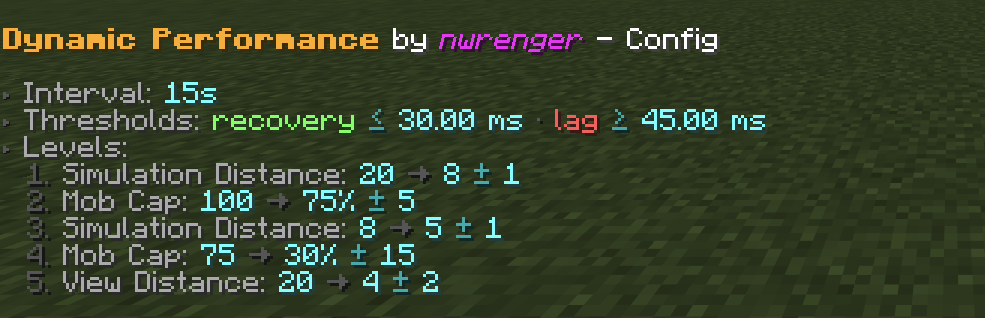
The screenshot shows the default config listed above.
Reload
After editing the config file, apply changes without restarting by running:
/dp reload
or
/dynamicperformance reload
If the config is invalid, the command reports the error and keeps the previous valid config active.
Contributing & Issues
I warmly welcome:
- Bug reports
- Feature requests
- Pull requests
Please open issues or PRs on GitHub.
License
This project is licensed under the LGPLv3 License. See LICENSE for details.
Available Versions
How to Install Dynamic Performance on Your Server
Order Server
Order a Minecraft Java server with at least 3 GB RAM (4 GB recommended).
Set fabric Loader
In the panel under "Egg", select the fabric loader and matching Minecraft version (26.3).
Install Mod
Open the mod browser in the dashboard and search for "Dynamic Performance". Click "Install" – done! Alternatively, upload the .jar via SFTP to the /mods folder.
Compatibility
Mod Loaders
Minecraft Versions
26.3, 26.2, 26.1.2 (+7 more)
Server-side
✓ RequiredRecommended RAM
4 GB(min. 3 GB)Frequently Asked Questions
Dynamic Performance server crashes on startup – what to do?
Most common cause: wrong fabric version or insufficient RAM. Check the server log (latest.log) for "OutOfMemoryError" or "Mixin" errors. With Mado Hosting: ensure at least 3 GB RAM is allocated and the loader matches the mod version (26.3). You can switch loaders with one click in the panel.
Is Dynamic Performance compatible with fabric and neoforge and quilt?
Dynamic Performance officially supports fabric, neoforge, quilt for Minecraft 26.3, 26.2, 26.1.2. The Mado dashboard automatically detects incompatible loader combinations.
Server lagging with Dynamic Performance – how to optimize performance?
Recommended RAM: 4 GB (per 8 players). Use /spark profiler to check if Dynamic Performance consumes the most tick time. Common fixes: reduce server view-distance to 8-10, install "performant" or "starlight" as supplementary mods on Forge. With Mado Hosting, your server runs on NVMe SSDs with dedicated CPU cores for minimal latency.
Similar Mods


Rent Modded Server
Install Dynamic Performance with just one click on your server.