
Entity Culling
Skip rendering of hidden entities
About this Mod
Entity Culling - 1.16.5 - 2.1.4 and newer versions are only compatible with Optifine G8!
Entity Culling - 1.16.5 - 2.1.3 and older versions are only compatible with Optifine G7!
Entity Culling - 1.12.2 - 2.0.8 and newer versions are only compatible with Optifine G5!
Entity Culling - 1.12.2 - 2.0.7 and older versions are only compatible with Optifine F5!
This mod requires MixinBootstrap (curseforge, modrinth) and RenderLib (curseforge, modrinth) to run (MC 1.12.2 only)!
Mixin 0.7-0.8 Compatibility (curseforge, modrinth) might be helpful when another mod uses an older mixin version and you are thus unable to launch the game (MC 1.12.2 only).
Entity Culling is a client-side performance mod that aims to skip rendering of hidden (tile-)entities.
In vanilla, it just renders all (tile-)entities that are in the field of view of the player. This means there may be hundreds of (tile-)entities eating your fps while you can't even see them because they are hidden behind a wall.
Culling of hidden Entities
By default, this mod uses an OpenGL occlusion culling implementation which gives you pixel-perfect bounding box culling with only one frame delay and a very small overhead.
If your hardware does not support OpenGL 4.3 then this mod uses a raytraced culling implementation. The raytraced culling is more CPU intensive while the OpenGL culling is more GPU intensive and thus depending on your hardware you might want to prefer one over the other.
This can result in massive FPS improvements when a lot of (tile-)entities are on the screen but not visible because they are occluded.
Test with EntityCulling-1.12.2-6.0.2 inside a Chocolate Quest Repoured dungeon with ~200 entities on screen shows huge improvements!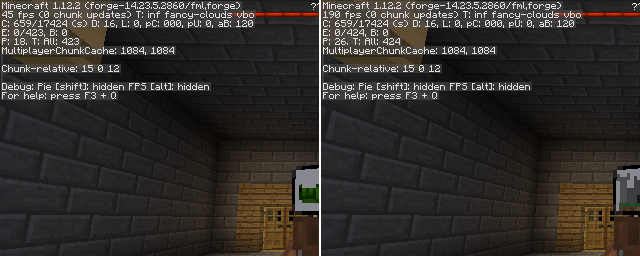


Available Versions
How to Install Entity Culling on Your Client
Install the Mod Loader Locally
Install forge for your local Minecraft version.
Download the Matching File
Choose the Entity Culling file for forge and Minecraft 1.16.5.
Install Mod
Place the .jar file in your local .minecraft/mods folder and restart Minecraft. No server-side installation is required.
Compatibility
Mod Loaders
Minecraft Versions
1.16.5, 1.12.2
Server-side
✗ UnsupportedRecommended RAM
4 GB(min. 3 GB)Frequently Asked Questions
Does Entity Culling need to be installed on the Minecraft server?
No. Modrinth marks Entity Culling as unsupported on the server side. Install it only in your local Minecraft mods folder. Your server can remain unchanged unless the mod page lists an additional dependency.
Which version and loader does Entity Culling require?
Use a file for forge and your exact Minecraft version. Supported versions include 1.16.5, 1.12.2. Files for different loaders are not interchangeable.
Entity Culling is not working – what should I check?
First check the Minecraft version, loader version and required dependencies. Put the .jar file in your local .minecraft/mods folder and remove older duplicates. Because this mod is client-side, adding server RAM will not fix it.
Similar Mods


Minecraft Server for Your Group
Entity Culling stays on your client. Host a compatible world for your group.