
Create: Extended Cogwheels
A small mod to add more cog types to create
About this Mod
This mod is an add-on to Create adding new materials to cogwheels to help with decoration and organisation
For more decorations for create check out Dave's building extended, Powderlogy & Illumination and Extended Flywheels
Materials
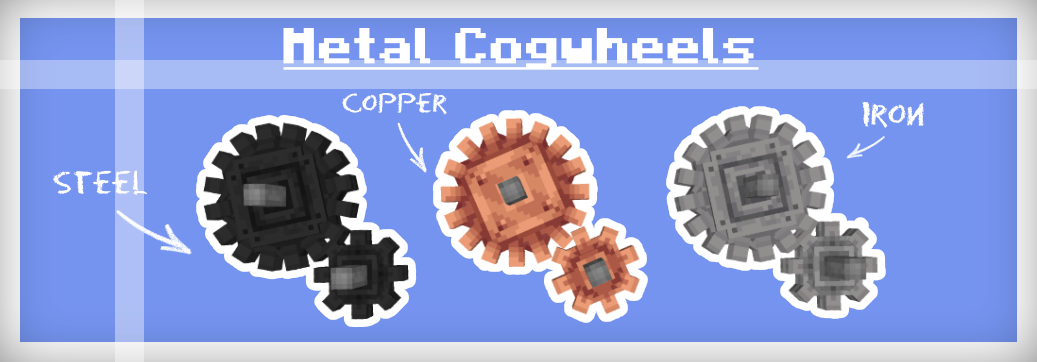
Dont worry there isn't yet another steel ingot implemented in this mod nor does it depend on any other mods that add steel. To make the mod as compatible with existing worlds as possible iron cogwheels can be blasted to turn into steel flywheels, or if steel is in your modpack then they can be crafted like any other cogwheel using steel ingots.
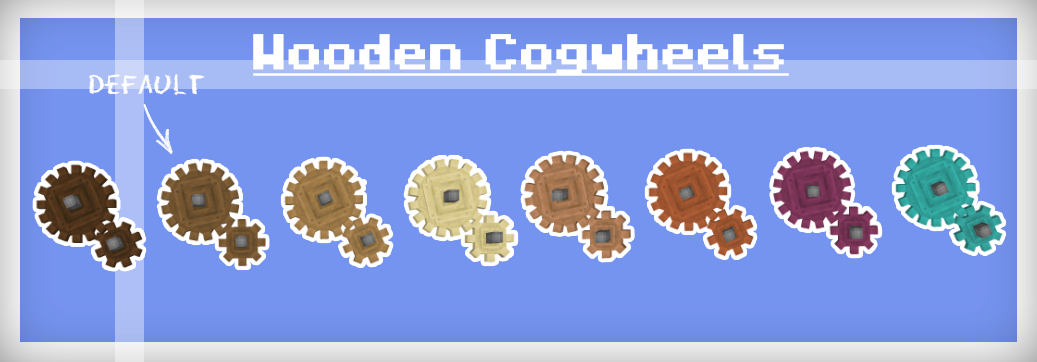
The recipe for regular cogwheels has been changed so that they can only be crafted with spruce planks, all recipes that use cogwheels have also been altered to accept any cogwheel type to prevent incompatibility
Showcase
Localization
Localization
If would like to, any help with translation would be highly appreciated
note - some words may be slightly altered or blocks may be missing a name please report them to me so that they can be fixed :)
- en_us
- en_uk
- pl_pl Polish RBus
- de_de German Itzz_Fabi
- nl_nl Dutch Siepert
- ko_kr Korean AsseyGithub
- zh_cn Chinese (Simplified) Junnaturefox
- pt_br Brazilian Portuguese Makzzin
- es_mx Mexican Spanish IceBeam1
- zh_tw Chinese (Traditional) EvanHsieh0415
Issues
If you find any issues or want to suggest a feature you can submit them on GitHub or on our Discord server

Available Versions
How to Install Create: Extended Cogwheels on Your Server
Order Server
Order a Minecraft Java server with at least 4 GB RAM (6 GB recommended).
Set fabric Loader
In the panel under "Egg", select the fabric loader and matching Minecraft version (1.20.1).
Install Mod
Open the mod browser in the dashboard and search for "Create: Extended Cogwheels". Click "Install" – done! Alternatively, upload the .jar via SFTP to the /mods folder.
Compatibility
Mod Loaders
Minecraft Versions
1.20.1, 1.19.2, 1.18.2
Server-side
✓ RequiredRecommended RAM
6 GB(min. 4 GB)Frequently Asked Questions
Create: Extended Cogwheels server crashes on startup – what to do?
Most common cause: wrong fabric version or insufficient RAM. Check the server log (latest.log) for "OutOfMemoryError" or "Mixin" errors. With Mado Hosting: ensure at least 4 GB RAM is allocated and the loader matches the mod version (1.20.1). You can switch loaders with one click in the panel.
Is Create: Extended Cogwheels compatible with fabric and forge and neoforge and quilt?
Create: Extended Cogwheels officially supports fabric, forge, neoforge, quilt for Minecraft 1.20.1, 1.19.2, 1.18.2. Note: Forge and Fabric mods are NOT cross-compatible – pick one loader and stick with it. The Mado dashboard automatically detects incompatible loader combinations.
Server lagging with Create: Extended Cogwheels – how to optimize performance?
Recommended RAM: 6 GB (per 5 players). Use /spark profiler to check if Create: Extended Cogwheels consumes the most tick time. Common fixes: reduce server view-distance to 8-10, install "performant" or "starlight" as supplementary mods on Forge. With Mado Hosting, your server runs on NVMe SSDs with dedicated CPU cores for minimal latency.
Similar Mods

![[ETF] Entity Texture Features](https://cdn.modrinth.com/data/BVzZfTc1/af683d206d50b05258d865b0d6e4aa2f2cee12f2_96.webp)
![[EMF] Entity Model Features](https://cdn.modrinth.com/data/4I1XuqiY/6e5bbd0d06b1741bfdab6c0cfab6de8fdaf0064c_96.webp)



Rent Modded Server
Install Create: Extended Cogwheels with just one click on your server.