
Fast Paintings
Fixes painting rendering, increasing their performance and allowing them to have custom models
Screenshots
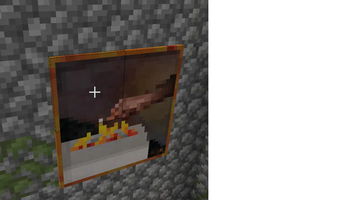
About this Mod
Fast Paintings




📖About 📖
[You are allowed to use this mod in Modrinth modpacks]
Fast Painting is a Performance Mod aimed at making Paintings render way faster
To do so the mod simply replaces them with their block equivalent form.
Block paintings will use baked models instead of tile renderer which makes them as fast as they could be
Moreover these are just blocks now so the lag associated with the painting entity ticking is gone too!
This approach also makes painting update immediately when you bereak their supporting block and also allows them to have particles
Moveover, as a side effect, the mod also allows you to entirely customize the painting model.
Infact the base model fixes a vanilla bug where the edge of the painting do not have their correct texture
Oh and dont worry you can still pass right through them. Screet doors yay!
❤️Support Me❤️
Modding is taking a lot of my time, so if you like what I do, and you would like to support me, you can do so here. If you do, you'll receive a custom Globe and or Statue just for you! This also applies if you purchase a server from Akliz using "supplementaries" code.

Need a server? Check out Akliz, they have top brand servers just for modded minecraft. They really have a cozy community with great support and the servers wonderfully
Use code "supplementaries" to get 20% off and also support me in the process!

🦉 Our Mods🦉








Available Versions
How to Install Fast Paintings on Your Server
Order Server
Order a Minecraft Java server with at least 3 GB RAM (4 GB recommended).
Set fabric Loader
In the panel under "Egg", select the fabric loader and matching Minecraft version (26.1.2).
Install Mod
Open the mod browser in the dashboard and search for "Fast Paintings". Click "Install" – done! Alternatively, upload the .jar via SFTP to the /mods folder.
Compatibility
Mod Loaders
Minecraft Versions
26.1.2, 1.21.1, 1.21 (+3 more)
Server-side
✓ RequiredRecommended RAM
4 GB(min. 3 GB)Frequently Asked Questions
Fast Paintings server crashes on startup – what to do?
Most common cause: wrong fabric version or insufficient RAM. Check the server log (latest.log) for "OutOfMemoryError" or "Mixin" errors. With Mado Hosting: ensure at least 3 GB RAM is allocated and the loader matches the mod version (26.1.2). You can switch loaders with one click in the panel.
Is Fast Paintings compatible with fabric and forge and neoforge?
Fast Paintings officially supports fabric, forge, neoforge for Minecraft 26.1.2, 1.21.1, 1.21. Note: Forge and Fabric mods are NOT cross-compatible – pick one loader and stick with it. The Mado dashboard automatically detects incompatible loader combinations.
Server lagging with Fast Paintings – how to optimize performance?
Recommended RAM: 4 GB (per 8 players). Use /spark profiler to check if Fast Paintings consumes the most tick time. Common fixes: reduce server view-distance to 8-10, install "performant" or "starlight" as supplementary mods on Forge. With Mado Hosting, your server runs on NVMe SSDs with dedicated CPU cores for minimal latency.
Similar Mods


Rent Modded Server
Install Fast Paintings with just one click on your server.