
Info Overlay
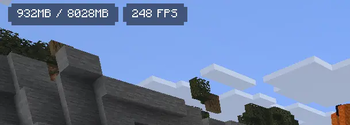
🖥️ Displays your FPS and other information on the screen. Supports large customization and new versions of Minecraft.
Screenshots
About this Mod

ℹ️ Information
📃 Description
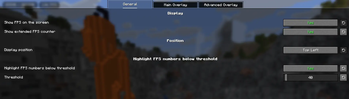
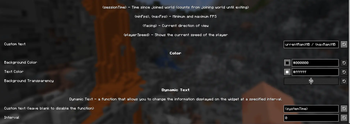
The mod allows you to display your FPS, as well as other information such as system time, coordinates, etc. You can freely edit the text using placeholders. You can also change the color, position, transparency of the overlay.
✨ Features
- Beautiful and minimalistic
- Huge customization
- Support for new versions starting from 1.20
❔ Usage examples
- Display your coordinates to mine resources more conveniently
- Show RAM usage and FPS to monitor your modpack’s performance
- Display in-game time and weather to stay isolated from society underground
- Show real-world time so you don’t have to go outside
- Display your facing direction to find your home
⚙️ Dependencies
- Fabric API (QFAPI for Quilt)
- Mod Menu (optional)
- Midnight Lib (for <1.9.1)
- YACL (for >2.0)
🌍 Languages
List of available languages
- English (en_us)
- Russian (ru_ru)
- Ukrainian (uk_ua)
- Belarusian (be_by)
- Simplified Chinese
- Chinese (Simplified)
- Arabic (Saudi Arabia)
- Catalan (Spain)
- Czech
- Danish
- German
- Greek
- Spanish (Spain)
- Finnish
- French
- Italian
- Japanese
- Dutch
- Norwegian
- Polish
- Portuguese (Brazil)
- Portuguese (Portugal)
- Romanian
- Swedish
- Vietnamese
Help with the translation on Crowdin!
Available Versions
How to Install Info Overlay on Your Client
Install the Mod Loader Locally
Install fabric for your local Minecraft version.
Download the Matching File
Choose the Info Overlay file for fabric and Minecraft 26.2.
Install Mod
Place the .jar file in your local .minecraft/mods folder and restart Minecraft. No server-side installation is required.
Compatibility
Mod Loaders
Minecraft Versions
26.2, 26.1.2, 26.1.1 (+20 more)
Server-side
✗ UnsupportedRecommended RAM
4 GB(min. 3 GB)Frequently Asked Questions
Does Info Overlay need to be installed on the Minecraft server?
No. Modrinth marks Info Overlay as unsupported on the server side. Install it only in your local Minecraft mods folder. Your server can remain unchanged unless the mod page lists an additional dependency.
Which version and loader does Info Overlay require?
Use a file for fabric, quilt and your exact Minecraft version. Supported versions include 26.2, 26.1.2, 26.1.1. Files for different loaders are not interchangeable.
Info Overlay is not working – what should I check?
First check the Minecraft version, loader version and required dependencies. Put the .jar file in your local .minecraft/mods folder and remove older duplicates. Because this mod is client-side, adding server RAM will not fix it.
Similar Mods

![[ETF] Entity Texture Features](https://cdn.modrinth.com/data/BVzZfTc1/af683d206d50b05258d865b0d6e4aa2f2cee12f2_96.webp)
![[EMF] Entity Model Features](https://cdn.modrinth.com/data/4I1XuqiY/6e5bbd0d06b1741bfdab6c0cfab6de8fdaf0064c_96.webp)



Minecraft Server for Your Group
Info Overlay stays on your client. Host a compatible world for your group.