
Fullbright No Shading
A clean client-side fullbright and no-shading mod for brighter, sharper Minecraft visuals.
Screenshots
About this Mod
Fullbright No Shading
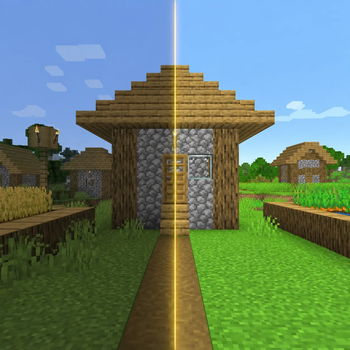
Fullbright No Shading is a lightweight client-side Fabric mod that makes Minecraft visuals brighter, cleaner, and easier to read.
It combines powerful fullbright controls with no-shading options inspired by clean visual enhancement mods, giving caves, villages, entities, items, blocks, fluids, and clouds a sharper and more consistent look.
Features
- Toggleable fullbright
- Fullbright strength slider up to 1200%
- Increase/decrease brightness with keybinds
- Open config GUI with a keybind
- Cloth Config GUI support
- Mod Menu integration
- No Block Shading option
- No Cloud Shading option
- No Entity Shading option
- Saves settings automatically
- Client-side only
FPS / Performance
This mod can help FPS slightly in some cases because no-shading options reduce some visual lighting/shading work, especially for block, cloud, and entity rendering.
It is not a full performance mod like Sodium, but it is lightweight and should not noticeably reduce FPS. For most players, it should feel neutral or slightly better while making the game look much clearer.
Recommended With
- Sodium
- Mod Menu
- Cloth Config API
Credits
Made by R3MU
Credits to Spunkyinsaan & StartsMercury.
Available Versions
How to Install Fullbright No Shading on Your Client
Install the Mod Loader Locally
Install fabric for your local Minecraft version.
Download the Matching File
Choose the Fullbright No Shading file for fabric and Minecraft 26.2.
Install Mod
Place the .jar file in your local .minecraft/mods folder and restart Minecraft. No server-side installation is required.
Compatibility
Mod Loaders
Minecraft Versions
26.2, 26.1.2, 26.1.1 (+13 more)
Server-side
✗ UnsupportedRecommended RAM
4 GB(min. 3 GB)Frequently Asked Questions
Does Fullbright No Shading need to be installed on the Minecraft server?
No. Modrinth marks Fullbright No Shading as unsupported on the server side. Install it only in your local Minecraft mods folder. Your server can remain unchanged unless the mod page lists an additional dependency.
Which version and loader does Fullbright No Shading require?
Use a file for fabric and your exact Minecraft version. Supported versions include 26.2, 26.1.2, 26.1.1. Files for different loaders are not interchangeable.
Fullbright No Shading is not working – what should I check?
First check the Minecraft version, loader version and required dependencies. Put the .jar file in your local .minecraft/mods folder and remove older duplicates. Because this mod is client-side, adding server RAM will not fix it.
Similar Mods


Minecraft Server for Your Group
Fullbright No Shading stays on your client. Host a compatible world for your group.