
inputbooster
InputBooster – Ultra-fast input polling for Minecraft PvP, capturing missed clicks, maintaining sprint, and improving combat responsiveness, even at low FPS. Compatible with Fabric and performance mods like Sodium & Lithium.
Screenshots
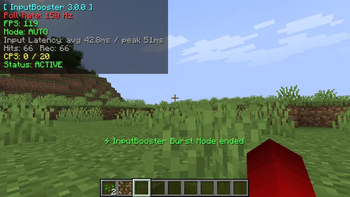
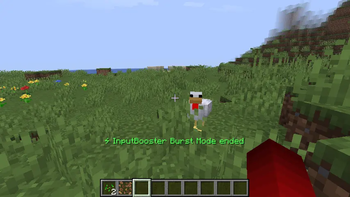
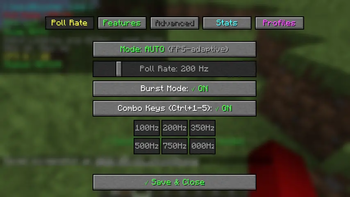
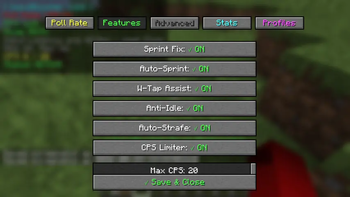
About this Mod
InputBooster
InputBooster is a client-side Fabric mod that improves input handling when Minecraft is running at low FPS or experiencing short stutters.
When Minecraft is under load, quick clicks or key presses can sometimes be missed. InputBooster checks inputs more frequently and can temporarily buffer some inputs so they can be handled on the next valid game tick.
Features
- Higher-frequency input polling
- Short input buffering
- Input recovery during short FPS drops
- Duplicate hit protection
- CPS limiter
- Sprint and W-tap assistance
- Auto-strafe and movement helpers
- Optional input replay recording and playback
- Per-server profiles
- In-game input statistics
- Safe mode
- Custom keybinds
The mod is client-side and does not require anything on the server.
Requirements
- Minecraft:
1.21.x / 26.1.x - Fabric Loader:
0.16.0+ - Fabric API
- Java 21+
Installation
Install Fabric Loader and Fabric API for your Minecraft version, then put the InputBooster .jar file into your mods folder.
If you find a bug or compatibility problem, please report it on GitHub with your Minecraft version, Fabric Loader version, InputBooster version, and any relevant logs.
InputBooster is developed and maintained by Ahaduzzaman Khan.
Available Versions
How to Install inputbooster on Your Client
Install the Mod Loader Locally
Install fabric for your local Minecraft version.
Download the Matching File
Choose the inputbooster file for fabric and Minecraft 26.3.
Install Mod
Place the .jar file in your local .minecraft/mods folder and restart Minecraft. No server-side installation is required.
Compatibility
Mod Loaders
Minecraft Versions
26.3, 26.2, 26.1.2 (+13 more)
Server-side
✗ UnsupportedRecommended RAM
4 GB(min. 3 GB)Frequently Asked Questions
Does inputbooster need to be installed on the Minecraft server?
No. Modrinth marks inputbooster as unsupported on the server side. Install it only in your local Minecraft mods folder. Your server can remain unchanged unless the mod page lists an additional dependency.
Which version and loader does inputbooster require?
Use a file for fabric, neoforge, quilt and your exact Minecraft version. Supported versions include 26.3, 26.2, 26.1.2. Files for different loaders are not interchangeable.
inputbooster is not working – what should I check?
First check the Minecraft version, loader version and required dependencies. Put the .jar file in your local .minecraft/mods folder and remove older duplicates. Because this mod is client-side, adding server RAM will not fix it.
Similar Mods


Minecraft Server for Your Group
inputbooster stays on your client. Host a compatible world for your group.