
ISB - Inventory Sorter Button
One-Click Inventory Sort Button.
Screenshots
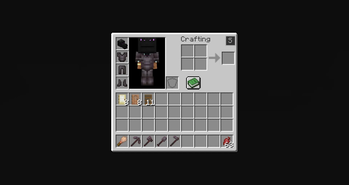
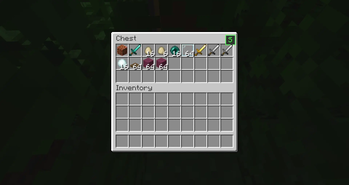
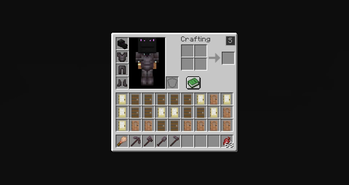
About this Mod
The mod adds a small button inside the inventory screen that allows players to quickly sort items in a simple and predictable way.
The goal of the mod is very straightforward: make it easier to organize inventories without changing how the game works.
🔹 What the Mod Does
When you open your inventory or a chest, a small button appears in the top-right corner of the GUI.
When this button is clicked, the mod:
• Reads the item stacks in the inventory
• Sorts them alphabetically based on their item registry name
• Reorders the slots according to that order
The items themselves are not modified. The mod only changes where the stacks are placed inside the inventory.
📦 Supported Screens
The sorting button works in:
✔ Player inventory
✔ Chest GUI
The sorting logic only affects the inventory slots visible in the container.
⚙️ Behavior
The sorting system follows a few simple rules:
🔹 Alphabetical order
Items are sorted using their registry names.
🔹 Stacks stay intact
Item stacks are never split or merged by the mod.
🔹 Slots are only reordered
The mod does not modify NBT data, durability, enchantments, or any other item information.
🔹 Client-side only
The mod runs entirely on the client and does not add any server-side functionality.
🖥 Interface
The mod adds a small button to the inventory GUI.
It is placed in the top-right area of the inventory screen so it is accessible but does not interfere with the rest of the interface.
Clicking the button immediately triggers the sorting process.
Available Versions
How to Install ISB - Inventory Sorter Button on Your Client
Install the Mod Loader Locally
Install fabric for your local Minecraft version.
Download the Matching File
Choose the ISB - Inventory Sorter Button file for fabric and Minecraft 1.21.11.
Install Mod
Place the .jar file in your local .minecraft/mods folder and restart Minecraft. No server-side installation is required.
Compatibility
Mod Loaders
Minecraft Versions
1.21.11, 1.21.10, 1.21.9 (+26 more)
Server-side
✗ UnsupportedRecommended RAM
4 GB(min. 3 GB)Frequently Asked Questions
Does ISB - Inventory Sorter Button need to be installed on the Minecraft server?
No. Modrinth marks ISB - Inventory Sorter Button as unsupported on the server side. Install it only in your local Minecraft mods folder. Your server can remain unchanged unless the mod page lists an additional dependency.
Which version and loader does ISB - Inventory Sorter Button require?
Use a file for fabric, forge, neoforge and your exact Minecraft version. Supported versions include 1.21.11, 1.21.10, 1.21.9. Files for different loaders are not interchangeable.
ISB - Inventory Sorter Button is not working – what should I check?
First check the Minecraft version, loader version and required dependencies. Put the .jar file in your local .minecraft/mods folder and remove older duplicates. Because this mod is client-side, adding server RAM will not fix it.
Similar Mods


Minecraft Server for Your Group
ISB - Inventory Sorter Button stays on your client. Host a compatible world for your group.