Jukebox Action Bar Fix
Fixes a bug with the jukebox action bar where the colours are wrong. Adds various settings for the action bar and adds the option to make all action bars coloured.
Screenshots
About this Mod
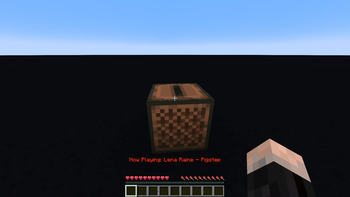
This mod fixes bug report MC-132961. This bug causes the colour changing text that says which disc is playing, to suddenly stop changing colours. In horror I quickly fixed this bug by making a small change in the code. This worked, but still, I was not satisfied. I tried raising the chromacity, but it just didn't look quite right. Most of the animation was taken up by blue and green, neglecting the colour spectrum's full beauty. This led me into the rabbit hole of perceptual colour spaces.
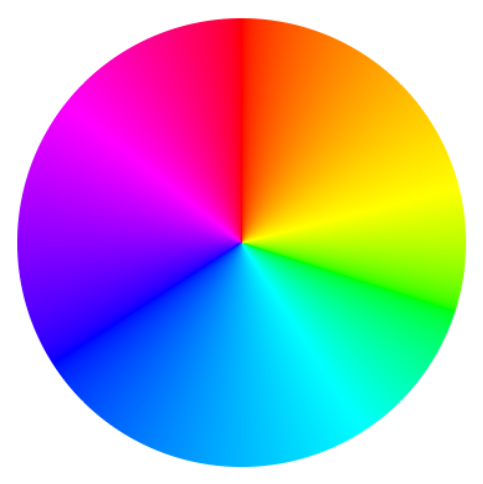
After countless hours delving into the intricacies of human color perception, deciphering mathematical equations, and extensive coding, I proudly present the perfect color wheel, with each hue is in its rightful position. And now, with this mod, you can enjoy these colours in the action bar for 3 seconds every time you play a music disc.
If desired, you can customize the mod's default settings to:
- Extend the duration of the action bar display.
- Adjust the animation speed to your preference.
- Enable the colorful text to appear e.g. during a player's attempt to sleep through the night or whenever an action bar is triggered.
- Make the action bar colours extra vibrant.
Check out the Oklab colour space by Björn Ottosson and this Oklab colour picker
Available Versions
How to Install Jukebox Action Bar Fix on Your Client
Install the Mod Loader Locally
Install fabric for your local Minecraft version.
Download the Matching File
Choose the Jukebox Action Bar Fix file for fabric and Minecraft 1.21.4.
Install Mod
Place the .jar file in your local .minecraft/mods folder and restart Minecraft. No server-side installation is required.
Compatibility
Mod Loaders
Minecraft Versions
1.21.4, 1.21, 1.20.6 (+2 more)
Server-side
✗ UnsupportedRecommended RAM
4 GB(min. 3 GB)Frequently Asked Questions
Does Jukebox Action Bar Fix need to be installed on the Minecraft server?
No. Modrinth marks Jukebox Action Bar Fix as unsupported on the server side. Install it only in your local Minecraft mods folder. Your server can remain unchanged unless the mod page lists an additional dependency.
Which version and loader does Jukebox Action Bar Fix require?
Use a file for fabric and your exact Minecraft version. Supported versions include 1.21.4, 1.21, 1.20.6. Files for different loaders are not interchangeable.
Jukebox Action Bar Fix is not working – what should I check?
First check the Minecraft version, loader version and required dependencies. Put the .jar file in your local .minecraft/mods folder and remove older duplicates. Because this mod is client-side, adding server RAM will not fix it.
Similar Mods


Minecraft Server for Your Group
Jukebox Action Bar Fix stays on your client. Host a compatible world for your group.