
Kerria
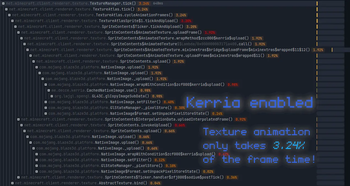
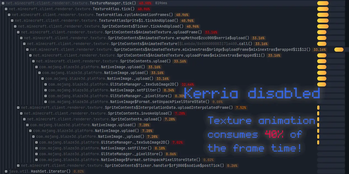
Faster texture animation
Screenshots
About this Mod
Kerria
Overview
Kerria is a mod that optimizes texture animations.
In vanilla Minecraft, texture animations are handled rather inefficiently. Each time a texture is updated, it is uploaded onto the atlas via the slow glTexSubImage2D, which involves CPU->GPU upload and may potentially incur a pipeline stall.
This mod adds two optimizations to reduce the performance impact of animated textures:
- Texture Animation Cache. Instead of performing an upload each time, we can cache non-interpolated animated textures once they are uploaded to the GPU. When the texture is subsequently needed, it is applied with a very fast GPU-to-GPU copy.
- Fast Texture Upload. Optimize texture upload performance with persistently mapped buffers and pixel buffer objects.
The optimizations can be configured through the Sodium/Embeddium video settings screen.
FAQs
Is this compatible with Sodium/Embeddium's "Animate Only Visible Textures" option?
Yes. That option improves performance by skipping uploading animated textures that are invisible, while this mod actually speeds up the process of uploading animated textures.
Available Versions
How to Install Kerria on Your Client
Install the Mod Loader Locally
Install fabric for your local Minecraft version.
Download the Matching File
Choose the Kerria file for fabric and Minecraft 1.21.1.
Install Mod
Place the .jar file in your local .minecraft/mods folder and restart Minecraft. No server-side installation is required.
Compatibility
Mod Loaders
Minecraft Versions
1.21.1, 1.20.6, 1.20.5 (+12 more)
Server-side
✗ UnsupportedRecommended RAM
4 GB(min. 3 GB)Frequently Asked Questions
Does Kerria need to be installed on the Minecraft server?
No. Modrinth marks Kerria as unsupported on the server side. Install it only in your local Minecraft mods folder. Your server can remain unchanged unless the mod page lists an additional dependency.
Which version and loader does Kerria require?
Use a file for fabric, forge, neoforge and your exact Minecraft version. Supported versions include 1.21.1, 1.20.6, 1.20.5. Files for different loaders are not interchangeable.
Kerria is not working – what should I check?
First check the Minecraft version, loader version and required dependencies. Put the .jar file in your local .minecraft/mods folder and remove older duplicates. Because this mod is client-side, adding server RAM will not fix it.
Similar Mods


Minecraft Server for Your Group
Kerria stays on your client. Host a compatible world for your group.