
LegendWatch
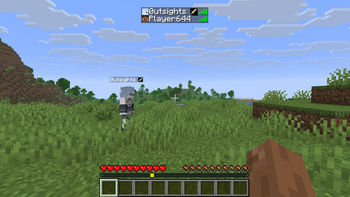
A Hoplite mod that shows any legendary a player has craft in their nametag
Screenshots
About this Mod
LegendWatch
A client-side Fabric mod for the Hoplite server. Listens to chat for legendary craft announcements and displays a small icon of the crafted legendary directly on that player's nametag and in the tab list — so you always know who's carrying a legendary without digging through chat.
Features
- Legendary icons appear on nametags above players' heads
- Legendary icons appear in the tab list
- If a player crafts multiple legendaries, all icons show side by side
- All 48 (+5) current Hoplite legendaries supported with unique icons
- Falls back to gold text for any unrecognized legendary
- Tracks legendary transfers — when a player is eliminated, their legendaries move to the killer's tag as predicted (shown with a
?) - Keybind to disable the mod entirely
- Keybind to switch between icon mode and name-only mode
- Keybind to toggle predicted legendary visibility
- Data clears automatically when a new match begins
- All keybinds are unbound by default and can be set in Options → Controls → LegendWatch
Available Versions
How to Install LegendWatch on Your Client
Install the Mod Loader Locally
Install fabric for your local Minecraft version.
Download the Matching File
Choose the LegendWatch file for fabric and Minecraft 1.21.11.
Install Mod
Place the .jar file in your local .minecraft/mods folder and restart Minecraft. No server-side installation is required.
Compatibility
Mod Loaders
Minecraft Versions
1.21.11, 1.21.10, 1.21.9 (+1 more)
Server-side
✗ UnsupportedRecommended RAM
4 GB(min. 3 GB)Frequently Asked Questions
Does LegendWatch need to be installed on the Minecraft server?
No. Modrinth marks LegendWatch as unsupported on the server side. Install it only in your local Minecraft mods folder. Your server can remain unchanged unless the mod page lists an additional dependency.
Which version and loader does LegendWatch require?
Use a file for fabric and your exact Minecraft version. Supported versions include 1.21.11, 1.21.10, 1.21.9. Files for different loaders are not interchangeable.
LegendWatch is not working – what should I check?
First check the Minecraft version, loader version and required dependencies. Put the .jar file in your local .minecraft/mods folder and remove older duplicates. Because this mod is client-side, adding server RAM will not fix it.
Similar Mods


Minecraft Server for Your Group
LegendWatch stays on your client. Host a compatible world for your group.