
McQoy
Dependencyless* config screens! An in-game editor for Kaleido-based configs - with no setup required.
Screenshots


About this Mod
QCONF OVER YACL (MCQOY)

For servers, use QoMC.
McQoy is a simple mod that automatically generates YACL (or Cloth) configuration screens for mods using Kaleido.
IT SEEMS I'VE MISSED YOU
Some mods use Kaleido to provide a .toml configuration - like our own Surveyor, or Crunchy Crunchy, or PicoHUD.
The files look nice, but you can't edit them in-game. With McQoy, you can! Just drop the mod in and you're set.
I DON'T NEED A DOCTOR, I AM A DOCTOR
To set this up for your own mod, check out Kaleido#usage - any loader and version, doesn't matter, it's universal.
When setting the config up, just make sure to specify your folder or filename as your mod ID, so McQoy can find it.
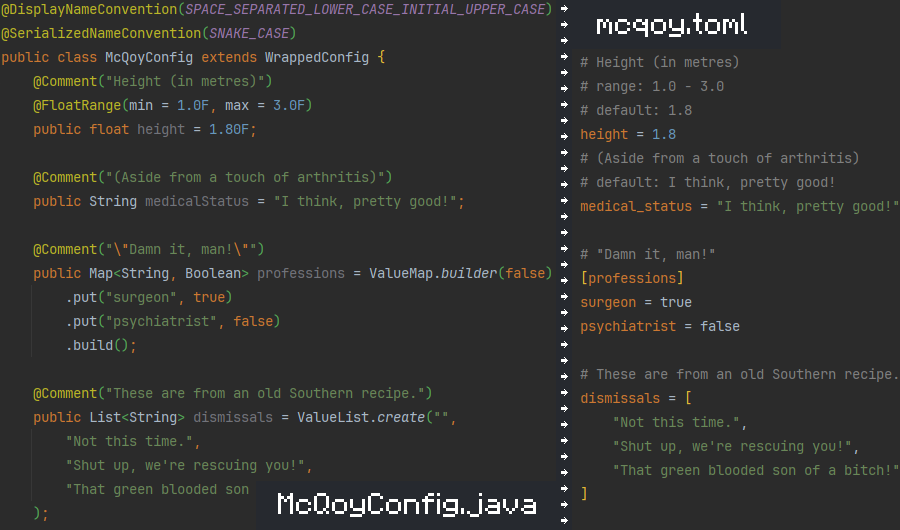
Then, on any McQoy-compatible version, installing McQoy will add screens! No setup, and no hard dependency.
For player visibility, you can also set McQoy as an optional dependency on Modrinth. (Or required, I'm not a cop.)
IF I'M NOT CAREFUL, I'LL END UP TALKING TO MYSELF
Oh, right - a little background and credit is due:
ALL I GOT LEFT IS MY BONES
Quilt Config isn't built on quilt, or even minecraft - It's a pure-java configuration library.
That means it works on every loader, and every version of minecraft, with no changes required.
The API is even designed for mods like McQoy to utilize - with fancy annotation-based metadata. Thanks qconf!
I'M NOT A MAGICIAN, SPOCK
Kaleido is just a wrapper for Quilt Config that shadows the library to avoid path conflicts with Quilt Loader.
With quilt seemingly being sunset, we'll be sure to follow the maintainers if they decide to fork it (hi ix!)
FASCINATING
All mods are built on the work of many others.
This project is based on Quilt Config - and exists only because it's a genuinely great pure-java config library.
Special thanks to ix0rai and cassiancc for providing helpful code snippets and having good ideas to begin with.
Available Versions
How to Install McQoy on Your Client
Install the Mod Loader Locally
Install fabric for your local Minecraft version.
Download the Matching File
Choose the McQoy file for fabric and Minecraft 26.1.2.
Install Mod
Place the .jar file in your local .minecraft/mods folder and restart Minecraft. No server-side installation is required.
Compatibility
Mod Loaders
Minecraft Versions
26.1.2, 26.1.1, 26.1 (+30 more)
Server-side
✗ UnsupportedRecommended RAM
4 GB(min. 3 GB)Frequently Asked Questions
Does McQoy need to be installed on the Minecraft server?
No. Modrinth marks McQoy as unsupported on the server side. Install it only in your local Minecraft mods folder. Your server can remain unchanged unless the mod page lists an additional dependency.
Which version and loader does McQoy require?
Use a file for fabric, forge, neoforge and your exact Minecraft version. Supported versions include 26.1.2, 26.1.1, 26.1. Files for different loaders are not interchangeable.
McQoy is not working – what should I check?
First check the Minecraft version, loader version and required dependencies. Put the .jar file in your local .minecraft/mods folder and remove older duplicates. Because this mod is client-side, adding server RAM will not fix it.
Similar Mods



Minecraft Server for Your Group
McQoy stays on your client. Host a compatible world for your group.