
Mercurizer
Better performance for low-end PCs, potato PCs. Possibly on mobile, and also on some mid- or high-end PCs
Screenshots
About this Mod
mercurizer
a sodium addon for hardware that sodium can't save.




integrated graphics · old cpus · limited ram · low-end hardware
mercurizer is a performance addon for sodium built specifically for hardware that struggles with modern minecraft.


why mercurizer?
sodium is already one of the best performance mods for minecraft.
but there is still a floor.
a lot of optimization assumes that you have a dedicated gpu, plenty of ram, and a relatively modern cpu.
mercurizer is made for the hardware that gets left behind.
the goal is simple: make minecraft playable on hardware that normally struggles to run it.
what makes it different?
automatic hardware tuning
on its first three launches, mercurizer benchmarks your system and measures:
- gpu upload bandwidth
- driver round-trip latency
- cpu throughput
the results are averaged across all three runs and used to automatically tune chunk upload budgets and texture animation thresholds for your hardware.
if your gpu or driver changes, the benchmark can be performed again.
adaptive refinement
the startup benchmark is only the beginning.
after 30 seconds of stable gameplay, mercurizer observes real in-game frame times and refines its configuration based on how your hardware actually behaves.
anti-stutter recovery
when frame times suddenly spike, mercurizer quickly reduces the amount of work being uploaded.
when performance stabilizes, it gradually restores the workload.
this helps prevent the constant increase → spike → decrease → increase cycle that can cause micro-stutters.
vsync-aware
when vsync is enabled, mercurizer automatically applies a more conservative upload budget to reduce the chance of blocking the render thread.
legacy hardware safety
older intel hardware and certain amd driver configurations automatically receive more conservative settings.
when aggressive tuning could compromise stability, mercurizer prioritizes keeping the game running.
real hardware. real results.
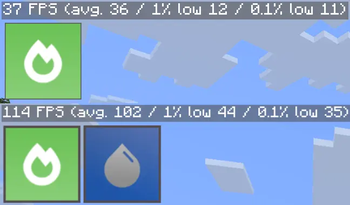
up to 3.08× the fps of sodium on integrated graphics
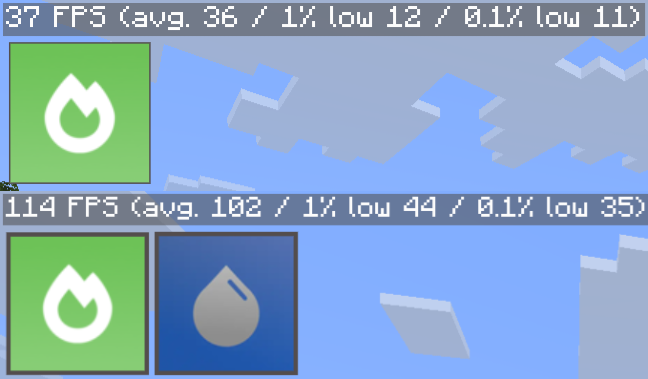
test system
| component | specification |
|---|---|
| device | macbook air 2017 |
| cpu | intel core i5-5350u |
| gpu | intel hd graphics 6000 |
| ram | 8 gb |
| os | debian 13 |
| render distance | 16 chunks |
| vsync | off |
| world | normal |
tested with:
0.9.1-beta.2+mc26.2-1.1 · 0.9.1-beta.2+mc26.1.2-1.1 · 0.8.9+mc26.1.1-1.5 · 0.8.9+mc26.1-1.5 · 0.8.13-beta.2+mc1.21.11-1.1
benchmark results will vary depending on hardware, drivers, minecraft settings, and workload.
who is this for?




mercurizer is primarily aimed at players who:
- use integrated graphics such as intel hd, uhd, or amd vega
- have 4 gb of ram or less available to minecraft
- already use sodium but still struggle with performance
- play on older laptops, office pcs, or budget hardware
- don't have a dedicated gpu to throw at the problem
you don't need a gaming pc.
that's kind of the point.
compatibility

- minecraft: 1.21.11+
- edition: java edition
- loader: fabric
- required: sodium
- compatible with: iris, sodium extra, and reese's sodium options
development status


mercurizer is still actively developed.
performance tuning at this level is highly hardware-dependent, so bugs, driver-specific issues, and unexpected behavior are possible.
if something goes wrong, please include:
- gpu
- cpu
- ram
- operating system
- gpu driver version
- minecraft version
- sodium version
- mercurizer version
the more hardware information you provide, the easier it is to reproduce the problem.
part of potato optimizer

mercurizer is one of the core optimization mods behind potato optimizer — an ultra-lightweight modpack built for pcs that struggle with modern minecraft.
edonme studios
support development
if mercurizer helped you squeeze a few more frames out of an old machine, consider supporting development.


every bit of support helps keep low-end optimization alive.

Available Versions
How to Install Mercurizer on Your Client
Install the Mod Loader Locally
Install fabric for your local Minecraft version.
Download the Matching File
Choose the Mercurizer file for fabric and Minecraft 26.3.
Install Mod
Place the .jar file in your local .minecraft/mods folder and restart Minecraft. No server-side installation is required.
Compatibility
Mod Loaders
Minecraft Versions
26.3, 26.2, 26.1.2 (+3 more)
Server-side
✗ UnsupportedRecommended RAM
4 GB(min. 3 GB)Frequently Asked Questions
Does Mercurizer need to be installed on the Minecraft server?
No. Modrinth marks Mercurizer as unsupported on the server side. Install it only in your local Minecraft mods folder. Your server can remain unchanged unless the mod page lists an additional dependency.
Which version and loader does Mercurizer require?
Use a file for fabric and your exact Minecraft version. Supported versions include 26.3, 26.2, 26.1.2. Files for different loaders are not interchangeable.
Mercurizer is not working – what should I check?
First check the Minecraft version, loader version and required dependencies. Put the .jar file in your local .minecraft/mods folder and remove older duplicates. Because this mod is client-side, adding server RAM will not fix it.
Similar Mods


Minecraft Server for Your Group
Mercurizer stays on your client. Host a compatible world for your group.