
Meshelium
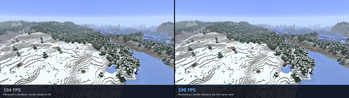
A performance mod that uses mesh shader rendering to offer a signifigant boost in performance. Support Nvidia, AMD, and Intel GPU's/iGPU's.
Screenshots
About this Mod
Meshelium
See further. Get more frames. Powered by mesh shaders.
Meshelium draws Minecraft's terrain with your graphics card's mesh shaders
instead of the way the game normally does it. You get more frames per second,
and you can push the render distance far past the slider's usual limit.
How much faster?
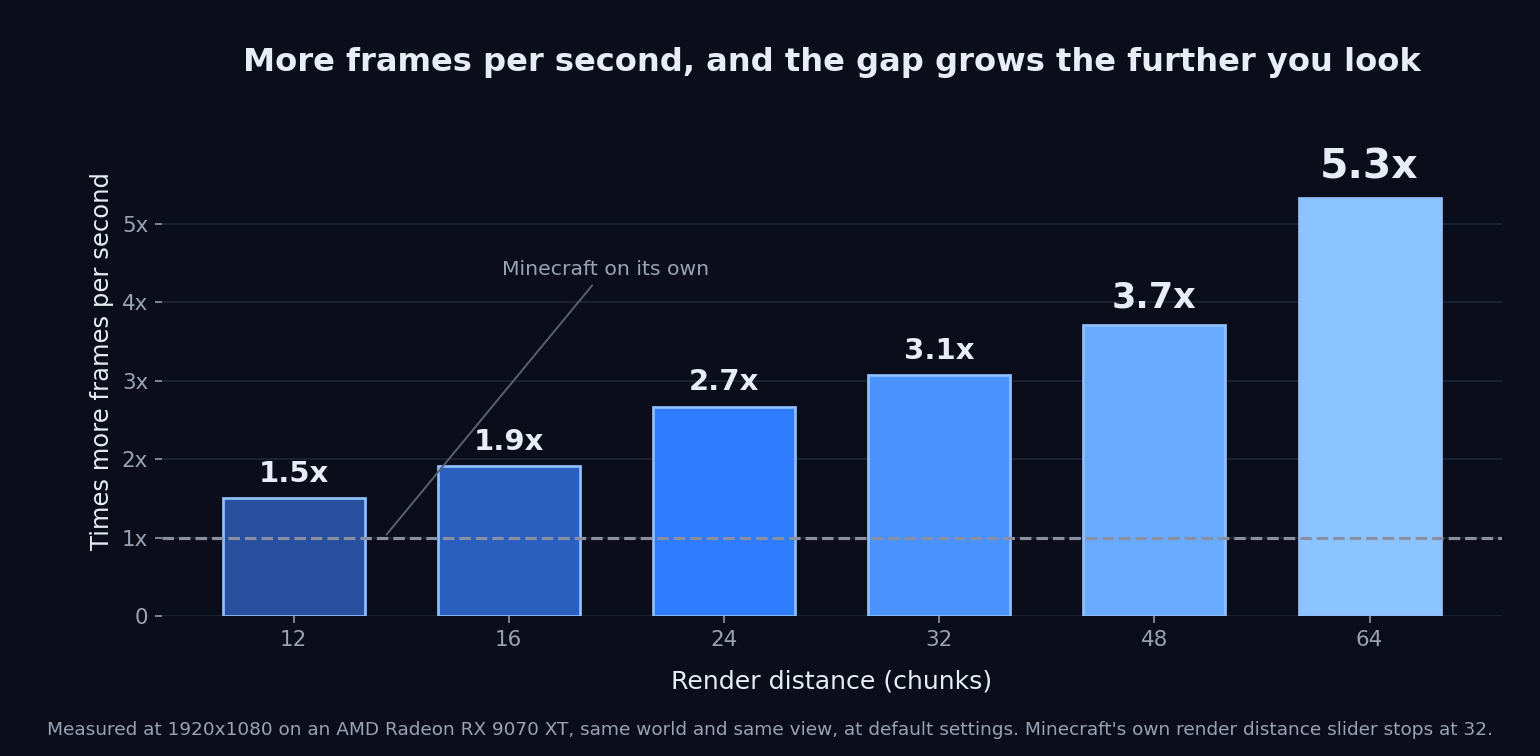
Measured at 1920x1080 on an AMD Radeon RX 9070 XT, same world, same view, one
run with the mod and one without. Measured without Sodium.
| Render distance | Minecraft | Meshelium | Difference |
|---|---|---|---|
| 12, Minecraft's default | 1,621 FPS | 2,437 FPS | 1.50× (+50%) |
| 16 | 1,115 FPS | 2,126 FPS | 1.91× (+91%) |
| 24 | 641 FPS | 1,709 FPS | 2.67× (+167%) |
| 32, as far as Minecraft goes | 393 FPS | 1,206 FPS | 3.07× (+207%) |
| 48 | 205 FPS | 761 FPS | 3.71× (+271%) |
| 64 | 114 FPS | 607 FPS | 5.32× (+432%) |
The further you look, the bigger the difference. Both columns are Minecraft's
Vulkan renderer, so the only thing that changes between them is Meshelium
itself.
These numbers are from one computer. Yours will land somewhere else.
Works better with Sodium!
They used to be a choice: one replaced the other. Now you get both.
Sodium keeps doing what it is best at - building the chunks - and Meshelium
draws them with mesh shaders. Install both and it happens on its own; there is
nothing to switch on.
Measured on a Radeon RX 9070 XT at 1920x1080, standing in the same spot in the
same world: with Meshelium drawing, the frame is about twice as fast as
Sodium on its own - 1.9x at render distance 64, and 1.8x at 96.
You also get GPU Visibility, which only exists on this path: Meshelium
works out what you can actually see on the graphics card itself, instead of
drawing everything it is handed.
Use Sodium 0.9.2 for your game version - the release, not the newer
0.9.3 alpha. (On 26.2, Sodium 0.9.2-beta.1 is the same build with a
different version number, and works too.) Meshelium plugs into parts of
Sodium that were never meant for other mods to touch, so another version may
not fit; the Meshelium settings screen shows which one you have and says
whether it matches.
With Sodium installed, Meshelium's settings are part of Sodium's video
settings: a Meshelium entry in the list on the left, with Sodium's Apply
and Undo. Only the settings that still do something are there. The ones that
only change how Meshelium builds chunks have nothing to do while Sodium is
doing that job, so they are hidden - including the memory settings described
below. They come back if you remove Sodium.
What you need
- Minecraft 26.2 or 26.3, on Fabric or NeoForge - pick the download
that matches your game version and your loader - On Fabric, Fabric API as well.
NeoForge needs no extra mod - Windows or Linux. No Mac: Macs don't do mesh shaders on Vulkan yet
- A graphics card with mesh shaders: AMD RX 6000 or newer, NVIDIA GTX
16xx / RTX 20xx or newer, Intel Arc, and recent laptop and handheld chips
including the Steam Deck. Meshelium asks your driver rather than checking a
list of models, so anything that reports the feature will work - and if it is
missing, Meshelium turns itself off, tells you why, and your game keeps
working normally
Client side only. Your friends do not need it, and neither does your server.
Do this or nothing will happen
Minecraft starts in the old drawing mode, OpenGL. Meshelium only works in the
new one, Vulkan.
- Options → Video Settings → Graphics API
- Choose Prefer Vulkan (Experimental) - that is Minecraft's own name for it
- Restart Minecraft. It only changes while the game is loading
Skip this and it looks like the mod did nothing. If that happens, Meshelium puts
a message on screen with a button that does it for you.
Playing online?
Bobby is what makes long distances work on a
server. A server only sends you the land close by, so a huge render distance
has nothing out there to draw no matter how fast your card is. Bobby remembers
the places the server already showed you and puts them back. Bobby remembers
the world, Meshelium draws it.
Settings
A Meshelium Settings button at the top of Video Settings. With Sodium
installed, look for Meshelium in Sodium's video settings instead.
Distance Cap is how you get past 32. It widens Minecraft's own render
distance slider, up to 120 chunks (with Sodium installed, Sodium's slider, up
to 96). Raising the cap changes nothing on its own -
you still move the normal slider afterwards. Raise it gradually: past about 64
Minecraft itself needs more memory than a default launcher gives it, and at 120
it can run out and close. Give Minecraft more memory before pushing it far.
GPU Visibility (Sodium only, on by default) works out what you can actually
see on the graphics card instead of drawing everything Sodium hands it.
Distance Fog ships Off, and that is a change from how Minecraft looks.
Minecraft fades distant terrain at a fixed 1024 blocks however far you can see,
which covers most of the view past 64 chunks. Off keeps a short fade at the very
edge, so the horizon still softens. Match View Distance moves the haze out with
your render distance; Minecraft Default puts it back exactly as the game has it.
Occlusion Culling asks your graphics card which terrain is hidden behind
other terrain and skips it. On Auto it switches itself on at 48 chunks. It
pays most at ground level looking across a long view, and costs a little from a
high camera looking down. Nothing breaks either way, so try both and watch your
frame counter.
Behind Advanced, off unless noted: Greedy Meshing merges identical
neighbouring block faces. Cull Tiny Plants Beyond and Cull Sub-Pixel
Detail Beyond skip things too small to see at range. Smart Leaves Beyond
(on, 16 chunks) skips leaf faces buried inside canopies, keeping the
see-through look. Solid Leaves Beyond builds leaves fully solid past a
distance.
Using less graphics memory - these two are hidden while Sodium is
installed, because Sodium owns that memory instead. Idle Memory Trim (on)
hands back graphics memory Meshelium is not using after half a minute of
standing still. Duplicate Terrain Memory (Freed) releases the second copy
of the terrain Minecraft keeps even though Meshelium is the one drawing from
it, which saves gigabytes at long render distances. On laptops and handhelds
with integrated graphics this counts double, because their graphics memory is
your system RAM.
Everything applies as soon as you change it, apart from the startup notice,
which waits for the next launch. Switching Meshelium off and on, changing
Duplicate Terrain Memory, or flipping Greedy Meshing reloads the terrain, so
chunks rebuild for a few seconds.
Thanks
Nvidium by MCRcortex is why this was
worth attempting. They pioneered mesh-shader terrain in Minecraft and proved
the idea works. Meshelium is its own mod, not a port of theirs: it targets the
cross-vendor VK_EXT_mesh_shader extension rather than the NVIDIA dialect,
runs on Minecraft's Vulkan backend, and its architecture, memory model and
culling are its own. MCRcortex has no involvement in Meshelium and has not
endorsed it.
Sodium by CaffeineMC, for the chunk
builder Meshelium now draws from. CaffeineMC has no involvement in Meshelium
and has not endorsed it.
Found a problem?
Bug reports, crashes, or just something that looks wrong:
https://github.com/ded811/Meshelium/issues. The log is the useful part to
attach - Meshelium writes down what it decided about your hardware, and why,
every time the game starts.
NeoForge and the early loading screen
On Minecraft 26.2 - handled for you; here is what is happening.
NeoForge's loading screen and Minecraft's Vulkan renderer cannot both
exist. The loading screen creates the game window in OpenGL mode, and
Vulkan - the renderer Meshelium runs on - cannot draw to a window made that
way, so the game dies during start-up with a GLFW error that blames your
graphics drivers. It is not your drivers, and updating them will not help.
It is a known NeoForge issue (neoforged/NeoForge#3230) and its fix has not
been merged.
You do not have to do anything about it. Meshelium closes that loading
screen in the instant before the game creates its window, so the game
starts normally. You get no loading screen and a game window that appears
a moment later than usual; nothing else changes. Meshelium also turnsearlyWindowControl off in config/fml.toml, so that even on a future
NeoForge build where the live fix no longer applies, the game still starts.
On Minecraft 26.3 - nothing to handle. NeoForge for 26.3 currently
ships with its early loading screen switched off altogether (its loader
ignores the setting), and the game makes its own window, so the problem
above cannot happen. Meshelium leaves everything alone there and says so in
the log.
On OpenGL none of this applies and the loading screen is left alone.
The Fabric build is unaffected.
Available Versions
How to Install Meshelium on Your Client
Install the Mod Loader Locally
Install fabric for your local Minecraft version.
Download the Matching File
Choose the Meshelium file for fabric and Minecraft 26.3.
Install Mod
Place the .jar file in your local .minecraft/mods folder and restart Minecraft. No server-side installation is required.
Compatibility
Mod Loaders
Minecraft Versions
26.3, 26.2
Server-side
✗ UnsupportedRecommended RAM
4 GB(min. 3 GB)Frequently Asked Questions
Does Meshelium need to be installed on the Minecraft server?
No. Modrinth marks Meshelium as unsupported on the server side. Install it only in your local Minecraft mods folder. Your server can remain unchanged unless the mod page lists an additional dependency.
Which version and loader does Meshelium require?
Use a file for fabric, neoforge and your exact Minecraft version. Supported versions include 26.3, 26.2. Files for different loaders are not interchangeable.
Meshelium is not working – what should I check?
First check the Minecraft version, loader version and required dependencies. Put the .jar file in your local .minecraft/mods folder and remove older duplicates. Because this mod is client-side, adding server RAM will not fix it.
Similar Mods


Minecraft Server for Your Group
Meshelium stays on your client. Host a compatible world for your group.