
Mine Frame Gen
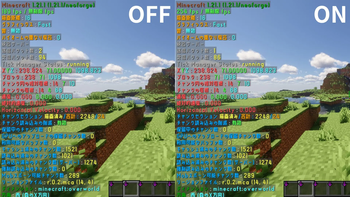
This mod enables frame generation within Minecraft.
Screenshots
About this Mod
This mod enables frame generation within Minecraft.
This mod simulates frame generation using frame blending.
It can be used even when shaders are applied.
You can achieve a 2x to 1.5x increase in frame rate.
このModはMinecraft内でフレーム生成を行えるようにするModです。
このModはフレーム合成をして疑似的にフレーム生成をしています。
シェーダー適用時でも使用できます。
大体2倍~1.5倍、フレームレートを向上させることができます。
How To Use 使い方
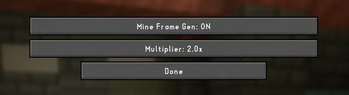
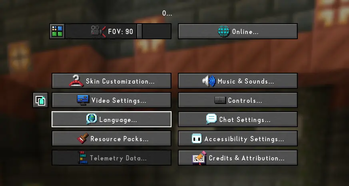
A tab for toggling frame generation on or off will be added to the left of the video settings.
ビデオ設定の左側にフレーム生成のオン/オフを切り替えるためのタブが追加されます
Precautions for Use 使用にあたっての注意
It may not function correctly depending on your PC or environment.
At low frame rates, you may notice ghosting artifacts.
お使いのパソコンや環境によってはうまく機能しない場合があります。
低いフレームレート値の場合、残像が残ることがあります。
mechanism 仕組み
This mod increases the frame rate by performing frame synthesis, which sequentially executes the following processes within the game.
- Minecraft renders frames A and B.
- The mod saves the screen.
- The mod overlays A and B with semi-transparency to create an intermediate frame, C.
- It inserts C into the sequence where A would normally transition directly to B.
- The display sequence becomes A → C → B.
このmodはゲーム内で以下の処理を連続で実行するフレーム合成を行いフレームレートを増加させます。
- MinecraftがフレームA,Bを描く
- MODがその画面を保存する
- MODが A と B を半透明で重ねて、中間フレームCを作る
- 通常、A→Bと表示される間にCを挟む
- A→C→Bと表示される
This mod uses the Codex for some parts.
このmodは一部にcodexを使用しています
Available Versions
How to Install Mine Frame Gen on Your Client
Install the Mod Loader Locally
Install fabric for your local Minecraft version.
Download the Matching File
Choose the Mine Frame Gen file for fabric and Minecraft 26.1.2.
Install Mod
Place the .jar file in your local .minecraft/mods folder and restart Minecraft. No server-side installation is required.
Compatibility
Mod Loaders
Minecraft Versions
26.1.2, 1.21.11, 1.21.8 (+2 more)
Server-side
✗ UnsupportedRecommended RAM
4 GB(min. 3 GB)Frequently Asked Questions
Does Mine Frame Gen need to be installed on the Minecraft server?
No. Modrinth marks Mine Frame Gen as unsupported on the server side. Install it only in your local Minecraft mods folder. Your server can remain unchanged unless the mod page lists an additional dependency.
Which version and loader does Mine Frame Gen require?
Use a file for fabric, neoforge and your exact Minecraft version. Supported versions include 26.1.2, 1.21.11, 1.21.8. Files for different loaders are not interchangeable.
Mine Frame Gen is not working – what should I check?
First check the Minecraft version, loader version and required dependencies. Put the .jar file in your local .minecraft/mods folder and remove older duplicates. Because this mod is client-side, adding server RAM will not fix it.
Similar Mods


Minecraft Server for Your Group
Mine Frame Gen stays on your client. Host a compatible world for your group.