
Neo Language Reload
Neoforge Port of Language Reload
Screenshots
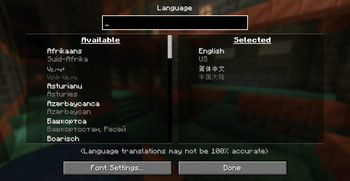
About this Mod
Description
This is an unofficial Neoforge port of Language Reload, dedicated to maintaining all the features of the original mod and ensuring compatibility.
Language Reload is a Fabric mod that adds quality of life changes related to languages.
Features
- Fast language switching without resource pack reloading
- A search box in the language menu
- Multiple language selection (Each translation in a language overrides translations from languages below.)
- Multilingual item search (Enables searching in any of selected languages in the creative inventory and the recipe book. This feature can be disabled in the mod options accessible via Mod Menu or directly in the mod config file.)
- Automatic language detection if there is no "lang:" in options.txt
- Reloading languages with F3 + J and cycling them with Shift + F3 + J
Development
I will try to keep it synchronized with the original mod version, so please be patient.
Compatibility
Modern UI
Open the Modern UI configuration screen and disable the Use Text Component Cache option in the Text Layout section.
Available Versions
How to Install Neo Language Reload on Your Client
Install the Mod Loader Locally
Install neoforge for your local Minecraft version.
Download the Matching File
Choose the Neo Language Reload file for neoforge and Minecraft 26.2.
Install Mod
Place the .jar file in your local .minecraft/mods folder and restart Minecraft. No server-side installation is required.
Compatibility
Mod Loaders
Minecraft Versions
26.2, 26.1, 1.21.11 (+6 more)
Server-side
✗ UnsupportedRecommended RAM
4 GB(min. 3 GB)Frequently Asked Questions
Does Neo Language Reload need to be installed on the Minecraft server?
No. Modrinth marks Neo Language Reload as unsupported on the server side. Install it only in your local Minecraft mods folder. Your server can remain unchanged unless the mod page lists an additional dependency.
Which version and loader does Neo Language Reload require?
Use a file for neoforge and your exact Minecraft version. Supported versions include 26.2, 26.1, 1.21.11. Files for different loaders are not interchangeable.
Neo Language Reload is not working – what should I check?
First check the Minecraft version, loader version and required dependencies. Put the .jar file in your local .minecraft/mods folder and remove older duplicates. Because this mod is client-side, adding server RAM will not fix it.
Similar Mods


Minecraft Server for Your Group
Neo Language Reload stays on your client. Host a compatible world for your group.