
Sodium/Rubidium Occlusion Culling Fix
Fix MC-70850, an invisible chunks issue brought back to MC1.18+ by Sodium.
Screenshots
About this Mod
Sodium/Rubidium Occlusion Culling Fix
🎉 The issue has been fixed officially in Sodium 0.5.0. You will no longer need this mod.
This is a mod which "fixes" MC-70850 for MC1.18+ by disabling Occlusion Culling properly fixing it.
It should have been already fixed since it is resolved by Mojang in 1.17. However, Sodium/Rubidium brought it back so we need to fix it again.
⚠️ Keep in mind that the fix is somehow breaking and will impact FPS. If you encounter performance issues, try removing this fix mod before blaming Sodium.
Relations
Forge
Requires Rubidium: The issue does not exist without Rubidium. In that case, you won't need the mod.
Fabric
Requires Sodium: The issue does not exist without Sodium. In that case, you won't need the mod.
Effect
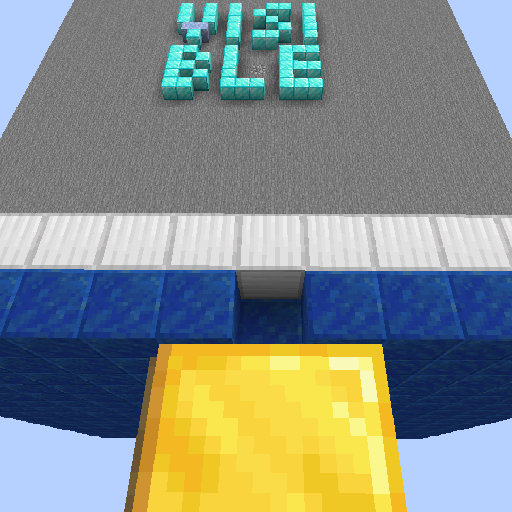
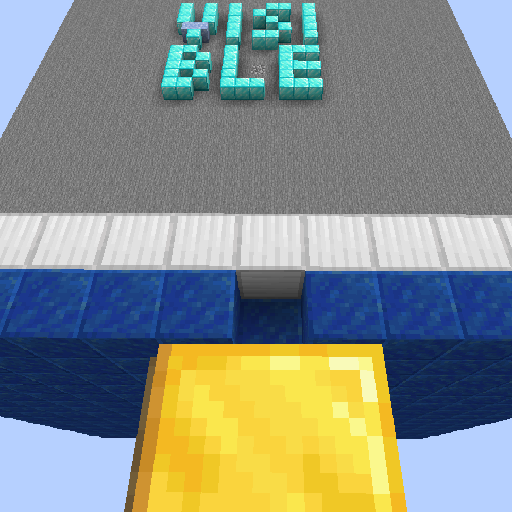
The chunk with letters "VISIBLE" in it was hidden in vanilla because of MC-70850. Mojang fixed that in 1.17, Sodium brought it back, and this mod fixed that again. You can get the test save for the bug on Mojira.
Side Effects
Though being an almost-proper fix, this fix does not completely match the intention of the original code. This might result in minor performance loss. However, we did not find significant performance drops.
Related Information
This fixes MC-70850 only. Another issue, MC-63020 causes a similar issue, and was fixed in 1.16.
Incompatibilities
Not found so far.
Plans
New features will not be added to the mod in order to keep the name descriptive. Please use Github Issue Tracker to report bugs.
This mod will not be backported.
- If you play 1.15/1.16 Forge and is having the issue, fix it with this mod.
- If you are the lucky one who is playing MC1.12.2, use EigenCraft Unofficial Patches instead.
Available Versions
How to Install Sodium/Rubidium Occlusion Culling Fix on Your Client
Install the Mod Loader Locally
Install fabric for your local Minecraft version.
Download the Matching File
Choose the Sodium/Rubidium Occlusion Culling Fix file for fabric and Minecraft 1.20.1.
Install Mod
Place the .jar file in your local .minecraft/mods folder and restart Minecraft. No server-side installation is required.
Compatibility
Mod Loaders
Minecraft Versions
1.20.1, 1.20, 1.19.4 (+7 more)
Server-side
✗ UnsupportedRecommended RAM
4 GB(min. 3 GB)Frequently Asked Questions
Does Sodium/Rubidium Occlusion Culling Fix need to be installed on the Minecraft server?
No. Modrinth marks Sodium/Rubidium Occlusion Culling Fix as unsupported on the server side. Install it only in your local Minecraft mods folder. Your server can remain unchanged unless the mod page lists an additional dependency.
Which version and loader does Sodium/Rubidium Occlusion Culling Fix require?
Use a file for fabric, forge and your exact Minecraft version. Supported versions include 1.20.1, 1.20, 1.19.4. Files for different loaders are not interchangeable.
Sodium/Rubidium Occlusion Culling Fix is not working – what should I check?
First check the Minecraft version, loader version and required dependencies. Put the .jar file in your local .minecraft/mods folder and remove older duplicates. Because this mod is client-side, adding server RAM will not fix it.
Similar Mods


Minecraft Server for Your Group
Sodium/Rubidium Occlusion Culling Fix stays on your client. Host a compatible world for your group.